Skip to content

The Geek Page

  • Windows 10
  • Windows 11
  • Android
  • iPhone
  • About

How to disable Password login in windows 10

Updated on: March 6, 2019 by Admin
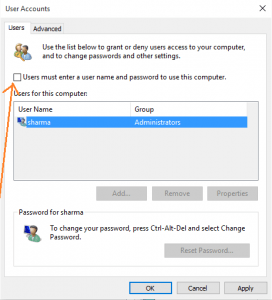
uncheck user must enter password
Categories How to, Windows 10

How to Hide Recycle Bin in windows 10

Updated on: August 17, 2016 by Admin
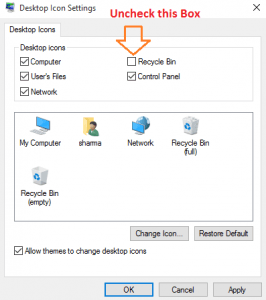
uncheck recycle bin to be shown desktop
Categories How to, Windows 10

How to turn off auto download and install of Driver in windows 10

Updated on: August 16, 2015 by Admin
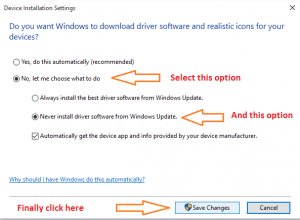
stop auto install download windows 10
Categories How to, Windows 10

How to Uninstall an update in windows 10

Updated on: December 15, 2015 by Admin
uninstall windows 10 update
Categories How to, Windows 10

Fix: Windows 10 Cumulative Update Failed KB3081424 error

Updated on: August 14, 2015 by Admin
delete invalid user account registry
Categories How to, Windows 10

How to change and install theme in windows 10

Updated on: November 16, 2016 by Admin
windows 10 themes
Categories How to, Windows 10

How to uninstall windows 10 apps : Top 2 methods

Updated on: August 17, 2016 by Admin
uninstall app
Categories How to, Windows 10

How to reset windows 10 without losing files

Updated on: August 17, 2016 by Admin
reformat recover windows 10
Categories How to, Windows 10

How to Change default installation folder of windows 10 apps

Updated on: August 17, 2016 by Admin
change installation folder windows 10 apps
Categories How to, Windows 10

How to change edge download folder default location

Updated on: August 17, 2016 by Admin
default download folder location
Categories How to, Windows 10

How to create Restore Point in Windows 10 a Step by step guide

Updated on: December 20, 2023 by Admin
restore point created
Categories How to, Windows 10

How to use Edge Note taking feature in windows 10

Updated on: August 14, 2015 by Admin
share web note edge windows 10
Categories browser, How to

How to add Downloads & network to start menu in windows 11/10

Updated on: September 10, 2021 by Admin
start menu
Categories How to, Personalization, Windows 11

How to manually update firefox Mozilla browser

Updated on: August 17, 2016 by Admin
restart firefox to update
Categories browser, How to

Windows 10 Hotkeys which were not there before

Updated on: August 30, 2015 by Admin
windows 10 hotkeys
Categories How to, Windows 10

How to check windows 10 activation status

Updated on: August 14, 2015 by Admin
windows 10 activation status confirm
Categories How to, Windows 10

Disable Lock screen of Windows 10 ! A Quick Fix by editing registry

Updated on: August 11, 2016 by Admin
nolockscreen
Categories How to, Windows 10

How to Change Windows 10 default browser to Mozilla or Chrome

Updated on: February 23, 2017 by Admin
change default browser windows 10 1
Categories How to, Windows 10

How to change windows 10 login screen background

Updated on: October 14, 2016 by Admin
change login screen windows 10
Categories How to, Windows 10

How to Disable animation in Windows 10

Updated on: August 17, 2016 by Admin
turn off animation
Categories How to, Windows 10

How to turn off auto update of windows 10

Updated on: August 17, 2016 by Admin
windows 10 auto update
Categories How to, Windows 10
Older posts
Newer posts
← Previous Page1 … Page351 Page352 Page353 … Page357 Next →

Recent Posts

  • Monster Hunter Wilds Fatal D3D Error (Device Removed / Device Hung)
  • Fix Borderlands 4 SHiFT Stuttering and Network Desync Error
  • ChatGPT App Stuck on a Spinner in Windows? 8 Fixes That Work
  • Fix Dune: Awakening Out of Video Memory Storm Crash
  • Fix Gears of War E-Day Error LowLevelFatalError and Xbox App Crash
  • Fix Ollama App Not Starting Server on Windows 11 (0.40.6)
  • Fix Open WebUI Tool Calling and Ollama Connection Bugs (Win11)
  • Fix USB Audio Interface Code 10 and No Sound (Windows 11)
  • Fix Domain Trust Relationship Lost on Windows 11 (Cred Guard)
  • Fix Black Screen and Explorer Crash on Virtual Desktops

Recommended

  • 101 Tech Tricks you don't know
  • Windows Run commands
  • Windows 10 Tips and Tricks
  • Windows Keyboard Shortcuts
  • How to Make Windows 10 Fast
© TheGeekPage 2026