The “Fatal D3D Error” or “Device Removed” or the “Device Hung” whichever one you got, it sounds like your graphics card just died. It almost certainly didn’t. In Monster Hunter Wilds, the cause is usually a mod. Sometimes it’s a broken shader file instead. Or a setting the latest patch doesn’t like. So hold off on that new GPU and try these first.
What’s Behind the Crash
D3D is Direct3D, the part of Windows that games use to talk to your graphics card. Device Removed and Device Hung mean the card stopped answering in time, so Windows reset the driver and the game went down with it.
Why does it stop answering? There are a few reasons in Wilds. Outdated mods are the big one. A Title Update also corrupted the saved shaders for a lot of players. And this game pulls sudden power spikes that trip the card’s own safety limits. Not a fun mix.
Fix 1 – Remove REFramework Completely
If you use mods, start here. Old versions of REFramework (the mod loader most Wilds mods need) crash the game’s graphics during fast travel and loading screens.
1 – Open your Monster Hunter Wilds install folder. On Steam, it’s usually
\steamapps\common\MonsterHunterWilds
2 – Delete the file called dinput8.dll.
3 – Then, delete the whole reframework folder.
4 – Launch the game without mods.
Crashes gone? Then wait for an REFramework build made for the current game version before you add mods back. And re-check it after every Title Update. Mods break on patch day. Every time.
Fix 2 – Delete shader.cache2
Quick one.
The Title Update corrupted the compiled shaders for the Seikret mount, and the bad file sticks around.
Go to the same install folder from Fix 1 and delete shader.cache2 (it sits right in the main folder, not a subfolder).
The game builds a fresh one on the next launch, so expect the first load to take a few extra minutes. Worth doing after any big patch, honestly. Even if nothing crashes yet.
Fix 3 – Switch Anti-Aliasing Back to TAA
The new patch broke the Native AA mode for DLSS and FSR. So that setting alone can hang the card.
1 – Open Options in the game.
2 – Go to the Display settings.
3 – Now, change Anti-Aliasing from the DLSS or FSR native option to TAA.
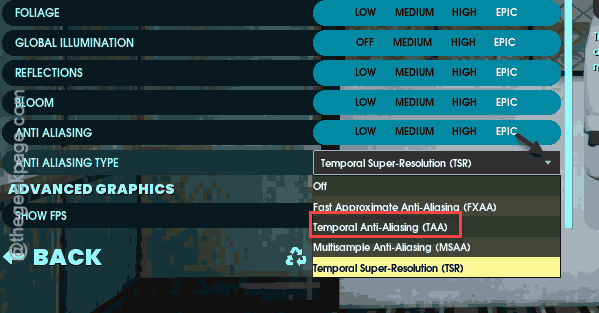
4 – Then, apply and restart the game.
But switch it back once Capcom patches it. TAA looks a bit softer. Small trade.
Fix 4 – Drop Volumetric Fog to Low
Crashing right when you use Focus Mode? That’s the fog. So set Volumetric Fog Quality to Low in the graphics settings.
Hard to spot the difference mid-hunt anyway.
Fix 5 – Lower Your GPU Power Limit to 85%
Wilds causes sharp, short power spikes (called transients). Those can trip the card’s hardware safety limit, and the driver times out with Device Hung. And capping power to 85% keeps the spikes under that line. You lose maybe a few frames. Usually not even that.
On an AMD card:
1 – Open AMD Adrenalin Software.
2 – Go to Performance > Tuning.
3 – Create a custom game profile for Monster Hunter Wilds.
4 – Drag the Power Limit slider to -15%.
5 – Click Apply at the top right.
On an NVIDIA card,
1 – Open MSI Afterburner.
2 – Click the link icon to unlink the Power Limit and Temp Limit sliders.
3 – Drag Power Limit down to 85.
4 – Click the checkmark to apply.
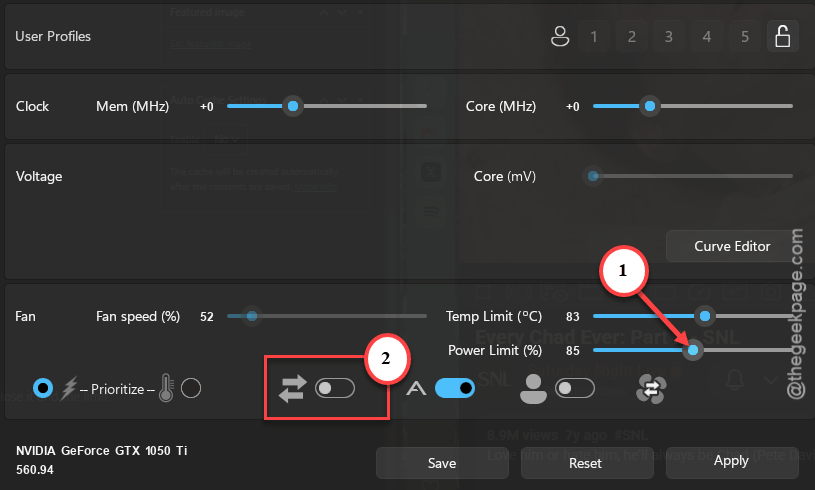
Leave Adrenalin or Afterburner running in the background while you play. But close it and the limit goes away.
People Also Ask
What causes a Fatal D3D error in Monster Hunter Wilds?
Your graphics card stopped responding, so Windows reset the driver. In Wilds, outdated REFramework mods are a common trigger. So is a corrupted shader.cache2 file after a Title Update. The broken Native AA setting and sudden GPU power spikes cause it too. It rarely means the card itself is failing.
What does the MH Wilds DXGI error device removed mean?
DXGI_ERROR_DEVICE_REMOVED is Windows saying the game lost its connection to your GPU. Usually the driver timed out and restarted. To fix it, remove REFramework and delete shader.cache2. Then switch anti-aliasing to TAA. Still crashing? Lower your GPU power limit to around 85% before you play.
Will lowering the power limit hurt my GPU?
No. Lowering the power limit is underclocking (the opposite of overclocking), so the card runs cooler and safer. It just can’t draw as much power during spikes. You might lose a few frames per second, but it will not damage anything, and you can reset it anytime.