You go to launch a game. And up pops 0x803F800F. The game won’t start. Just an error and a shrug from your Xbox.
Annoying, because the game’s right there in your library. So why won’t it open? Almost always it’s a license thing. Let’s sort it.
Why This Happens
Basically? Your Xbox thinks you don’t have permission to play that game right now. The license check failed.
And the usual reason is a subscription. If the game came through Game Pass or Xbox Live Gold, and that sub lapsed — even by a day, even from a failed monthly payment — access cuts off.
Was the game bought on someone else’s account? A friend’s, maybe, who shared it? If their subscription expired, or they stopped paying, your access dies with it. One person spent ages on this before realizing the game was on a friend’s Gold account that had lapsed.
Sometimes it’s simpler than all that. Just a stuck license handshake. A glitch in how the console verified your ownership. So we’ll cover both.
Fix 1 – Check Your Subscription
Start here. Inactive subscription is the real reason for this debacle.
1 – Press the Xbox button on your controller to open the guide.
2 – Go to Profile & system (far right tab), then Settings.
3 – Under Account, select Subscriptions.
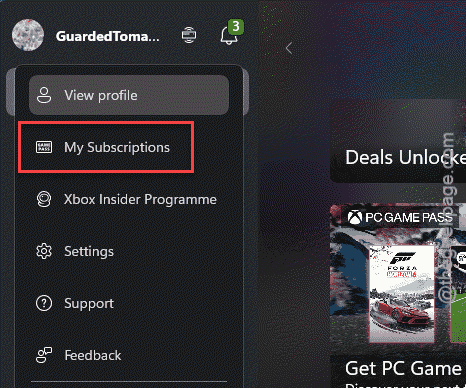
4 – Look at the status. Does it say expired? Or is there a warning banner about billing?
5 – If it lapsed, select it and choose Extend your subscription or Get Game Pass to renew.
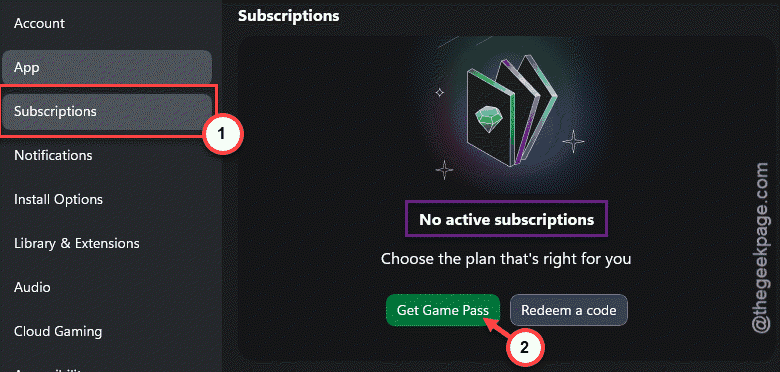
Renewed and it works again? Done. A failed auto-payment does this all the time — your card expired, the charge bounced, access stopped. Fix the billing and you’re back in.
Fix 2 – Full Power Cycle the Console
Quick one.
At first, press and hold the Xbox button on the console itself (not the controller) for about ten seconds, until it fully shuts off. Wait a few seconds. Turn it back on and try the game. This is a real shutdown, not a restart — it drains the system and forces a fresh license check on boot. Takes two minutes. Worth doing before anything fancier.
Fix 3 – Remove and Re-add Your Profile
Try removing and re-adding the profile to fix this problem.
1 – Press the Xbox button, Then, go to Profile & system.
2 – Open the Settings and proceed to the Accounts.
3 – Select Remove accounts.
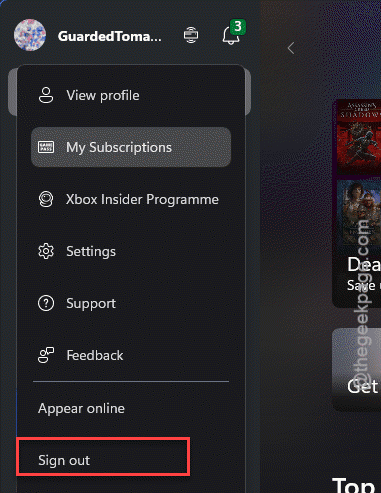
3 – Choose your profile — the one hitting the error — and confirm.
4 – Restart the console.
5 – Select Add new, then sign back in with your Microsoft email and password.
Signing back in pulls a fresh, clean copy of your licenses. Fixes a lot of the stubborn cases.
Fix 4 – Check Whose Account Owns the Game
Still stuck? Time for an honest question. Did you actually buy this game on your account?
If a friend or family member bought it — or it came through their Game Pass — your access depends entirely on their subscription staying active. The moment theirs lapses, you get 0x803F800F. Nothing you do on your end fixes that.
So check. Either they renew, or you buy the game on your own account. No way around it.
Fix 5 – Buy or Re-acquire the Game
Don’t want a subscription anymore, or the license is just plain broken? Then own it outright.
1 – Press the Xbox button to open the guide.
2 – Go to the Store.
3 – Search for the game.
4 – Select Buy, confirm your payment method, and purchase it.
That gives you a permanent license tied to your account. No subscription required, no dependence on anyone else. And if you’d recently been refunded for it, this re-establishes a clean ownership record.
How to Prevent This
– Keep a valid payment method on your account.
– Sharing games with friends? Just know your access ends the second their subscription does. Buy the ones you care about.
– Power cycle your console now and then. It clears stale cache before it has a chance to glitch a license.
People Also Ask
How to fix error code 0x80004005 on Xbox?
0x80004005 is a generic connection or update error. Do a full power cycle of the console to troubleshoot this problem.
How to fix the error code 0x803f8001?
0x803F8001 is another license-check failure, often tied to playing a game while signed in differently than when it was bought, or a lapsed subscription. Then power cycle and try again.