Getting this “Oops! Not sure what happened there” error message on your Xbox? Though the majority of Xbox users have shared this problem, the same error has been reported by some of the Xbox app users on the PC. Users face this problem while purchasing some items or games from the Xbox console, so it is definitely a connectivity problem. Our guide will help you resolve this issue at your end.
Fix 1 – Check the Xbox server connectivity
You should take a look at the current status of the Xbox servers. If those are down or any outage is there, that should resolve your query.
Step 1 – Open up the Xbox Server Status.
Step 2 – There are many services available there.
Step 3 – Toggle all the services, profile, Store and subscriptions sections and check whether any of the services are down or not.
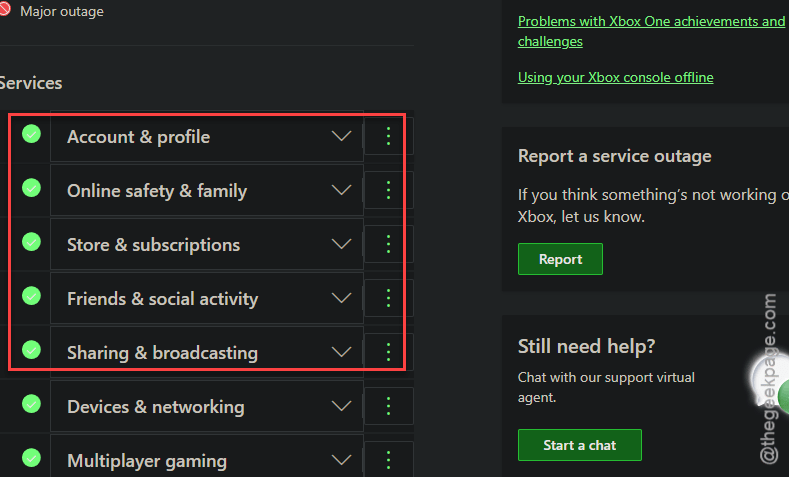
If you see any sign of outage, local or wide area wide, the problem will resolve itself when the servers are back online.
Fix 2 – Clear the Xbox’s cache
Corrupted Xbox console cache can lead to this problem. Clear up the Xbox cache and do a hard reset on it.
Step 1 – On your Xbox console, go to the Settings page.
Step 2 – Then, reach the System settings.
Step 3 – Load up the Storage tab.
Step 4 – Tap the Clear local saved games option there to clear the local cache of your console.
Wait for sometimes and see whether it works.
Fix 3 – Hard reset the Xbox console
You can hard reset the Xbox console.
Step 1 – At first, press-hold the Xbox console’s power button for at least 10–12 seconds. This will turn off the console for sure.
Step 2 – Next, disconnect the power cable from the Xbox console.
Step 3 – Wait for an entire minute.
Step 4 – Then, plug in the Xbox to power source using the cable. Next, start up the console.
Now see whether this resolves your issue or not.
Fix 4 – Check the payment method
We have already mentioned this error statement usually generates at the payments page, while the user is purchasing some item on the Xbox console.
Step 1 – You should definitely take a look at the payment method that is connected to the Xbox account. Check whether you have put necessary information correctly, like – billing address, city, pin code details, etc.
Step 2 – Visit the Xbox purchase history page to see whether the payment has gone through or not. Make sure you are logged in with the proper Microsoft account.
You may also wait for a while, if there are any issues at bank’s end.
Hope these solutions have helped you!