The ‘Unexpected end of archive’ error message may show up when there is an issue with the extraction process of a compressed file in the WinRAR or 7-zip app. The main reason behind this Unexpected error message is corruption in the RAR pieces of the compressed file that the user is trying to decompress. This problem can be solved by getting all the missing pieces together and repair the broken file completely. Here are the solutions that will help you fix the issue.
Fix 1 – Use the WinRAR Repair the Archive
If you have witnessed this problem in the WinRAR app, you can use the inbuilt scan and repair function to repair the archive.
Step 1 – To do this, locate the file in the File Explorer.
Step 2 – Next, double-tap to attempt to load it up in WinRAR. It will open up and show you the ‘Unexpected End of Archive’ error message. Tap Close to quit the error prompt there.
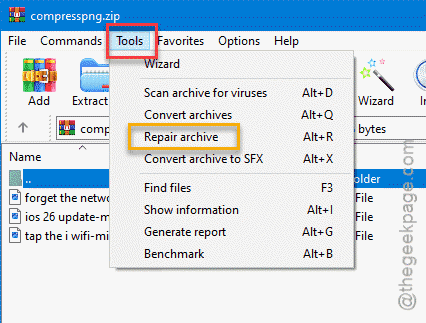
Step 3 – Now, returning to the main WinRAR page, select the compressed file in there. Then, tap the Tool option and choose the Repair Archive function.
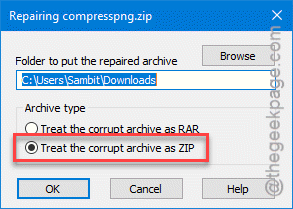
Step 4 – Now, select any of these options according to the archive type (ZIP/RAR) –
Treat the corrupt archive as RAR
Treat the corrupt archive as ZIP
Step 5 – Tap OK to proceed further.
After this, follow the on-screen instructions to complete the repair process. Once you have repaired the compressed file, you can extract it normally. It won’t run into an Unexpected end error message again.
Fix 2 – Download a New Copy of the File
If the repairing operation fails, then that means the compressed file is beyond repair. You can not repair it from your end using WinRAR. So, you must download a fresh copy of the file from the original source again. If you have received the file as an attachment of an email, request the sender for another email with the same attachment file.
NOTE – The bigger size of RAR files do often corrupted due to the missing of small chunks of PAR files. So, if there is an option to get the package in smaller, compressed file format, you should opt for it. If you have all the PAR files for the main compressed file, you can take the help of QuickPar or MultiPar to repair the main RAR file.
Fix 3 – Add the file to Windows Security Exclusions List
Sometimes, Windows Security automatically quarantines parts of the compressed file during the extraction process due to security measures.
Step 1 – To counter this effect, you must put this compressed file/folder under the Exclusions list. Load up the Windows Security.
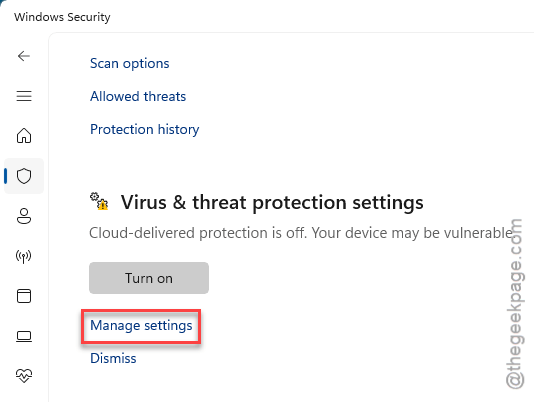
Step 2 – Next, go to the Virus & threat protection settings. Tap the Manage settings once again.
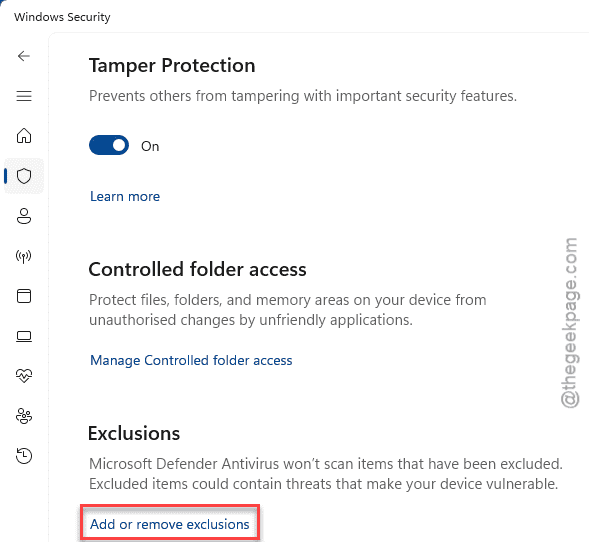
Step 3 – Find the Exclusions section there, and click Add or remove exclusions.
Step 4 – Choose the Add an Exclusion option there. Tap the Folder option.
Step 5 – Now, we recommend you put the entire folder consisting the compressed file and the extraction location to the Exclusions list.
Step 6 – So, select the mother folder and tap OK to add it.
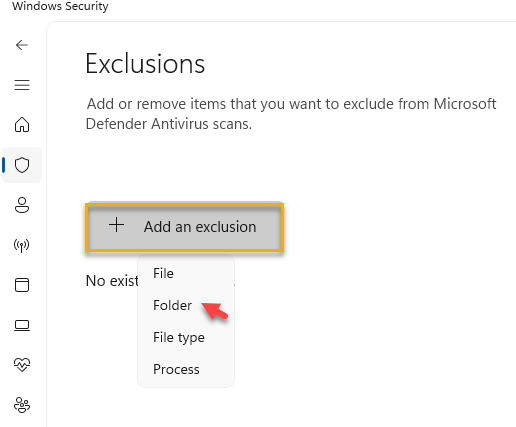
This way, there won’t be any interference from the Windows Security during the extraction process.
Fix 4 – Run a Disk Checking Scan
You should do a disk checking scan to identify whether any disk corruption is causing this issue.
Step 1 – At first, write cmd in the search box.
Step 2 – Next, right-click the Command Prompt item in the search results, and tap Run as administrator.
Step 3 – Paste this code there in the terminal and replace the drive letter accordingly in the code and hit Enter.
chkdsk drive letter /f /r
NOTE – Replace the drive letter in the code with the actual drive letter of the drive that contains the compressed file. Like, if the file is in the G: drive, the command will look like this –
chkdsk g: /f /r
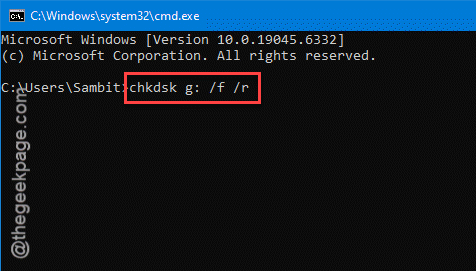
Now, it may take some time to complete the disk checking operation. So, wait for it to finish. Then, retry decompressing the files once again.
FAQs on Unexpected End of Archive error message –
1. What causes the Unexpected End of Archive error?
The Unexpected End of Archive error occurs due to the corruption or missing pieces of files in a compressed file (.rar/.zip). During the extraction process of the file, the programs halts unexpectedly, which results into this error message. The main reasons behind this problem include corrupted source file, malware, bad disk, and low disk space.
2. How to fix the Unexpected End of Archive error?
You can fix the Unexpected End of Archive error by repairing the main archive using WinRAR or freewares. However, if the low disk space or bad sectors on the disk is causing such issues, freeing up more space and running a disk checking command should do the trick. If nothing helps, downloading a fresh copy of the file should help resolve the issue.