Does your iPhone lag extensively in low power mode after the iOS 26 update? There are some reports coming from various user threads of this problem of getting extreme lags in low power mode on iOS 26 devices. We have explained the main reason behind the lag issue, with actual fixes to nullify the staggering lag problem.
Fix 1 – Install the latest update
The first stable build of iOS 26 is full of bugs that has caused many such issues for the users. So, upgrade to the latest version of the stable build to fix this lag in low power mode.
Step 1 – To look for this update, open the Settings console on the iPhone.
Step 2 – Next, go to the General settings page.
Step 3 – Tap the Software Update section.
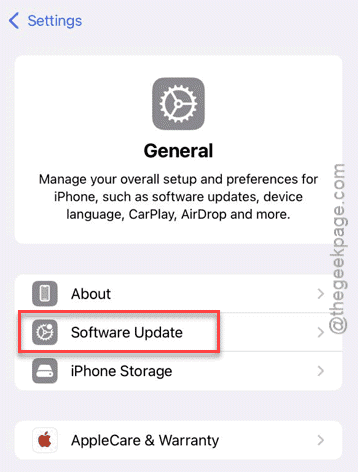
It will load up the latest version of the iOS update in there.
Step 4 – When the pending update appears, tap the Update Now button.
Wait for the iPhone to download the update on your iPhone, and install it. Once the update has been installed, and the device has restarted, put the device in low power mode and check.
Fix 2 – Force restart the iPhone
A hard restart can fix many temporary glitches that may influence such issue.
Step 1 – At first, press and release the Volume Up button of your iPhone.
Step 2 – Do press and release the Volume Down button once as well.
Step 3 – Then, press and hold the Power button on the iPhone for at least 10 seconds.
You will see your iPhone has restarted. Once the device has rebooted, you can
Fix 3 – Disable the Adaptive Power Mode
iOS 26 has the option where if the device in Adaptive Power mode which can throttle the overall performance of the device.
Step 1 – Load up the iPhone’s Settings page.
Step 2 – Next, go to the Battery settings.
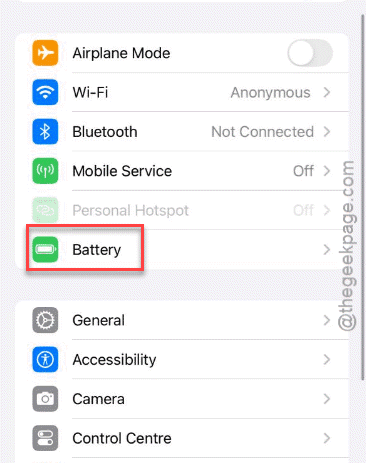
Step 3 – Now, load up the Power Mode settings.
Step 4 – Turn off the Adaptive Power mode in there.
Check if this helps with the lag issues that you are having on your device.
Fix 4 – Low Power Mode affects performance
The latest version of iOS 26 includes a complete revamp of the low power mode system. The ‘new’ low power mode is more efficient in power saving than what we had in iOS 18. It considerably reduces the frames in UI, applications to save on battery. So, you can expect a lot of fps drops, stutters during the low battery mode in iOS 26. The iPhone automatically caps the refresh rate to 60 Hz in low power mode, even in the iPhone Pro models. This sudden reduction may appear to be stuttering, as you are too used to the 120 Hz refresh rate.
This also includes 5G connectivity in low power mode, which is completely disabled on several iPhone models. The animations in UI also slows in the new iteration of Low Power mode. So, the device may feel choppy and laggy.