While setting up a shortcut for mass sharing contacts from your iPhone, you may see the following error message ‘This action is trying to share contacts, which is not allowed‘. The report from the iOS 17 users is prevalent in multiple forums, but there are a few iOS 18 users have faced the same problem with contact shortcut as well. So, if you are getting this error message, don’t worry. A simple change in the iOS settings can fix the problem for you.
Why am I getting this error message?
Applications on your iPhone needs explicit user permission, even to access the contacts stored on your device. The shortcuts actually helps automate the process, is not an exception either. Depending upon your response, it may or may not get proper access to the device contacts. There is a certain trigger in place that prohibits the mass transfer of sensitive information such as your contacts. If somehow a user or an application tries to move or share multiple contacts at one time, this trigger rings up, cancelling the whole operation.
But, sometimes user actions can also trigger the trigger, causing certain inconvenience. There is a way you can bypass this blockade and complete the transfer process. You must allow the sharing of large amount of data on your device.
Fix – Permit the sharing of large amount of data
The contact sharing feature will serve the intended purpose if you have permitted the sharing of large amount of data from your user end.
Step 1 – Load up the Settings console on your iPhone.
Step 2 – Open up the Apps tab, next.
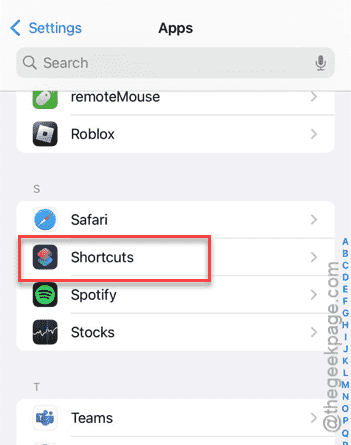
Step 3 – Then, go to the Shortcuts app there.
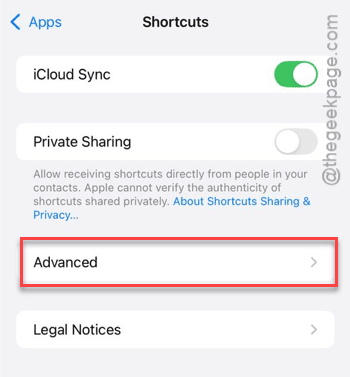
Step 4 – Tap the Advanced button, next.
Step 5 – Finally, just turn on the Allow Sharing Large Amounts of Data option.
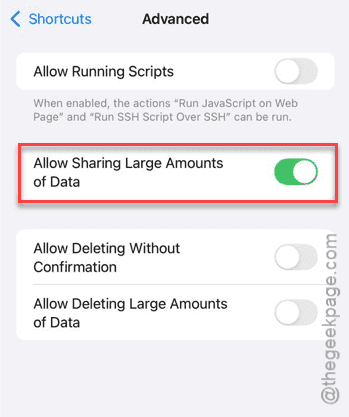
After enabling this feature, the contact shortcut will start to work as intended. There won’t be any prohibition on the number of shared contacts whatsoever.