Having no cellular service SIM Card on your iPhone after installing the latest iOS update? After installing the latest iOS 18.6 update or iOS 26 Beta 3 update, some users have noticed that the SIM card is no longer working on their devices. You will not be able to make or receive calls, send/receive messages if it shows up ‘No Service‘ or ‘Invalid SIM‘ option. This frustrating experience can stem from the latest iOS update, misalignment of the SIM card or carrier compatibility issues after the latest update. Whatever is the reason you are getting this error message, here are the top solutions that will fix the issue.
Here is the Quick Fix guide for the veteran iPhone users ~
| Issue Cause | Quick Fix | Time Needed |
|---|---|---|
| Glitch in the iOS | Restart the iPhone and check the SIM status Or, Update the iPhone Settings > General > Check for updates > Update now |
2 minutes |
| SIM misalignment issue | Detach the SIM card and reinsert | 2-3 minute |
| Corrupted network settings | Reset network settings Settings > General > Transfer or reset iPhone > Reset > Reset Network Settings |
4-5 minutes |
But, if you want to take a deep dive, here the detailed step-by-step guide for you~
Fix 1 – Force Restart the iPhone
Do a simple restart of the iPhone or, if that doesn’t work, force restart the device to fix the SIM related issue.
Step 1 – Restart your iPhone normally. Open the Control Centre and tap the Power button there. Use the Slide to power off button to switch off the device.
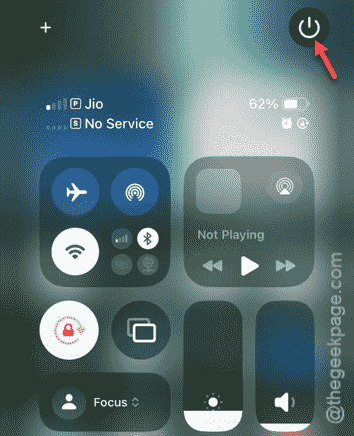
Step 2 – Restart the iPhone and check the status of the SIM.
If that doesn’t work, try the force-restart procedure~
Step 1 – Press-release the Volume Up button.
Step 2 – Do the same with the Volume Down button.
Step 3 – Next, press-hold the Power button of the iPhone until the device shuts down and restarts.
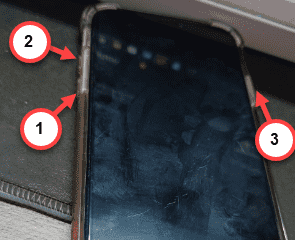
See the current status of the cellular service on your iPhone.
Fix 2 – Adjust the SIM Card Alignment
The SIM card alignment can cause this issue.
Step 1 – Detach the SIM card from the SIM slot using a SIM ejector tool.
Step 2 – After ejecting the SIM tray, rectify the SIM alignment. Clean up the dust from the SIM tray and SIM slot.
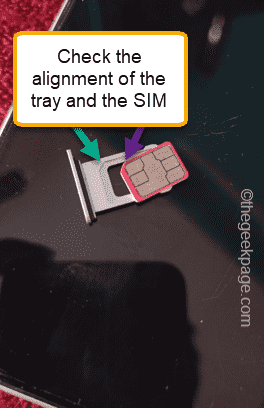
Step 3 – Insert the SIM card into the tray and back to the iPhone.
Wait for a few seconds and look whether you are getting any cellular reception or not.
Fix 3 – Reset the iPhone’s Network Settings
Misconfigured cellular settings can cause this malfunction.
Step 1 – Load up the iPhone Settings page. Then, proceed this way~
General > Transfer or reset iPhone
Step 2 – Tap the Reset option.
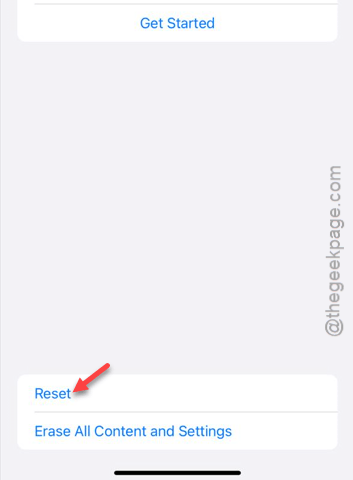
Step 3 – Next, tap the Reset Network Settings option to reset the network settings to the default settings.
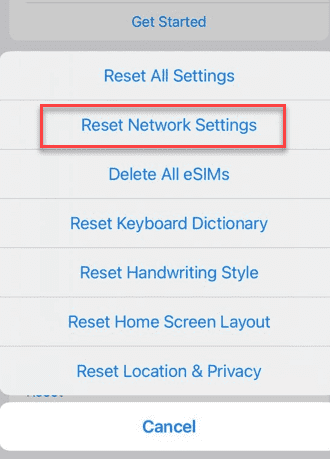
iPhone will take a few minutes to clear up the network settings completely. It will clear all the cellular modifications. Later, see whether the SIM is functional or not.
Fix 4 – Install the Latest iOS Update Patch
It is possible the certain bugs in the iOS 18.6 or iOS 26 (Beta or stable) has stem this SIM card issue. Apple patches this problem in the next update.
Step 1 – In the iPhone Settings page, open the General settings.
Step 2 – Next, load up the Software Update tab.
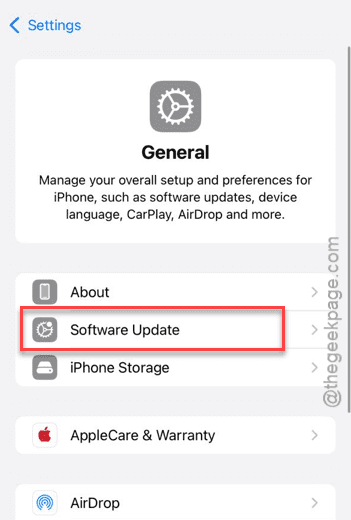
Step 3 – Look whether any updates are still pending for your iPhone. In such case, tap the Update Now option to install the update.
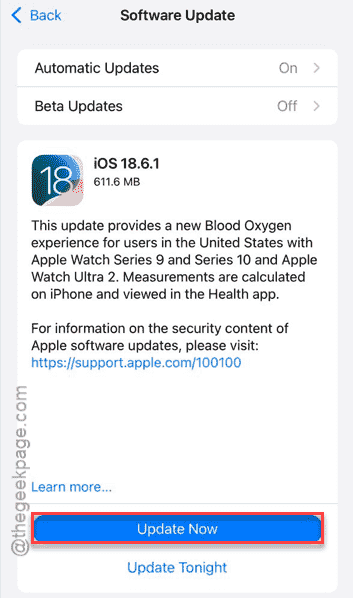
After updating the iPhone, the SIM card issue will be fixed.
FAQs –
1. Why did my SIM card stop working after iOS 18.6?
This SIM card problem after the update can stem from carrier compatibility issues. Otherwise, alignment issues or just a glitch can cause the problem as well.
2. Does resetting the network settings delete the data from my iPhone?
No. Resetting the network settings does not delete any of the application data or your personal data from the device. It just removes the saved network credentials like Wi-Fi passwords, paired Bluetooth device IDs, etc.
3. Should I contact my carrier if the SIM is not working after iOS update?
Yes. After implementing the basic troubleshooting steps, if the SIM card problem is not resolved, you should take it up directly with your carrier provider. They can further assist you from their end to troubleshoot the SIM card issue.