Can’t update the apps on your iPhone/iPad? Every app needs an update at some point in the service to introduce new features or patch bugs in the application. So, if you are unable to update the apps in the iPhone, there is a possibility that you can’t use the app after a certain point. So, you should look into this problem and fix it.
Fix 1 – Restart the iPhone/iPad
This can just be another glitch in your iPhone. So, just restart the iPhone or the iPad, then you can try to update the app from the App Store.
If that was just a bug, this time, you won’t have any problem updating the app to the latest version.
Fix 2 – Allow App Store purchases
You must rectify the App Store Purchase settings on your iPhone.
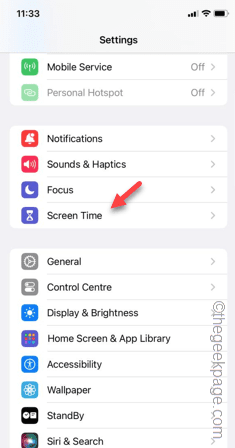
Step 1 – In the iPhone Settings, open the “Screen Time” settings.
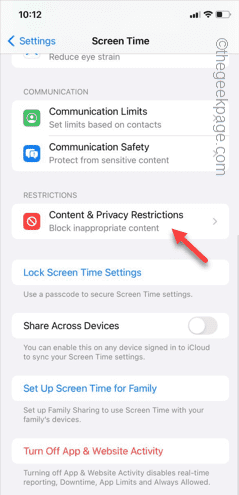
Step 2 – Open the “Content & Privacy Restrictions” settings.
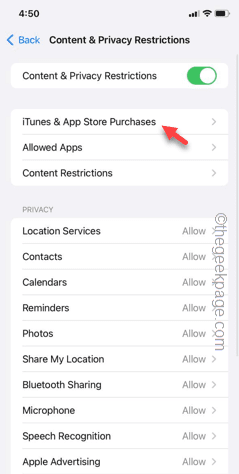
Step 3 – If this feature enabled, open up the “iTunes and App Store app purchases” setting.
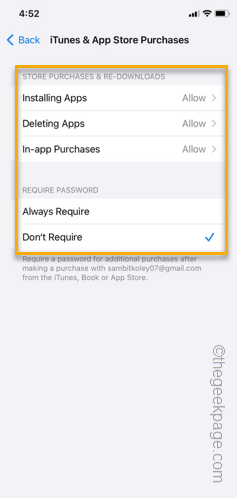
Step 4 – In there, you will find several settings such as ‘Installing Apps‘ and ‘Deleting Apps‘ and ‘In-app Purchases‘ mode.
Step 5 – Open all these settings and set these to “Allow” mode.
Step 6 – Additionally, toggle the ‘Require Password‘ setting to “Don’t Require” mode.
Now, go back to the App Store and retry updating the same application.
NOTE – If this doesn’t work, you can just disable the “Content & Privacy Restrictions” feature from your iPhone and try updating the app. You can find the settings here –
Settings > Screen Time > Content & Privacy Restrictions
Fix 3 – Update the app manually
Instead of updating the app from the App Store, you should update the app manually.
Step 1 – Go to the App Store.
Step 2 – Directly search for the app from the search box.
Step 3 – In the search result, find and update the app in there.
Step 4 – Tap the “Update” to update the app.

Verify the app update process using the proper verification method (Face ID or Touch ID).
This way, you can update the app to the latest version, manually from the App Store.
Fix 4 – Cancel the update process and restart
This is a nice trick that can help you update the app.
Step 1 – To do this, go to the App Store and initiate the update process.
Step 2 – Now, minimize the App Store and go back to your App Library.
Step 3 – Find the downloading app update process. You can track the app update progression from there.
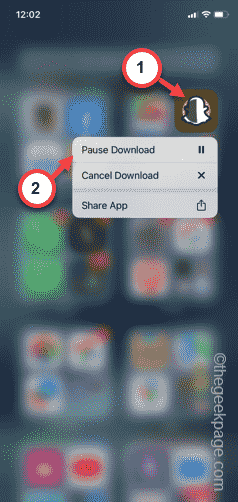
Step 4 – Hold the app icon quickly and tap “Pause Download” to pause the downloading process.
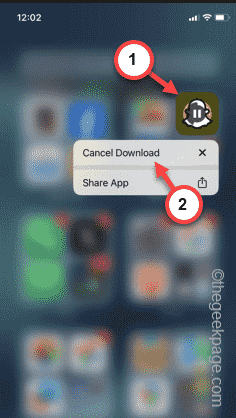
Step 5 – Next, hold the same app icon, there and tap “Cancel Download“.
Step 6 – Now, after cancelling the downloading process, return to the App Store and update the app.
This time, the app will be updated without any more issues.
Fix 5 – Close the app and retry
Sometimes the app may not update properly if the app update is opened on your iPhone.
Simply close the app and try updating the app from the App Store. This time, the app will be updated to the latest version.
Fix 6 – You must have enough storage
Your iPhone must have at least 10% of the total storage left for the apps to update. So, delete any unnecessary apps or files from the device.
Step 1 – On your iPhone, go this way –
Settings > General
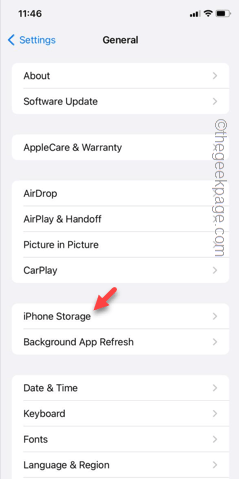
Step 2 – In the General tab, open the “iPhone Storage“.
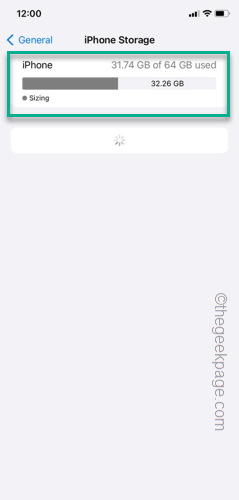
Step 3 – Before you delete anything, check the status of the free space on your iPhone.
Step 4 – If the amount of free space is very low or less than 10% of the total storage, you must remove anything unnecessary from the device.
This way, once you have cleared up enough storage, you can update the apps.
Fix 7 – Update the iPhone
Finally, if everything else fails, try to see whether an iOS version is available. If that is the case, you must install the updates.
Step 1 – In the Settings, go to “General“.
Step 2 – Open the “Software Update” tab.
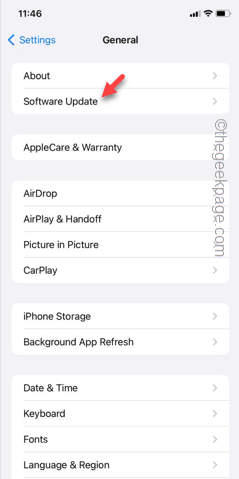
Step 3 – If there is an update, all the necessary information will show up there.
Step 4 – Tap the “Install Now” button and the software will start to get updated.
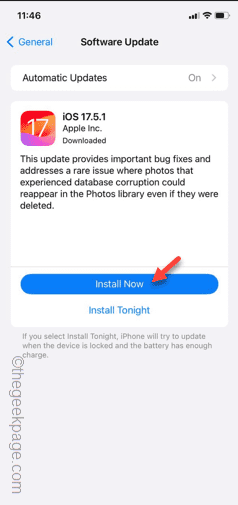
System Reboot is a mandatory process of the system update. So, leave the alone for a few minutes and let it complete the iOS update process.
Soon, when the iOS updates, you won’t face any problem updating the app.
Hope these problem gets fixed.