Is your iPhone connecting automatically to a non-existing Wi-Fi? Though the problem looks weird at the first glance, the same sort of problems has surfaced in various Apple community forums. So, we have these solutions that can fix the problem. Your iPhone won’t be connecting to older or imaginary Wi-Fi networks.
Why the iPhone is connecting to a non-existent Wi-Fi network?
When you connect to a Wi-Fi for the first time, your iPhone keeps the record of the SSID, password of that Wi-Fi. As the iPhone recalls the password of that SSID, it automatically connects to that Wi-Fi. Now, if you have changed the Wi-Fi SSID (the name of the Wi-Fi that is visible to the users) but continued using the same password, the iPhone may connect to that older SSID. This is the reason why the device is connecting to the Wi-Fi automatically.
While this may not be a problem if you have a single Wi-Fi network in the proximity of the device, things can change if you have multiple Wi-Fi networks. The only way of getting out of this problem is to reset the network configuration of the iPhone.
Fix – Reset the network settings
When you reset the network settings, all the stored network details are deleted from your iPhone. This will remove the older network credentials as well.
Step 1 – Load up the iPhone Settings.
Step 2 – Next, go to the “General” area of the Settings panel.

Step 3 – Next, tap the “Transfer or reset iPhone” settings.
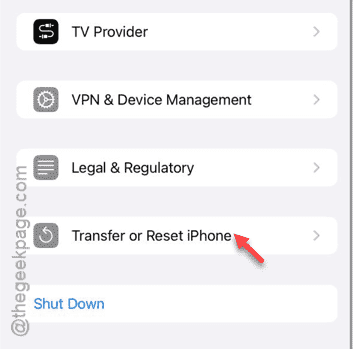
Step 4 – In the following page, click the “Reset” option that you found there.
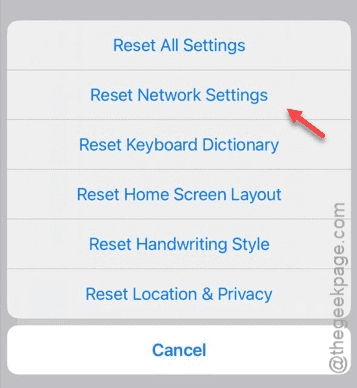
Step 5 – Within the list of options, tap the “Reset Network Settings” option.
Step 6 – Next, tap the “Reset Settings” option to reset the network settings completely.
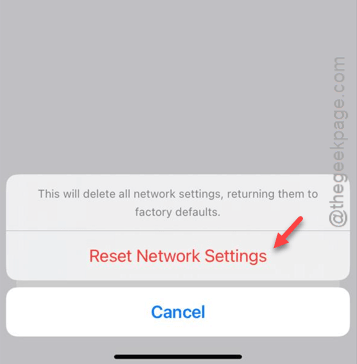
Your iPhone will be restarted to complete the resetting process.
But, when the device has rebooted after the resetting operation, you must connect the iPhone to the Wi-Fi.
Simply, provide the password and join the network.
NOTE – Whenever you change the name of your home Wi-Fi, change the name of the Wi-Fi to something completely different from the existing one. Change the Wi-Fi password in the same process as well.
Check if this is working!