After updating the Apple Watch to watchOS 26, there are some user reports indicate wrong sleep data they are getting from their wearables. Your Apple Watch use various sensors to collect advanced sleep metrics, such as sleep cycles, REM, Core and Deep cycle, and other various data. So, inaccurate sleep data means that it will impact your overall health score. These solutions will help you resolve the problem, if you think the Apple Watch is not tracking your sleep metrics properly since upgrading to any iteration of watchOS 26.
Fix 1 – Refresh the Sleep Tracking Function
Turn off the Sleep Tracking function, and later, re-enabling the same should put it back on track.
Step 1 – To do this, tap the crown button on the Apple Watch once to load up the app menu.
Step 2 – Next, load up the Settings from there.
Step 3 – Then, open the Sleep settings.
Step 4 – Turn off the Sleep Tracking function.
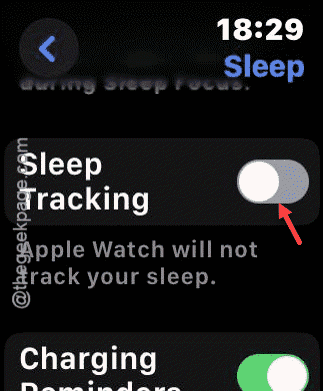
Step 5 – Wait for a few seconds and re-enable the Sleep Tracking feature.
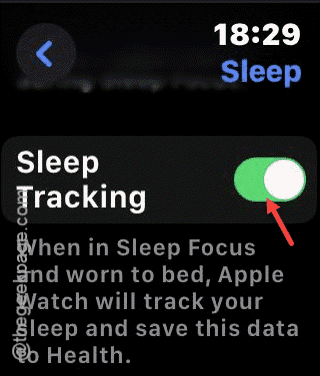
After re-enabling the Sleep tracking facility on the Apple Watch, it will calculate the sleep data correctly.
Fix 2 – Set the Apple Watch as primary data source for Sleep
Your Apple Watch may procure the sleep data from other fitness bands. So, set it to the Apple Watch as primary source for sleep data.
Step 1 – Load up the Health App on your iPhone.
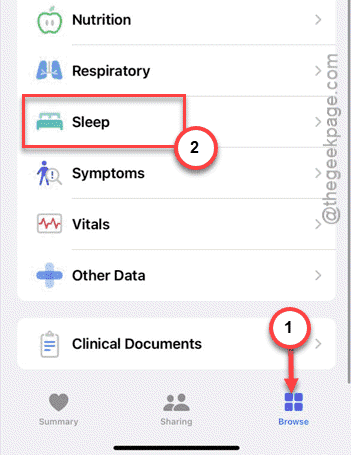
Step 2 – Reach the Browse section in the Health app.
Step 3 – Go to the Sleep section.
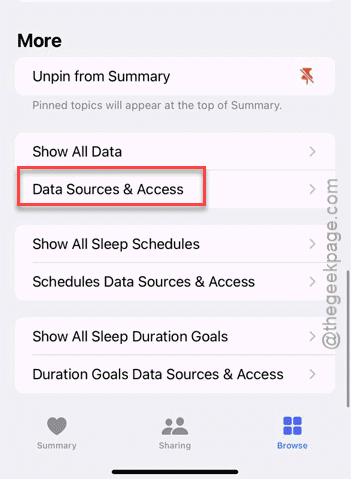
Step 4 – Open the Data Sources and Access option.
Step 5 – You have to make some changes in there. So, tap the Edit button there.
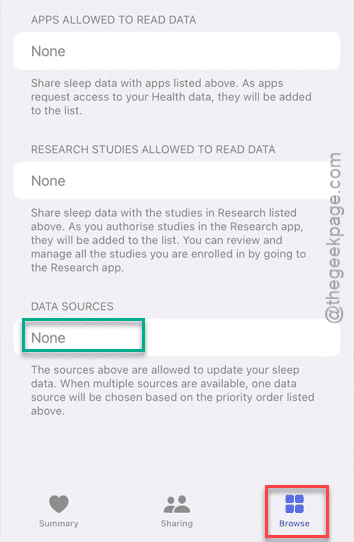
Step 6 – Make sure your Apple Watch is present in that Data sources list.
Now, the Health app will retrieve the sleep data directly from the Apple Watch.
Fix 3 – Use or modify the Sleep Schedule
The sleep tracking process can be more efficient, if you have a sleep schedule. Edit the sleep schedule according to your sleep pattern.
Step 1 – You can manage the Sleep schedule from the Health app.
Step 2 – Next, go to the Browse tab. Thereafter, load up the Sleep settings.
Step 3 – Tap the Edit button in ‘Your Schedule’ section to modify the sleep settings.
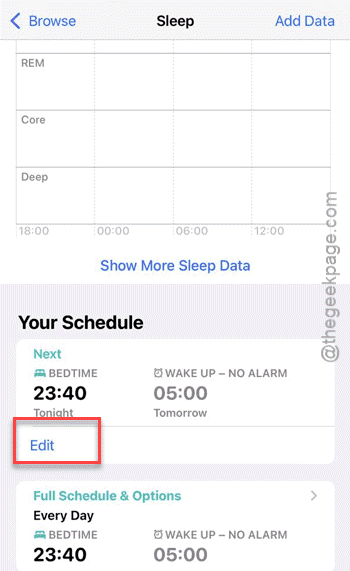
Step 4 – Adjust the Sleep cycle according to your sleep pattern, like when you usually go to sleep and, when you wake up.
Step 5 – Tap the Done button once you are done to save the sleep modification.
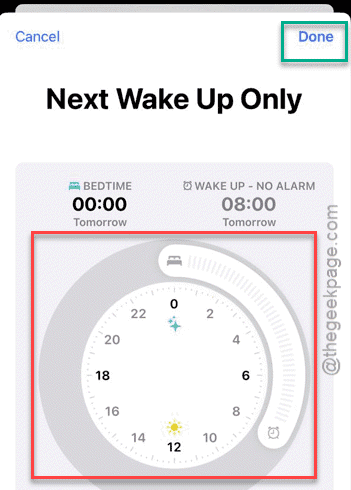
Once you have adjusted the sleep schedule, the sleep metrics will be more precise.
Fix 4 – Install third-party sleep metrics app
If the sleep data is still erroneous, you should definitely try some sleep metric applications. There are some good third-party sleep tracking utilities that you can use to track the sleep data. Here, is a brief list of trusted apps that you can try out –
AutoSleep (Paid)
SleepWatch
Pillow
NOTE – However, some users have mentioned that uninstalling the third-party sleep tracking software utilities are clashing with the watchOS 26’s native sleep metric calculations. So, if you are using any such utilities on your Apple Watch, you may delete those apps and try again.
Fix 5 – Update the watchOS
Many users have noticed the wider range of inaccuracy of the sleep data on their Apple Watch since the watchOS 26.0.2 update. So, you should install the latest patch where Apple have addressed it.
Step 1 – Load up the Watch app on your iPhone.
Step 2 – Next, go to the My Watch tab. Then, go to the Software Update section.
Step 3 – If any watchOS update is pending, install it from there.
The latest watchOS patch should fix the bug that is causing sleep data inaccuracy. These are the
Why the Sleep Data on Apple Watch is wrong?
The reason why the sleep data is wrong on the Apple Watch can be inaccurate due to a combination of factors like wrong sensor reading to misconfigure sleep tracking function or sleep schedule. Keep in mind that the dedicated sleep tracking medical instruments can record and measure the sleep metrics like sleep stages more accurately than the Apple Watch.
Does Apple Watch automatically track sleep?
Yes. Any Apple Watch, running on the watchOS 11 or later, can automatically measure the user’s sleep and collect various sleep metrics such as different sleep stages data. Though in the on older versions of Apple Watch, such as Watch SE, running on watchOS 10, users must turn on the ‘Track Sleep with Apple Watch’ function to track the sleep data.