Getting a continuous static hissing sound from the iPhone’s speaker grills while your iPhone 17 is charging? There are a number of users who have heard this particular sound while the device is in the charging state. This phenomenon recurs even when the iPhone volume slider is set to nil or in mute mode. If you are suspecting this as a hardware fault, that is not the case. Here are some fixes that should help you resolve the problem.
Fix 1 – Update the iPhone
As the majority of the complaints are pouring in from the iOS 26 build running on the iPhone 17, it seems that this is directly linked to the first stable rollout build of iOS 26. Install the latest patch of the iOS 26 to finish the update process.
Step 1 – At first, load up the Settings tab on the iPhone. Next, go to the General tab.
Step 2 – Next, proceed to the Software Update tab.
On this page, you will find latest software update for your iPhone.
Step 3 – Then, tap the Update Now to install the latest version of the iOS update on the device.
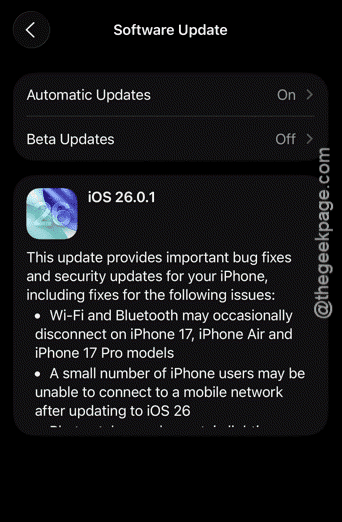
After installing the iOS update, this hissing sound problem will disappear. See whether this works or not.
Fix 2 – Use compatible charger to charge iPhone
Sometimes, if you are using the wrong charger or a faulty MagSafe charger, you may hear such static hissing sound.
Step 1 – Check the charger cable you are using. If the wire has worn out or any other kind of defect in the cable, simply use a different cable.
Step 2 – Try to use official Apple chargers or Apple-authorized charger to charge the iPhone 17.
Step 3 – If you have any MagSafe chargers near you, charge the device using that and observe whether you can detect the static or hissing sound.
See whether this helps!
Fix 3 – Force-Restart the iPhone
The final solution that you can try is to force-reboot the iPhone and try to charge it.
Step 1 – To do this, terminate all the apps running on the iPhone. Next, press and release the Volume Up button once.
Step 2 – Next, press and release the Volume Down button.
Step 3 – Now, finally, to force-restart the iPhone, press-hold the Side button on your iPhone for 10–15 seconds. You will see the Apple logo has appeared on the iPhone’s screen.
After force-restarting the device, put it on charge. Test whether you can hear that continuous static, hissing sound from the iPhone’s speaker.
Fix 4 – Contact the Apple Support
After doing basic troubleshooting, if you are still getting that hissing sound from the iPhone’s speaker while the device is on charge, you should consult an Apple authorized service centre. There is a chance of hardware issues, that cannot be solved using software-based fixes. So, consult the Apple Support and book a call at your nearest Genius bar. They can further guide you on this.