Another Patch Tuesday, another broken desktop for you. This time it’s KB5124008 (the September 2026 update), and it may leave you staring at black screen. Some people get a black background where the wallpaper should be, with the icons and taskbar still there. Others get nothing but a black screen and a mouse cursor. The wallpaper version hits PCs that are not set to English. The update shipped a bad file that only trips on other display languages. But Task Manager is still operational on a black screen. So every fix below starts from there, or from Settings.
Fix 1 – Restart Windows Explorer
Fastest thing to try. Thirty seconds.
1 – At first, hit the Ctrl + Shift + Esc together to open Task Manager.
2 – Then, find Windows Explorer on the Processes tab.
3 – Later, right-click it and select Restart.
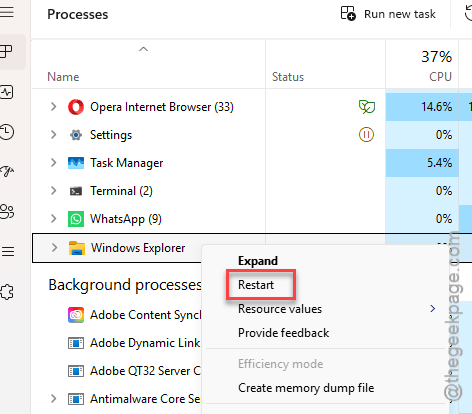
Check if this resolves the issue.
Though this is just a temporary bypass, not a permanent cure. If the black comes back after a reboot, keep going.
Fix 2 – Uninstall ExplorerPatcher or StartAllBack
Remove any File Explorer modding tool from your system.
1 – Start by pressing the Ctrl + Shift + Esc to open Task Manager.
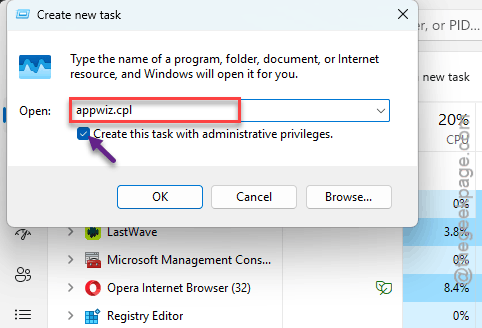
2 – Next, choose the Run new task at the top.
3 – Type appwiz.cpl in the box.
4 – Check Create this task with administrative privileges and press Enter.
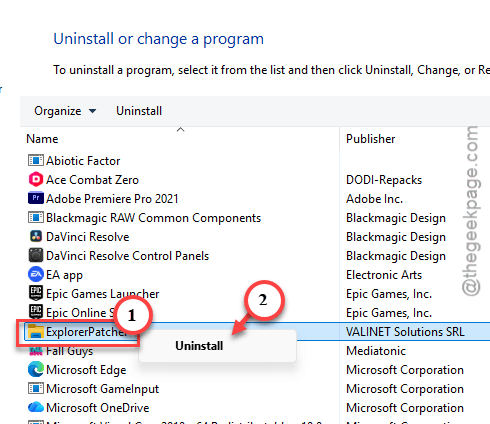
5 – Find ExplorerPatcher, StartAllBack, or any similar taskbar tool in the list.
6 – Right-click it and select Uninstall.
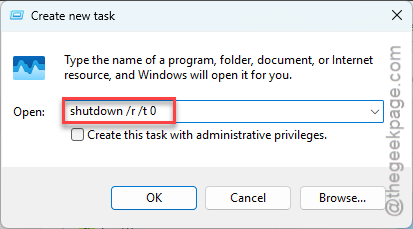
7 – Click Run new task again, type shutdown /r /t 0, and press Enter to restart.
And wait for the tool’s own update before you put it back. Reinstall the old version and you’re right back here.
Fix 3 – Check the Shell Value in the Registry
You should modify the shell value in the system registry.
1 – Open Task Manager and click Run new task.
2 – Type regedit, check the admin box, and press Enter.
3 – Go to
HKEY_LOCAL_MACHINE\SOFTWARE\Microsoft\Windows NT\CurrentVersion\Winlogon
4 – Double-click Shell in the right pane.
5 – Make sure Value data says exactly explorer.exe.
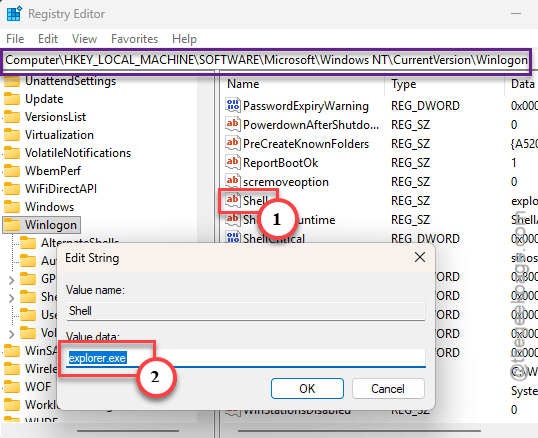
6 – Click OK and close the Registry Editor.
7 – Use Run new task to start explorer.exe.
If the value said cmd.exe or was blank, that was your problem. Do not change anything else in that key.
Fix 4 – Switch the Display Language to English
For the black wallpaper version. Weird fix, but it sidesteps the bad file.
1 – Press Windows + I to open Settings.
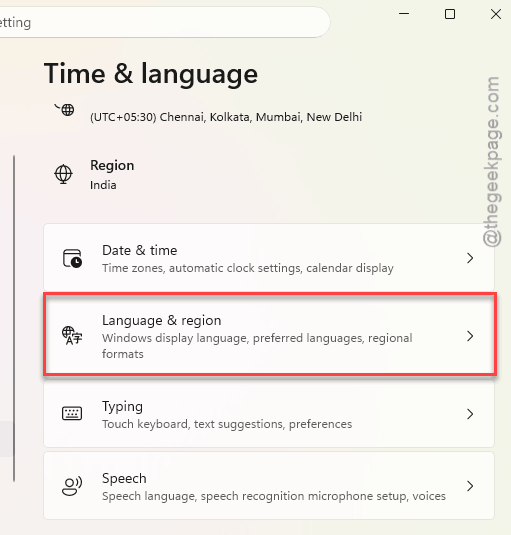
2 – Click Time & language in the left sidebar.
3 – Click Language & region.
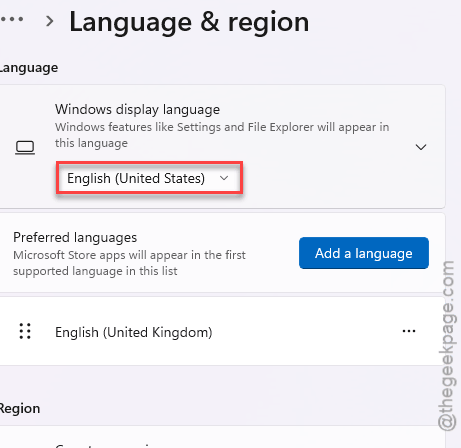
4 – Next, set the Windows display language to English (United States).
5 – Sign out and sign back in.
Your wallpaper should draw properly once you’re signed in again. Not ideal if English isn’t your language (obviously). So treat it as a stopgap until Microsoft patches the update.
Fix 5 – Set the Wallpaper From File Explorer
KB5124008 also breaks the Personalization page in Settings for some people. So go around it. This workaround is credited to Microsoft’s own release health notes.
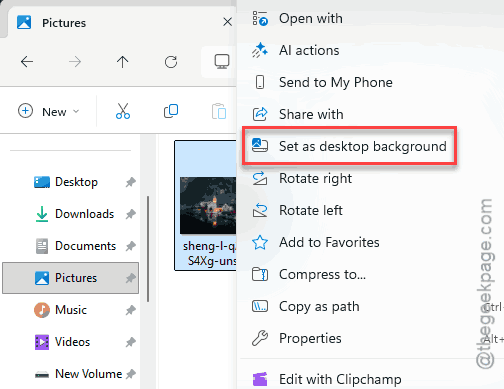
1 – Start by loading up the File Explorer.
2 – Then, proceed to the Pictures folder.
3 – Then, right-click the image you want and select Set as desktop background.
Check if this works.
Fix 6 – Uninstall KB5124008
Want your own language and a working desktop? Remove the update.
1 – Just open up the Windows Settings.
2 – Go to Windows Update.
3 – Click Update history.
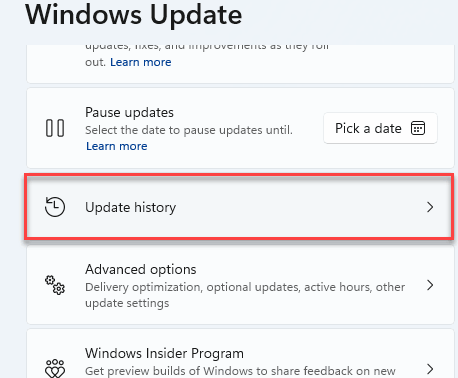
4 – Then, scroll down and choose the Uninstall updates.
5 – Find KB5124008 and click Uninstall.
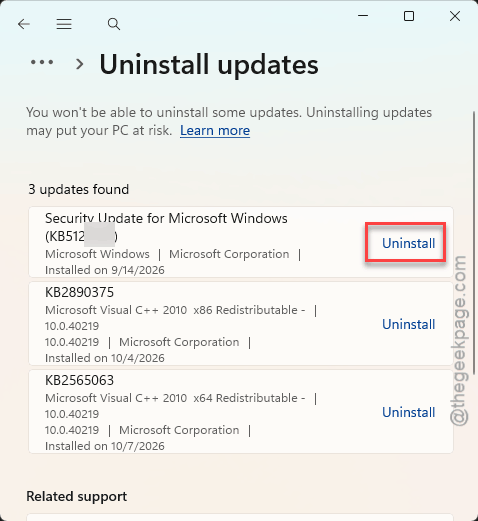
6 – Restart your PC.
Check if this works.
Fix 7 – Re-Register the Shell Packages on Citrix or FSLogix
This one is for IT admins. On Citrix with FSLogix profiles, Explorer can start before its app dependencies finish registering, and users get the black desktop at every logon. One admin fixed it with a logon script that registers three packages first.
The script runs Add-AppxPackage -Register with -DisableDevelopmentMode on the AppxManifest.xml file in each of these folders under C:\Windows\SystemApps:
- MicrosoftWindows.Client.CBS_cw5n1h2txyewy
- Microsoft.UI.Xaml.CBS_8wekyb3d8bbwe
- MicrosoftWindows.Client.Core_cw5n1h2txyewy
The same admin noted that delaying Explorer’s start by any other method may work too.
Keep It From Coming Back
- Pause updates for a week after Patch Tuesday if you can. Let other people find the bugs.
- Using a taskbar mod? Update it before you install Windows updates, not after.