If the COD MW3 or Warzone gets stuck in loading profile, it looks like a server outage. Usually isn’t. Here is a list of solutions to follow and fix the Call of Duty and Modern Warfare 3 online profile fetching issue that you are currently facing at your end. And that you can fix yourself.
Why This Happens
The Season 4 to 5 transition leaves debris. A corrupted players folder. A bugged favorite loadout. Sometimes both, and the game hangs trying to match them against the servers.
There’s a second trigger too. The game starts streaming new Season 5 shop assets in the background before it even authenticates you. That download jams? Your login waits behind it. Forever.
Fix 1 – Delete the players Folder
The big one. This wipes the corrupted config from the update.
1 – Open File Explorer and go to your Documents folder.
2 – Open the Call of Duty folder.
3 – Delete the folder named players.
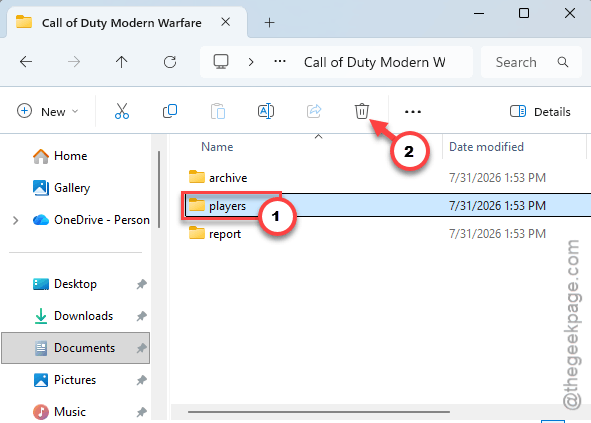
Your audio and graphics settings reset. Your loadouts don’t — those live on Activision’s servers, not in that folder.
Fix 2 – Turn Off On-Demand Texture Streaming
This stops the shop-asset download from blocking your login.
1 – While stuck on the fetching screen, press Cancel to drop into offline mode.
2 – Go to Settings > Graphics > Quality.
3 – Turn On-Demand Texture Streaming to OFF.
4 – Restart the game and let it log in.
Fix 3 – Overwrite the Bugged Favorite Loadout
A corrupted favorite weapon can loop the whole profile fetch. The trick: force the game to replace it.
1 – Launch the game and go straight to the Store or Battle Pass tab, before the loop crashes the menu.
2 – Find any bundle or Battle Pass tier with a weapon blueprint in it.
3 – Select the weapon and choose Equip to Favorite Loadout (some screens call it Auto-equip).
That overwrite kicks out the bugged weapon, and the multiplayer menus come back.
Fix 4 – Flush Your DNS
Quick one.
1 – Press the Windows key, type cmd, right-click Command Prompt, and run it as administrator.
2 – Type this code, press Enter to execute it.
ipconfig /flushdns
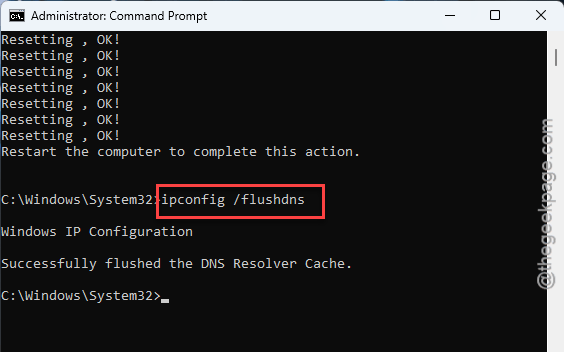
Then, restart your PC. This clears outdated routes still pointing at the pre-Season 5 login servers. Takes about a minute, start to finish.
Fix 5 – Change Your Adapter’s MAC Address
Sounds drastic. It isn’t — it just makes Activision’s servers hand you a fresh IP lease instead of the one stuck in a routing loop.
1 – Right-click the Start button and open Device Manager.
2 – Expand Network adapters.
3 – Right-click your active adapter and choose Properties.
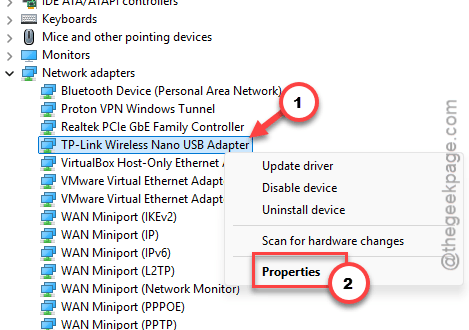
4 – Under the Advanced tab, find Network Address (sometimes listed as Locally Administered Address).
5 – Set the Value to any random 12-character mix of letters and numbers, then click OK.
See if this works.
Fix 6 – The Second-Controller Trick
On console with a friend nearby? This one’s odd but it works.
1 – Have your friend load into a lobby on their account, on your console.
2 – Turn on a second controller and sign in with your bugged account.
3 – Press X/A to join as a split-screen player.
4 – Once you’re in, go to the Weapons and Barracks tabs.
5 – Change your Emblem and Calling Card, and strip all attachments and skins from every custom loadout.
6 – Log out and start the game normally on your account.
Corrupted emblems and skins are a known loop trigger. This clears them without ever touching the broken menu.
Fix 7 – The Discord Invite Bypass
Last resort on PC.
1 – Close the game completely, then have a friend send you a lobby invite through Discord — not the in-game invite system.
2 – Accept it, and as the game auto-launches,
3 – Spam F3 on the loading screen.
That forces it past the profile fetch. Once you land in the lobby, reset your classes, emblems, and calling cards to defaults so the loop doesn’t come back.
How to Prevent This
- When a new season hangs on login, go straight for the players folder. First stop, every time.
- Strip exotic skins off your favorite loadout right before a season flips. Boring, but the corrupted-loadout loop can’t grab what isn’t there.
- Flush DNS after big patches. One command.
People Also Ask
How do I fix Warzone stuck on “Connecting to Online Services”?
Same family of problem as the profile fetch loop. Flush your DNS from an admin Command Prompt (ipconfig /flushdns), restart, and delete the players folder in Documents\Call of Duty. Still stuck? Check Activision’s server status page before going further — sometimes it really is them.
Why is MW3 stuck on the loading screen?
Usually a corrupted local config or a jammed background download. Delete the players folder in Documents\Call of Duty to reset the config, and switch off On-Demand Texture Streaming so Season 5 shop assets stop blocking the login queue.
Why does COD say fetching account data from platform?
The game is syncing your profile with Activision’s servers, and something in that profile — a favorite loadout, an emblem, a calling card — isn’t parsing. Auto-equipping a fresh weapon from the Store tab overwrites the corrupted entry and usually breaks the loop.