You open Copilot. “Not available in your region.” That’s it. No workaround offered. No help link. Just blocked. If you’re in an unsupported region where Microsoft is yet to release the CoPilot or the region is geo-blocked, you might feel locked out. But there are some useful ways you can bypass this restriction.
Why This Happens
Microsoft hasn’t released Copilot everywhere. In some of the regions, like China, it is blocked to cater the local laws and regulations. Your working region be blocked from their end. Windows does scan your IP address (which stands for your geograpical location in this case), while you try to connect to Microsoft CoPilot service.
So simple settings tweak like changing your Windows language to English (US), won’t help you bypass the region-based blockers. Only a good, secure VPN service connected to United States region can provide you with the CoPilot access.
Fix 1 – Change Your Windows Region to United States
Start with this. It’s the easiest change and sometimes enough by itself.
1 – Open Settings (press Windows + I).
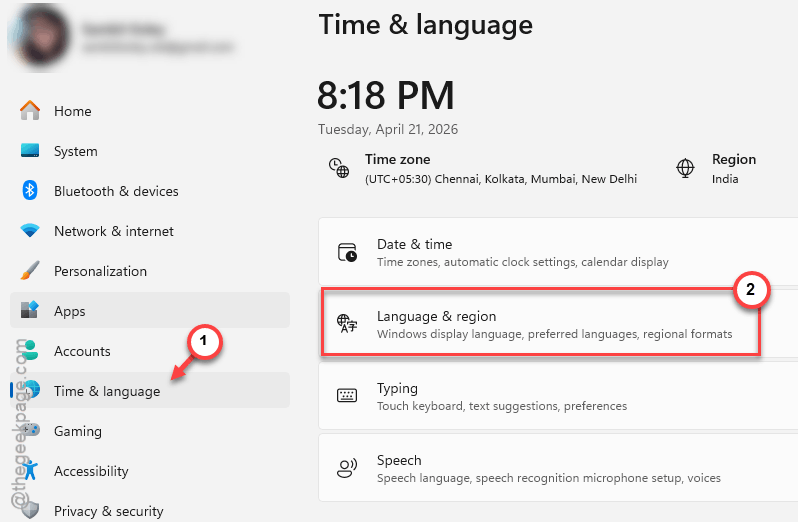
2 – Go to Time & Language in the left sidebar.
3 – Click Language & region.
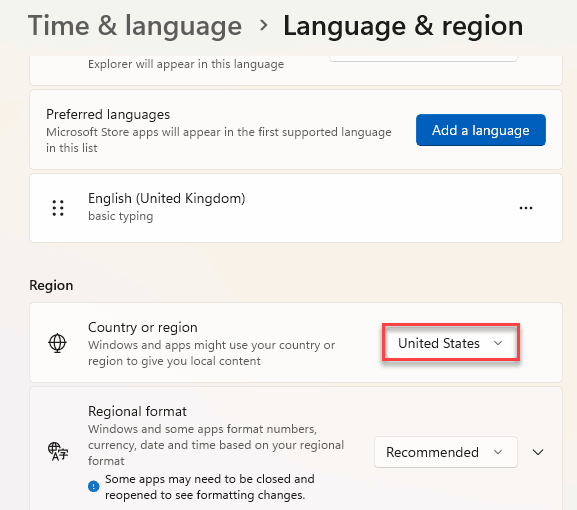
4 – Under Country or region, change it to United States.
5 – Restart your PC.
And check if Copilot works now. For some people, this alone does the job. If not, you’ll need a VPN too.
Fix 2 – Use a VPN Set to the United States
If changing the region wasn’t enough, a VPN tricks Microsoft into thinking you’re in a supported country.
1 – Install a VPN if you don’t have one. Most free ones will work for this.
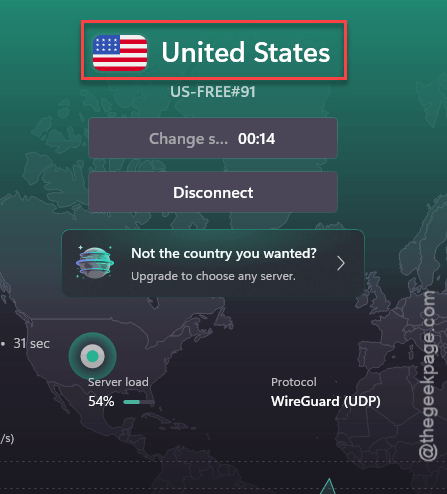
2 – Connect to a US East or US West server. Those are the most reliable for Copilot.
3 – Open Copilot.
Should work immediately. But some VPN protocols cause issues. If Copilot still blocks you, try switching protocols (see Fix 3).
Fix 3 – Switch VPN Protocol to WireGuard
Some users found that Copilot works with certain VPN protocols but not others. WireGuard seems to be the most reliable.
1 – Open your VPN app’s settings.
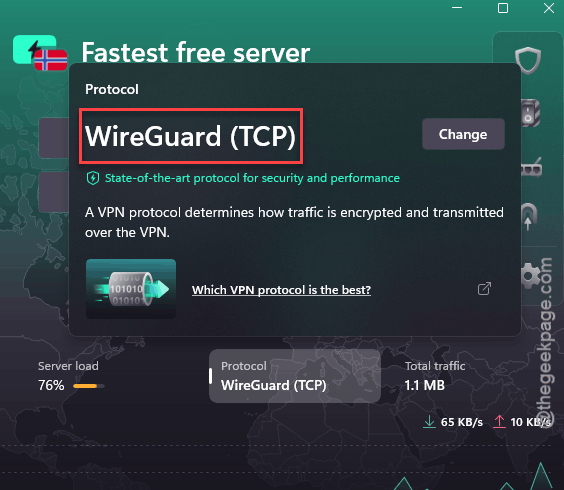
2 – Look for a Protocol option. Might be under Advanced or Connection settings.
3 – Switch to WireGuard if available.
4 – Reconnect to a US server.
5 – Try Copilot again.
Weird that the protocol matters. But multiple Reddit users confirmed WireGuard works when OpenVPN doesn’t. So yeah.
Fix 4 – Try a European Server Instead
Not everyone needs a US server. Some European countries have Copilot enabled too.
1 – In your VPN, try connecting to Germany, UK, or France.

2 – Open Copilot.
That’s it. One user reported German servers work perfectly fine. Could save you some latency compared to routing through the US.
Fix 5 – Wait for Official Rollout
Not a “fix” exactly. But Microsoft is expanding Copilot availability regularly. If none of the above works — or you don’t want to deal with VPNs — the feature will likely come to your region eventually. No timeline though. Classic Microsoft.
How to Prevent This
- Keep your Windows region set to United States if you rely on Copilot. It doesn’t affect much else.
- Use a VPN with WireGuard protocol for the most reliable connection.
- Check Microsoft’s Copilot availability page periodically. New regions get added without announcements sometimes.
People Also Ask
What about regions where Copilot is not available?
Change your Windows region to United States in Settings > Time & Language > Language & region. Then use a VPN connected to a US server. Both changes together usually unlock Copilot even from unsupported countries.
Does Copilot work with a VPN?
Yes. Connect to a US or supported European server. Use WireGuard protocol if available — it’s the most reliable. Some other protocols get detected and blocked. But WireGuard seems to work consistently.
Why Copilot is currently not available in my account?
Could be region-based or account-based. If your Windows region is set to an unsupported country, Copilot will not show up. Change the region and try a VPN. If it still says unavailable, your specific account might need a Microsoft-side toggle. Contact support in that case.