You launch a match. It crashes to desktop. Or it loads, then stutters so bad the game’s unplayable. Right after a patch, too.
Yeah, this one’s common. And it’s rarely your PC’s fault. Usually it’s a leftover mod, a bad hook cache, or a security setting getting in the way. Here’s how to sort it.
Why This Happens
Short version? A patch changed something, and now old bits of the game don’t fit anymore.
The usual troublemaker is mods. Interface and graphics mods get built for a specific version. A patch drops, the mod’s suddenly out of date, and the game crashes the second it tries to load it.
Then there’s Windows itself. It keeps a little “game profile” for each executable — how it should behave, what to hook into. After an update, that cached profile can go stale. And a stale profile means stutter or an instant crash.
One more thing. A Windows security feature called Memory Integrity sometimes blocks the game when it grabs big chunks of RAM. No error. Just a crash. Sneaky.
Fix 1 – Delete Outdated Mods
Start here — it’s the top cause of post-patch crashes.
1 – Open File Explorer and go to C:\Users\YourUsername\Games\Age of Empires 2 DE, or wherever you have installed the game on your system.
2 – Open the folder named with a long string of numbers. That’s your user ID.
3 – Open the mods folder inside it.
4 – Delete everything inside both the local and subscribed subfolders.
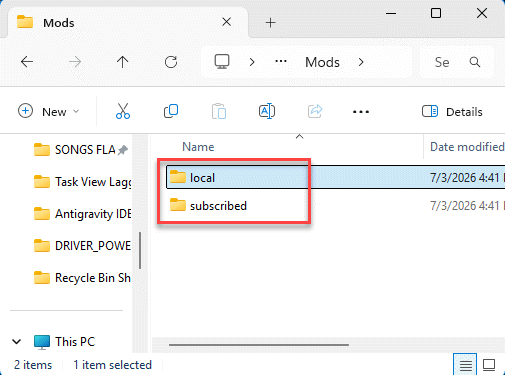
5 – Launch the game again.
Don’t worry — you can re-subscribe to the ones you actually use later, once they’ve been updated for the new patch. This clears the crash for most people right away.
Fix 2 – Break the Bad Game Profile Cache
If it still crashes, that stale Windows game profile might be the problem.
1 – Go to the AOE original location –
C:\Program Files (x86)\Steam\steamapps\common\AoE2DE
[The location may differ in your case]
2 – Find the file aoe2de_s.exe.
3 – Rename it to something else, like AoE2_Launch.exe.
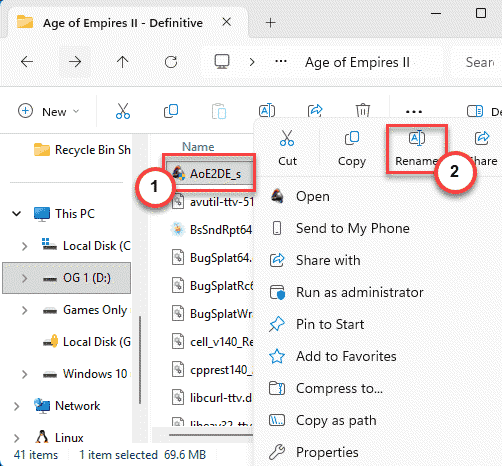
4 – Open Steam, right-click Age of Empires II: DE, and choose Properties.
5 – On the General tab, find Launch Options.
6 – Paste this in exactly, quotes and all: “C:\Program Files (x86)\Steam\steamapps\common\AoE2DE\AoE2_Launch.exe” %command%
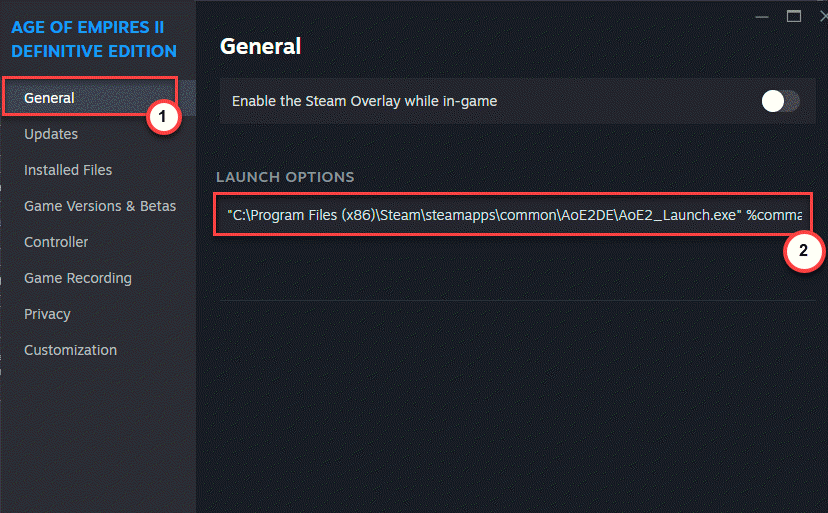
7 – Close the window and launch from Steam as normal.
The new filename dodges the old broken profile. Steam still knows how to start it thanks to that launch line.
Fix 3 – Turn Off Memory Integrity for the Game
Crashing when a match loads or when the game allocates memory? Windows Memory Integrity could be blocking it.
1 – Open Windows Security.
2 – Click Device security.
3 – Under Core isolation, click Core isolation details.
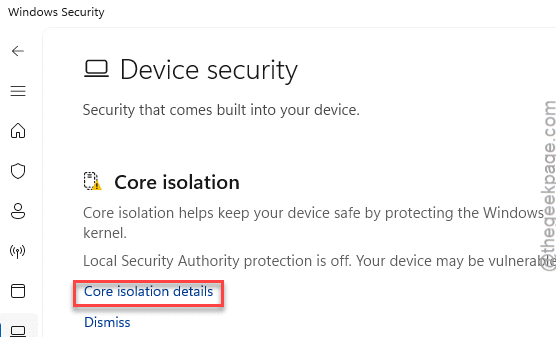
4 – Switch Memory integrity to Off.
5 – Restart your PC for it to take effect.
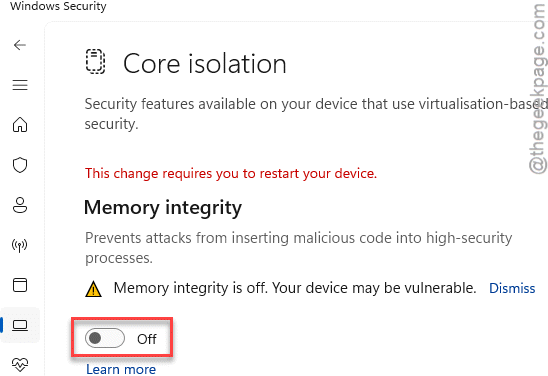
One heads-up — this is a security feature, so only leave it off if it clearly fixes your crash. If the game’s stable now, you found your cause. If not, flip it back on.
Fix 4 – Verify the Game Files
Quick and worth doing. A patch can leave a file half-written, and Steam can check for that.
1 – Right-click Age of Empires II: DE in Steam, choose Properties.
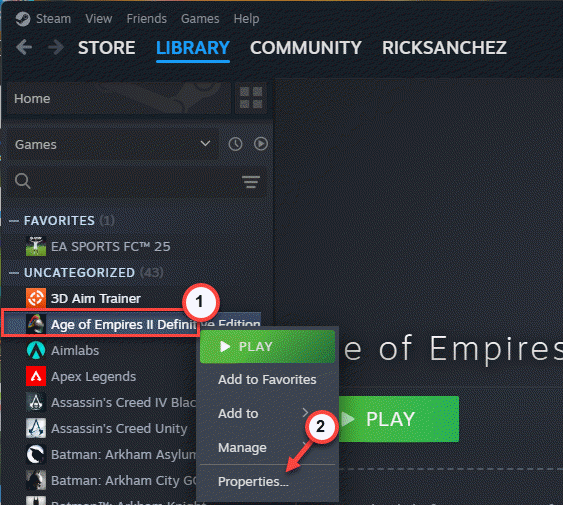
2 – Next, open Installed Files. Then, click Verify integrity of game files.
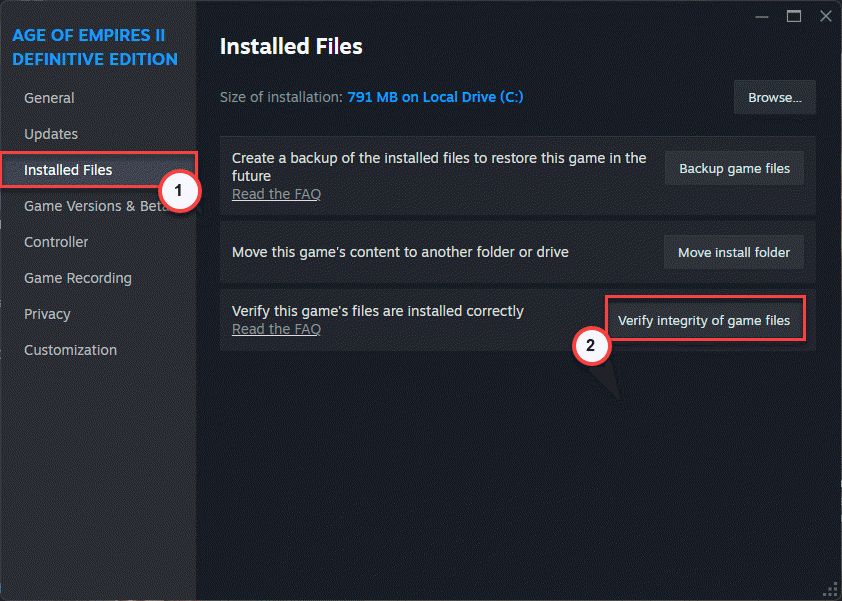
It scans and re-downloads anything broken. Takes a few minutes.
Fix 5 – Update Your Graphics Driver
Stuttering more than crashing? An old GPU driver is a likely cause after a game patch.
1 – Open Device Manager with Windows + X.
2 – Expand Display adapters to see your card — NVIDIA, AMD, or Intel.
3 – Go to that maker’s website and grab the newest driver for your exact model.
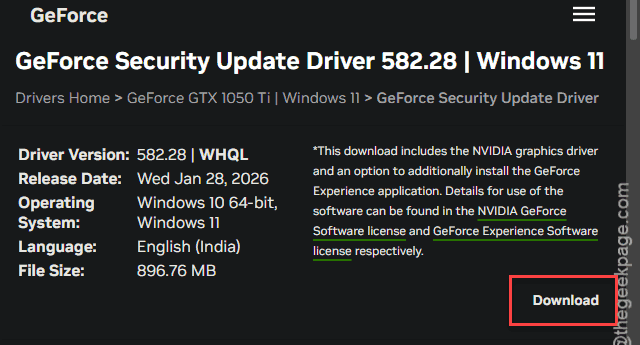
4 – Run the installer and pick a clean install if it offers one.
5 – Restart and load a match to check the stutter.
How to Prevent This
– After every big AoE2 patch, give your mods a minute to update before you play. Loading an outdated one is the fastest way to crash.
– Keep your graphics driver current. AoE2 leans on the GPU more than people expect, especially in late-game with huge armies on screen.
– Don’t pile on twenty mods at once. The more you run, the more likely one breaks after a patch. Keep it lean.
– Verify your game files whenever a patch feels off. It’s quick and catches half-downloaded updates before they crash you.
People Also Ask
Why does my Age of Empires 2 keep crashing?
After a patch, outdated mods are the usual cause. Go to C:\Users\YourUsername\Games\Age of Empires 2 DE, open your user ID folder, and delete everything in the mods folder’s local and subscribed subfolders. If it still crashes, verify the game files through Steam to catch any broken update files.
How do I make AoE2 run better?
Update your graphics driver first — that fixes most stutter. Then clear old mods and verify your game files in Steam. If big battles still lag, lower the graphics settings and turn off any heavy visual mods. Keeping Memory Integrity off can also help if it’s blocking the game.
Is AoE2 CPU or GPU intensive?
Mostly CPU. Age of Empires 2 DE leans hard on the processor, especially in late-game when there are hundreds of units and lots of pathfinding. The GPU matters for high resolutions and visual effects, but a strong single-core CPU makes the biggest difference for smooth play.