Game was fine. Updated. Now it crashes. Sometimes right at launch. Sometimes mid-mission. Either way, unplayable.
Helldivers 2 has a history of post-update crashes. Usually tied to shader cache corruption or DX12 issues. Fixable, though.
Why This Happens
Every time Helldivers 2 pushes a patch, it can invalidate old cached shader files. Your GPU compiled those shaders for the previous version. New version comes along and tries to use old shaders. Boom. Crash to desktop.
And DX12 is another common culprit. Some GPUs — especially older ones — do not handle DX12 well with this game. Arrowhead Studios knows about it. But the default is still DX12 for some reason.
Fix 1 – Switch to DirectX 11
DX11 is more stable for a lot of people. Less flashy. But it stops the crashes.
1 – Open Steam.
2 – Find Helldivers 2 in your Library.
3 – Right-click it and click Properties.
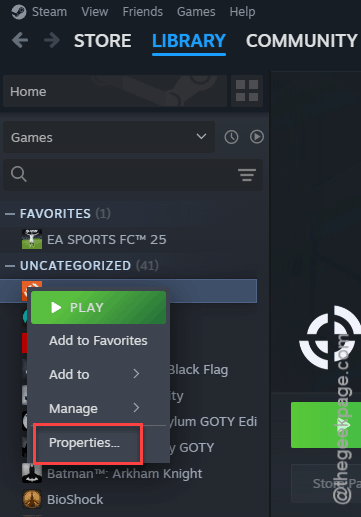
4 – In the General tab, find Launch Options at the bottom.
5 – Type –use-d3d11 in the text box.
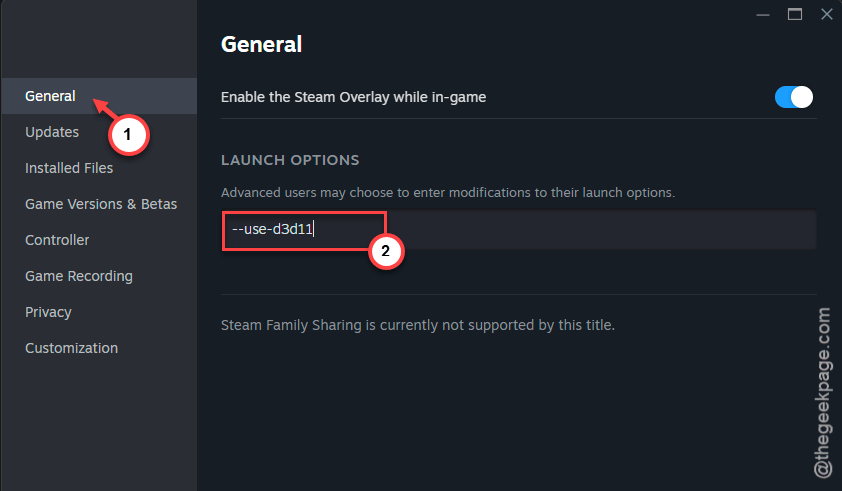
6 – Close the window and launch the game.
And that alone fixed it for a lot of players. Worth a shot before you try anything else.
Fix 2 – Delete the Shader Cache
Corrupted shader cache is the number one reason for post-update crashes. Deleting it forces the game to rebuild everything fresh.
1 – Close the game completely. Make sure it is not running in the background.
2 – Open File Explorer (press Windows + E).
3 – Go to the address bar at the top. Type %appdata%\Arrowhead\Helldivers2\shader_cache and press Enter.
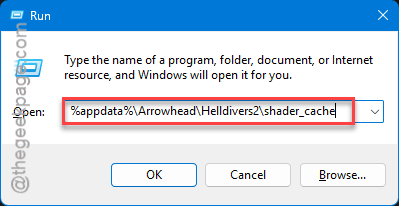
4 – Select everything inside this folder.
5 – Delete all of it.
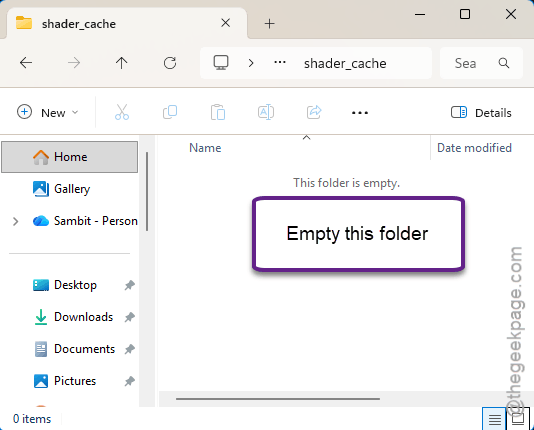
6 – Launch the game again.
The game will stutter a bit while it rebuilds the cache. That is normal. Give it a few minutes.
Fix 3 – Cap Your FPS
Uncapped frame rates push the GPU too hard after certain updates. Capping to 75 FPS keeps things stable.
1 – Launch Helldivers 2.
2 – Open the in-game menu. Go to Options.
3 – Click Graphics.
4 – Find Frame Rate Limit.
5 – Set it to 75. Not unlimited.
6 – Apply the setting.
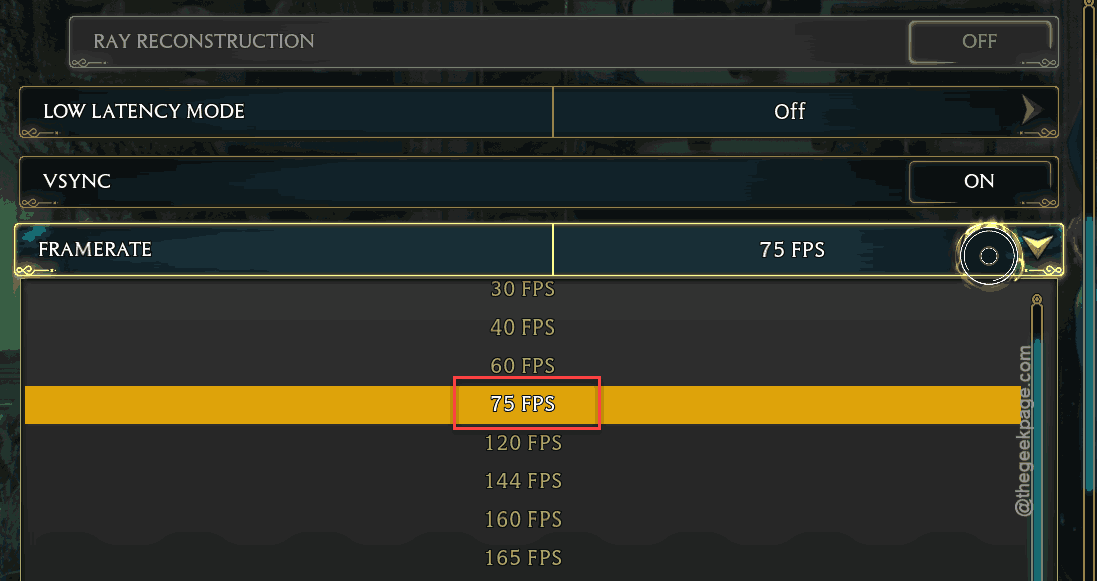
Done. If 75 still crashes, try dropping it to 60. Some GPUs just cannot handle uncapped frames with this game. Annoying, but it works.
Fix 4 – Verify Game Files on Steam
Quick check. Sometimes the update itself gets corrupted during download.
1 – Open Steam and go to your Library.
2 – Right-click Helldivers 2.
3 – Click Properties.
4 – Go to the Installed Files tab on the left.
5 – Click Verify integrity of game files. It is at the bottom of that section.
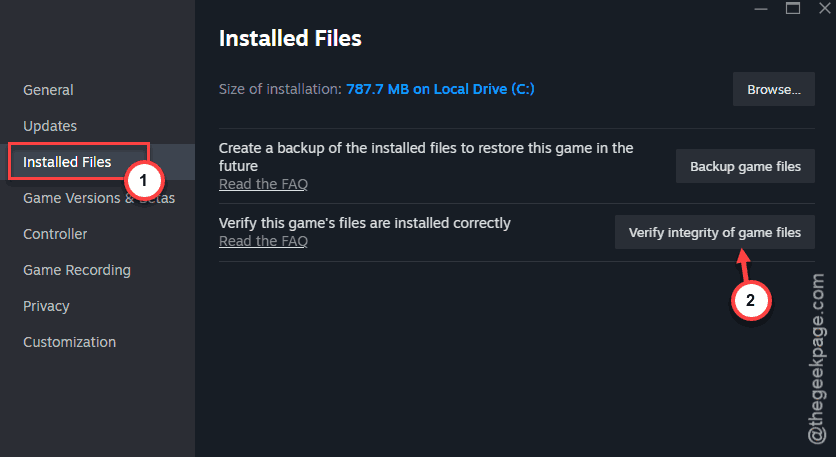
6 – Wait for Steam to finish checking. Could take a few minutes.
If it finds anything broken, it will redownload just those files. Not the whole game.
Fix 5 – Update Your GPU Drivers
Old drivers plus a new game patch? Recipe for crashes.
1 – For NVIDIA: open GeForce Experience (or the NVIDIA App). Click Drivers at the top. Download and install any available update.
2 – For AMD: open AMD Software: Adrenalin Edition. Check for updates under the Home tab.
3 – Restart your PC after the driver installs.
And always do a clean install if you can. There is usually an option for it during the driver setup.
Fix 6 – Disable Steam Overlay
The overlay conflicts with some games after patches. Turning it off is easy.
1 – Open Steam.
2 – Right-click Helldivers 2 in your Library.
3 – Click Properties.
4 – Under the General tab, uncheck Enable the Steam Overlay while in-game.
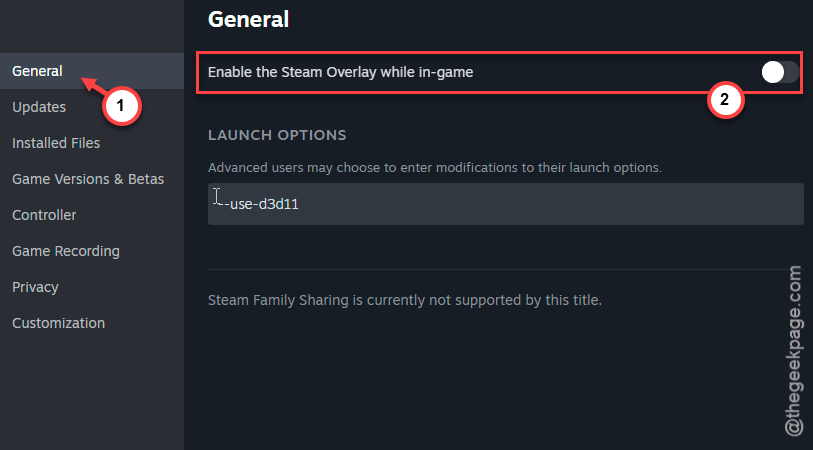
Not ideal if you use the overlay for chat. But if it stops the crashing, worth it.
How to Prevent This
- After every game update, delete the shader_cache folder before launching. Takes two seconds.
- Keep GPU drivers updated. Check weekly if you play often.
- Cap your FPS to 75 or lower. Uncapped is asking for trouble with this game.
- If DX11 runs stable for you, stick with it. DX12 looks slightly better but crashes more.
People Also Ask
Why does Helldivers 2 keep crashing?
Shader cache corruption. That is the usual culprit after updates. The game tries to use old cached shaders with new code and it just dies. Delete the shader_cache folder and it normally fixes itself. Also try switching to DX11.
Why does my PC keep crashing after an update?
Game updates can break compatibility with your current GPU drivers. So update those first. And clear any shader caches the game stores locally. If your whole PC crashes — not just the game — that points to a driver issue or overheating.
Is Helldivers 2 bricking PCs?
No. It is not bricking anything. Hard crashes can feel scary. But a crash-to-desktop or a freeze is not permanent damage. Your PC is fine. The game just needs a shader cache clear or a DX11 switch.