You open Windows Sandbox on your ARM64 laptop. It spins for a second. Then: “The container OS failed to start.” And that’s it. Nothing loads.
Frustrating, because Sandbox is supposed to be the easy, throwaway test space. On ARM chips it’s pickier than on regular PCs.
Why This Happens
The usual cause? A required virtualization feature isn’t switched on. Sandbox leans on a few of them, and if even one is off, you get that error.
Sometimes it’s a turf war. Another security feature — Defender Application Guard — wants the same isolated container space. On ARM, they collide and neither starts right.
And sometimes it’s just damage. Sandbox borrows files straight from your main Windows install. So if those files are corrupted, the copy it builds is broken before it even starts.
Fix 1 – Switch On Every Virtualization Feature
This is the first thing to check, and it solves most cases. Sandbox needs three Windows features turned on, not just one.
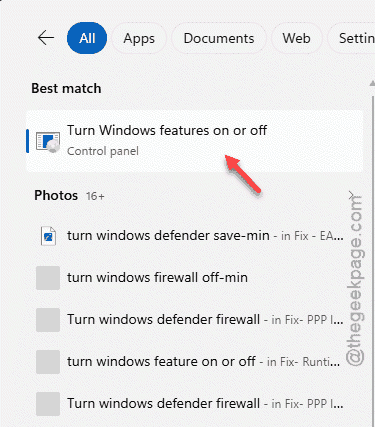
1 – Click Start, type Turn Windows features on or off, and open the top result.
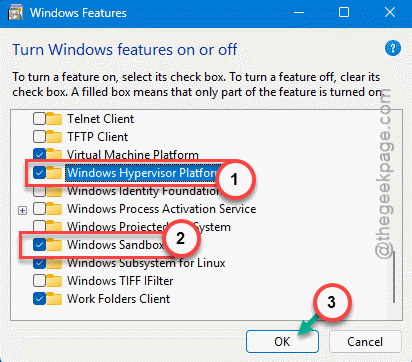
2 – Scroll through the list and make sure all three of these are checked:
 Windows Sandbox
 Virtual Machine Platform
 Windows Hypervisor Platform
3 – Click OK. Windows will download the bits it needs.
Restart your PC when it asks.
Fix 2 – Start the Virtualization Service
Sandbox depends on a background service.
1 – Press Windows + R, type services.msc, and press Enter.
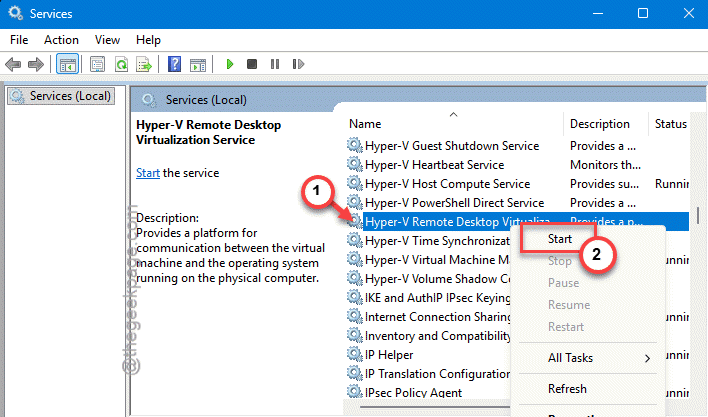
2 – Scroll down to Hyper-V Remote Desktop Virtualization Service.
3 – Right-click it and choose Start. If it’s already running, choose Restart instead.
4 – Double-click the service, change Startup type to Automatic, and click OK.
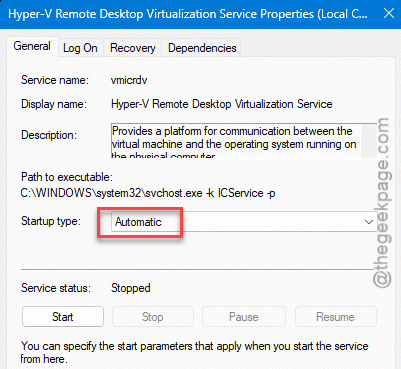
Now it’ll fire up on its own every time you boot. One less thing to babysit.
Fix 3 – Repair Your Windows System Files
Since Sandbox copies files from your main Windows, any corruption there breaks the copy. These two built-in tools scan and patch those files.
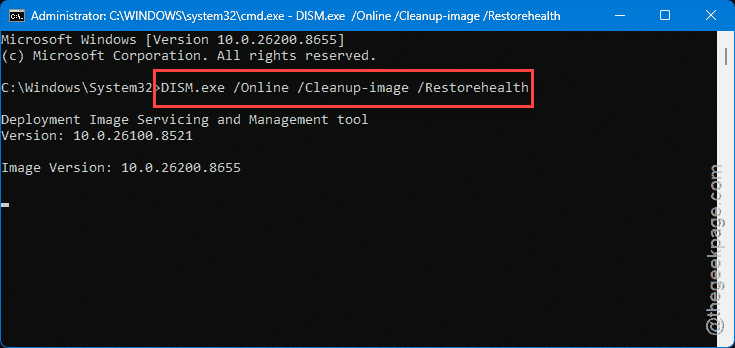
1 – Click Start, type cmd, right-click Command Prompt, and choose Run as administrator.
2 – Type this and press Enter:
DISM.exe /Online /Cleanup-image /Restorehealth
3 – Wait for it to finish. It can sit at a percentage for a while — that’s normal, let it run.
4 – Then type sfc /scannow and press Enter.
5 – Let that finish too, then restart and try Sandbox again.
Fix 4 – Install Pending Windows Updates
Easy one to overlook. An out-of-date system can be missing the exact piece Sandbox needs to deploy. Press Windows + I, go to Windows Update, and click Check for updates.
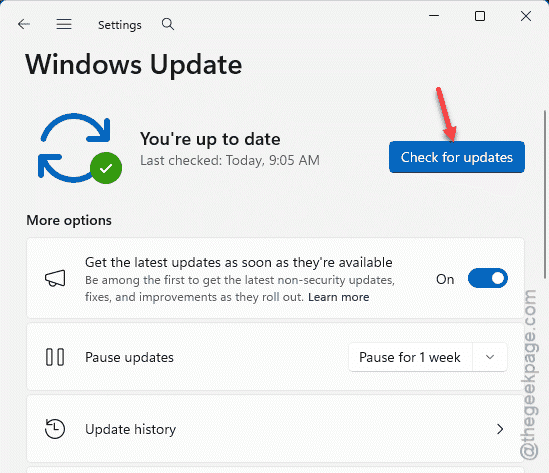
Install anything that’s waiting — especially cumulative updates — and reboot. ARM64 support for Sandbox keeps improving with each update, so a fresh patch alone sometimes does it.
Fix 6 – Roll Back to When It Last Worked
Did Sandbox break right after you changed something — a new app, a setting, an update?
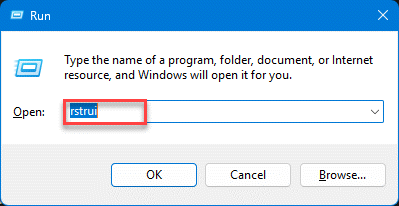
1 – Press Windows + R, type rstrui, and press Enter.
2 – Click Next.
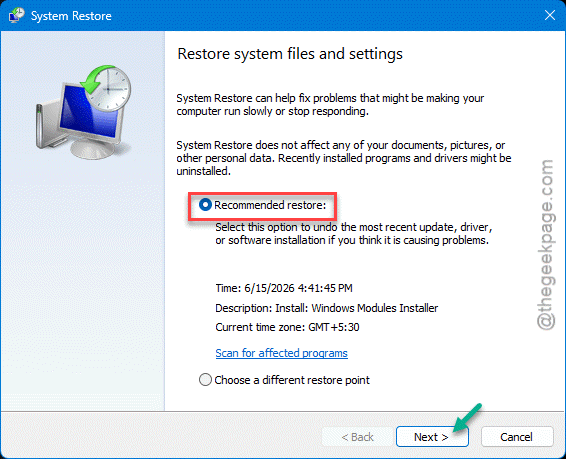
3 – Pick a restore point dated before the errors started.
4 – Click Finish and let it run.
Your files stay safe — this only rewinds system settings and installed programs. It’s the fallback when nothing else lands.
How to Prevent This
– Keep all three virtualization features on: Windows Sandbox, Virtual Machine Platform, and Windows Hypervisor Platform. Sandbox needs the full set.
– Don’t run Defender Application Guard and Sandbox together on ARM. They compete for the same space.
– Stay current on Windows updates. ARM64 Sandbox support gets steadier with each one.
– Run a DISM and SFC scan every so often. Healthy system files mean Sandbox builds cleanly.
People Also Ask
Why is my Windows Sandbox not opening?
Most often a required feature is switched off. Sandbox needs Windows Sandbox, Virtual Machine Platform, and Windows Hypervisor Platform all turned on. Check those first in Turn Windows features on or off. Corrupted system files or a stopped virtualization service can block it too.
How do I enable Windows Sandbox on ARM?
Open Turn Windows features on or off from the Start menu, check Windows Sandbox along with the two virtualization features, and click OK. Windows downloads the components and you restart. ARM64 needs a recent Windows version, so install pending updates first if it doesn’t appear.
What does ‘container OS failed to start’ mean?
It means the small copy of Windows that Sandbox builds couldn’t boot. Usually a virtualization feature is off, or the system files Sandbox borrows are damaged. Turn on all three features, then run DISM and SFC to repair the files. That combination clears most cases.