Does the stand reminders are not alerting you on your Apple Watch? Apple Watch users can set up a stand reminder on their wearable, if the user has been sitting for 50 minutes of an hour. If you are having any issues with not getting any Stand Reminders on your Apple Watch, this guide will be of help.
Fix 1 – Unpause the Fitness Rings on Apple Watch
The stand reminders can stop functioning if you have mistakenly paused the Fitness Rings on your Apple Watch.
Step 1 – Tap the digital crown on your Apple Watch.
Step 2 – Find the Fitness app on the wearable and load it up.
Step 3 – Next, tap on your Fitness rings on the watch.
Step 4 – Tap the Pause Rings option. Select For Today option to pause the rings briefly.
Step 5 – After this, tap the Resume Rings option.
After enabling the rings, the stand reminders will be available on your Apple Watch.
If the option to control the rings are not available directly on the Apple Watch, you can do this from Watch app~
Step 1 – On the Watch app, go to My Watch tab. Next, load up the Fitness app.
Step 2 – Then, tap the ring in the Activity Rings section.
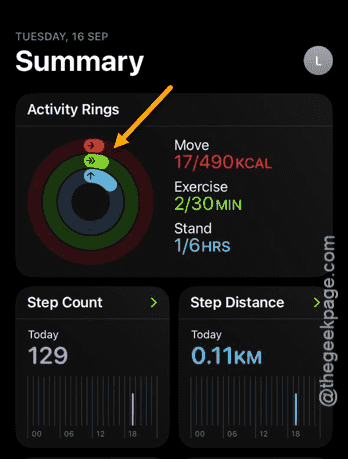
Step 3 – Scroll down and use the Pause Rings option.
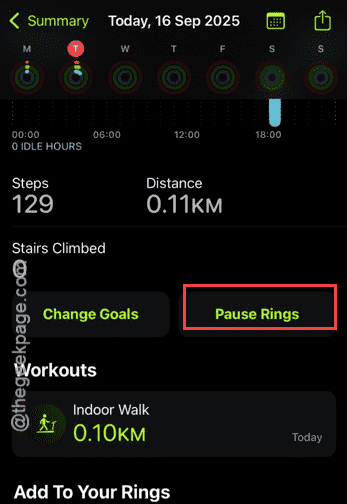
Step 4 – Select the For Today option.
Now, the fitness rings will be paused.
Step 5 – Now, on the same page, tap Resume Rings option to resume the fitness rings.
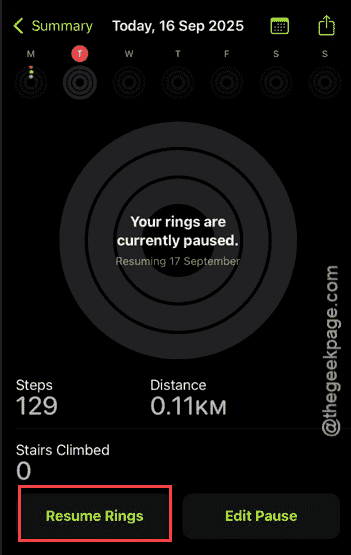
After doing this, you can expect to receive regular Stand Reminders on your Apple Watch.
Fix 2 – Turn off and turn on the Stand Reminders
You have to disable the Stand Reminder and re-enable it to refresh the whole mechanism.
Step 1 – Tap the digital crown once to load up the menu.
Step 2 – Then, open the Fitness app from there.
Step 3 – Later, turn off the Stand Reminders from there. Wait a second, and turn it back on.
NOTE – In any case, if you can’t find the Stand Reminders option in the Fitness app (you may not find it in older Series/SE Apple Watches), you can do it from the Watch app –
Step 1 – Open the Watch app. In the My Watch tab, go to the Activity section.
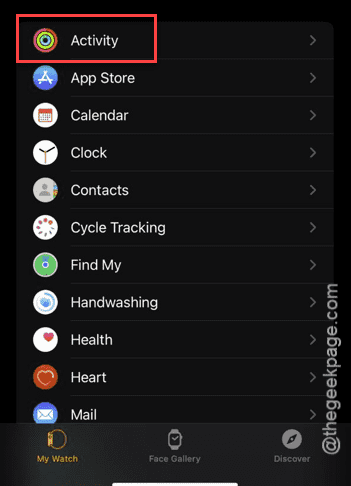
Step 2 – Turn off the Stand Reminders from there.
Step 3 – A few seconds later, turn it back on.
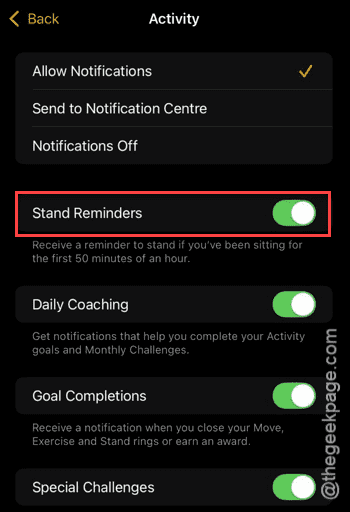
After refreshing the Stand Reminders should fix the issue for most of the affected users.
Fix 3 – Update the iOS and watchOS
Sometimes, if you are using an older version of the watchOS or iOS, this error can appear.
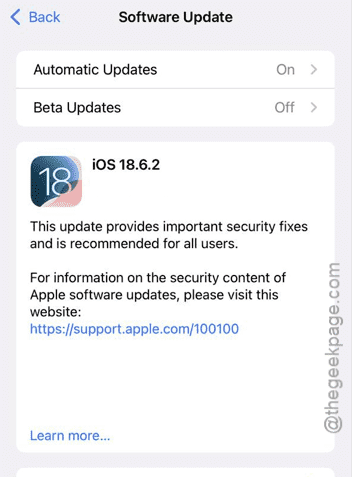
Step 1 – At first, open the Settings on your iPhone. Next, navigate to the Software Update section this way –
General > Software Update
Step 2 – If you can find a pending update there, tap Update Now to install the latest version of the iOS on your device.
Step 3 – Next, load up the Watch app.
Step 4 – Go to the My Watch section from the bottom dock and go this way –
General > Software Update
Step 5 – Look for a pending watchOS update there. Update it your watch from there.
After upgrading to the latest version of the watchOS and iOS, the stand reminders will come regularly.
Why the Stand Reminders are not working on Apple Watch?
The Stand Reminders do provide a necessary window for a healthy habit for your body that in turn increases your productivity. These reminders are programmed to alert the user to stand up if they have been sitting in the same location for 50 minutes or an hour. The Apple Watch may miss a few Stand Reminders if you have disabled it manually in the Watch settings. However, the Stand Reminder can also get blocked in case if you have paused the fitness rings on Apple Watch. These are two main reasons why stand reminders are not alerting you to stand up.