Does the Sleep Focus not turning off on your Apple Watch? Some Apple Watch users have recently complained about this problem where the Sleep Focus is not automatically turning off. This abnormality of the Sleep Focus may delay the start of your day, disturbing the otherwise perfect sequence of your daily routine. Wrong sleep tracking settings, focus mirroring modifications can be held responsible for this issue. We have explained the reasons and the solutions that will help you resolve the issue.
Fix 1 – Turn on Sleep Tracking with Apple Watch
The Sleep Tracking function must be enabled on the Apple Watch for the Sleep Focus to function properly.
Step 1 – Open the Watch app. In the My Watch tab, open the Sleep settings.
Step 2 – Turn on the Track Sleep with Apple Watch option.
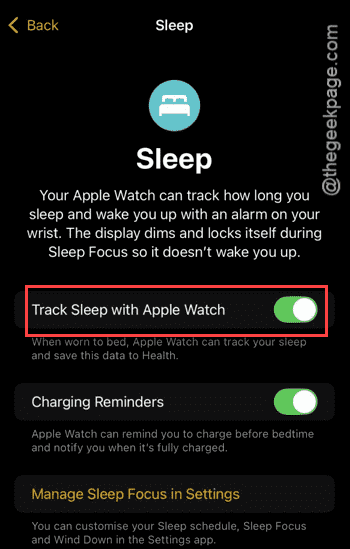
This will fix the sleep focus not automatically turning off issue.
Fix 2 – Enable Mirror my iPhone for Focus
Focus needs to be mirrored from your iPhone to your Apple Watch for it to function properly.
Step 1 – On the Watch app, go to the My Watch category from the bottom dock.
Step 2 – Then, open the General settings in there.
Step 3 – Next, open up the Focus settings.
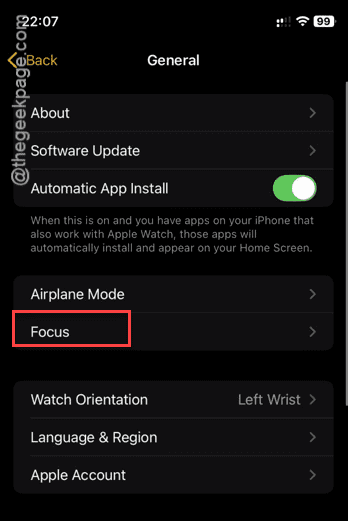
Step 4 – Turn on the Mirror my iPhone option in there.
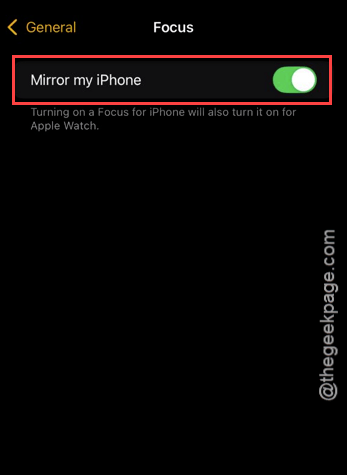
After turning on the focus mirroring function, the Sleep Focus will perform according to the user’s preference.
Fix 3 – Enable Use Schedule for Sleep Focus module
The Sleep Focus module needs access to the schedule to activate and deactivate automatically.
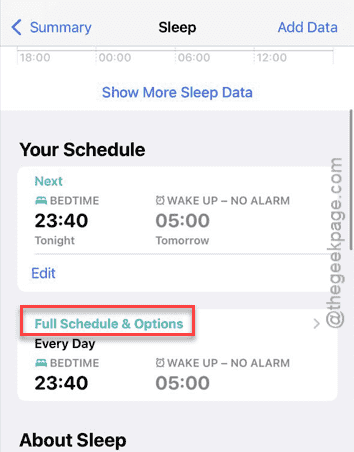
Step 1 – You can do this from the Health app. So, open it up from there.
Step 2 – Next, go to the Sleep settings next.
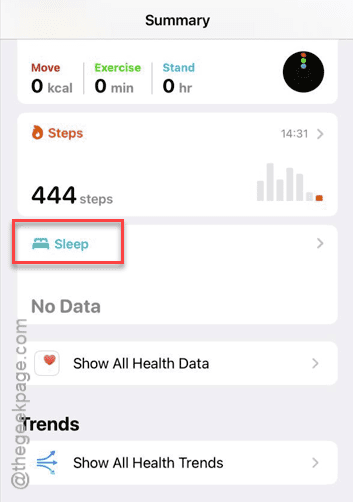
Step 3 – Later, reach the Your Schedule section. Tap to open up the Full Schedule & Options tab.
Step 4 – Finally, turn on the Use Schedule for Sleep Focus option.
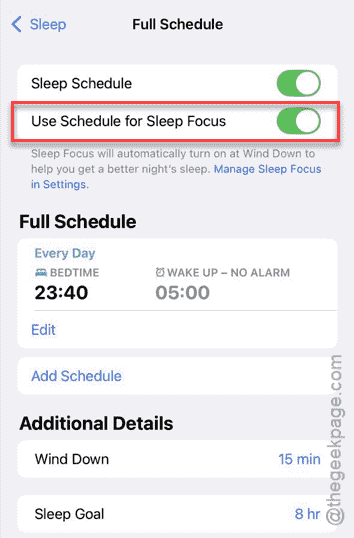
After enabling this feature, the Sleep Focus will automatically turn as soon as you wake up from your peaceful night’s sleep.
NOTE – Sleep Focus does not deactivate automatically at a preset time. You can actually specify the time when you go to bed and your usual wake-up time in the Sleep Focus settings. According to that information, Sleep Focus will be activated and deactivated automatically in that specified time.
Why does the Sleep Focus is not turning off on your Apple Watch?
The Sleep Focus on Apple Watch blocks all the unnecessary alerts for a specific time, helping users get a distraction free sleep. It activates automatically at a user-preset time and also terminates after a particular time. But, there are some intricate parts of related settings such as Focus Mirroring, Enabling Sleep Focus Schedule permissions can malfunction the Sleep Focus settings on your Apple Watch.
FAQs –
1. Why the Sleep Focus not turning off automatically in my Apple Watch?
The Sleep Focus may not be turning off automatically if some of the features such as focus mirroring, sleep tracking is disabled on your Apple Watch. Additionally, Sleep Focus needs user’s permission to sleep focus module to automatically turn it off.
2. Can I use Sleep Focus on all my Apple devices?
Yes. Sleep Focus is available on all the Apple devices. It synchronizes the Sleep Focus data, schedule across your iPhone, Apple Watch, iPad, Mac, etc. This provides a connected experience for the users.