Your Apple Watch has the period tracking feature, which can help you track your menstruation cycle. But, some of Apple Watch users have reported that the period tracking tool is not working properly or depicting wrong date measurements.
Fix 1 – Clean up the rear sensors
Your Apple Watch records the data directly using the sensors placed on the backside of the Apple Watch.
Step 1 – Use a clean piece of cloth to clear up the backside of the Apple Watch.
Step 2 – Clear the wobble on the backside where it contains all the sensors.
After clearing up the backside, see if the period tracker is working or not.
Fix 2 – Check the watch orientation
The orientation of the watch plays a vital role in advanced female health tracking, as it can measure your wrist temperature and reckon the start of the menstruation cycle.
Step 1 – At first, open up the Watch app on your iPhone.
Step 2 – Then, head on to the “My Watch” tab. Tap to load up the “General” tab.
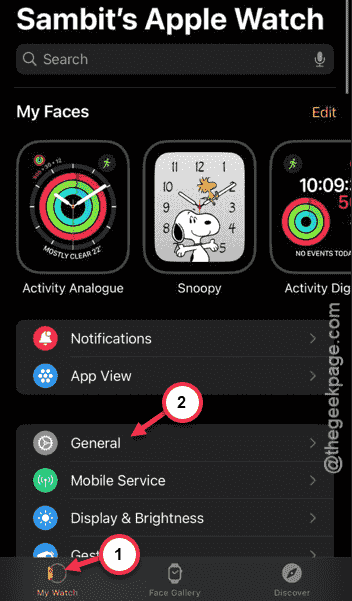
Step 3 – Next, open up the “Watch Orientation” menu.
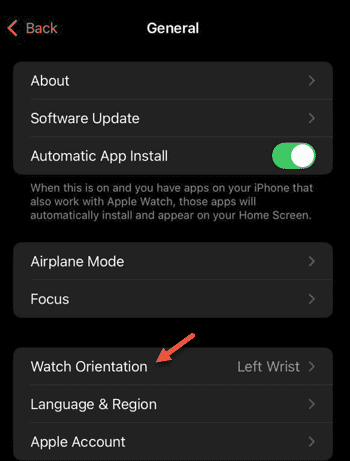
Step 4 – Now, you can change the orientation of the watch. Choose the hand where you wear the watch.
Step 5 – Set the dial option accordingly as well.
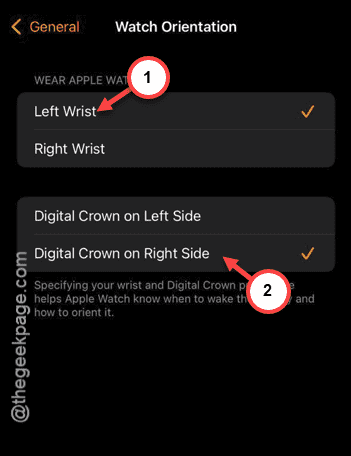
Check if this is working out for you.
Fix 3 – Unpair the Apple Watch and reconnect
Disconnect the Apple Watch from your iPhone and establish the pairing again.
Step 1 – Load up the Watch app interface on your iPhone.
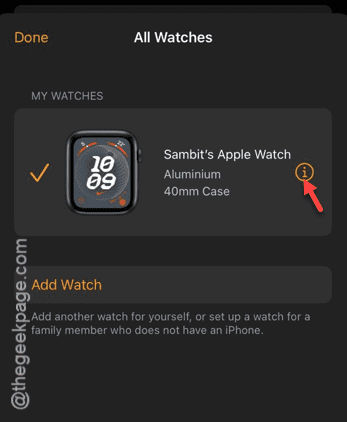
Step 2 – After opening it up, tap the “All Watches” option on the top of the page.
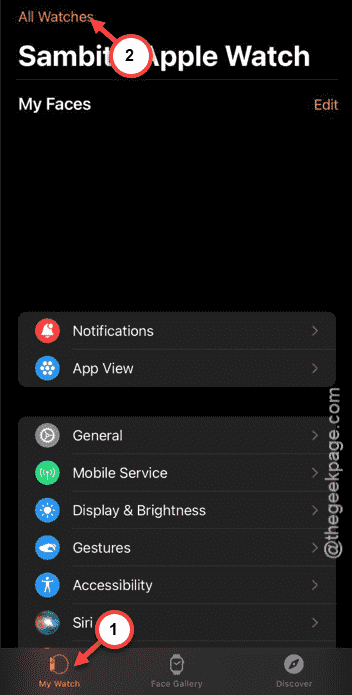
Step 3 – Tap the “i” button there beside the watch to open up the watch settings page.
Step 4 – Go down through it and tap “Unpair Apple Watch” option.
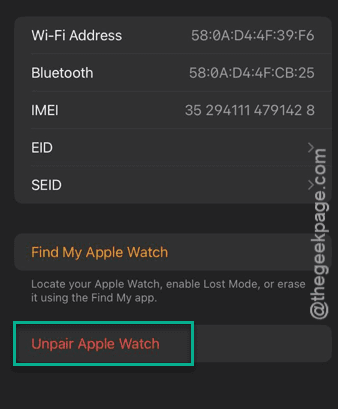
It will ask for your Apple ID, password. Provide it, and the watch shall be unpaired from your iPhone.
Step 5 – You can pair your Apple Watch afresh.
The period cycle tracker should work just fine now.
Fix 4 – Use the latest version of watch
The advanced female health metrics can be detected by the Apple Watch 8 or newer version of the watches. SE series or any older Apple Watch is exempted from these measurements. So, you can’t expect them to measure the cycle automatically.
NOTE – The period tracker is nothing but a logbook of the dates you are menstruating. You have to personally input the first date, and it will calculate and predict the future dates. If there are any human error in the process, like entering a wrong date, it may lead to this problem.