Does your iPhone filling up the passwords automatically? The feature, that enables the iPhone to save the passwords securely and fill up the blank passwords automatically, is quite helpful in many cases. But, there are shortcomings to this process as well, and if you want to dissuade your iPhone from filling up the passwords automatically, this article is just for you.
Why iPhone is filling up passwords automatically?
Your iPhone save all the passwords and recall them as it needs. When you input the password for the first time for a service, web or app, iPhone sends you a prompt to save it. Upon saving the password, when the next time you load a log-in page, you see an option to autofill the password.
While this feature is beneficial for all the users, there are certain cases where these frequent password inputs are not welcome. Like, when you have to log in to the same website using different user IDs, it can be problematic for you to remove the pre-filled passwords again and again. So, to disable this automatic password input on various apps and webpages, you have to go through these steps.
Fix – Disable automatic password fill-up
You need to make this change in Autofill Passwords option from the Settings page.
Step 1 – So, load up the home page of the Settings.
Step 2 – Now, if you are using iOS 17 or before, you need to open the “Passwords” box.
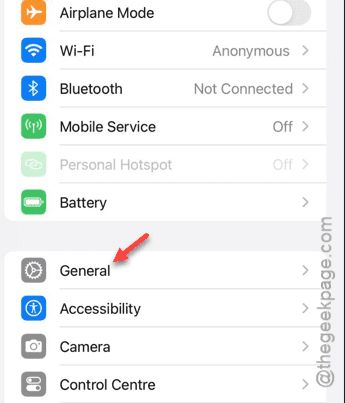
Step 3 – Or, if you are on iOS 18 or later, go to the “General” panel.
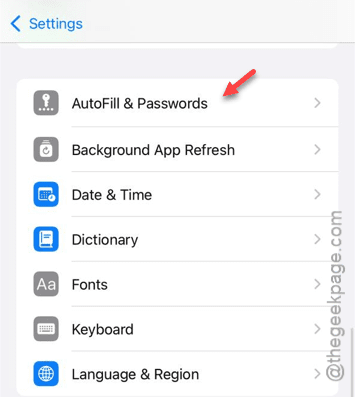
Step 4 – There you will find the “AutoFill & Passwords” option. This is the setting we are looking for. So, open it up.
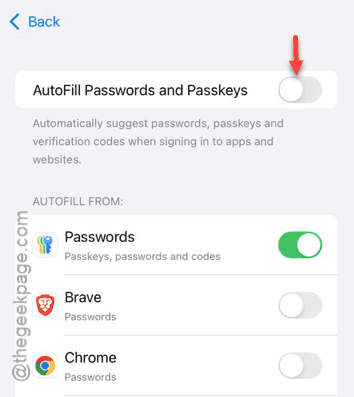
Step 5 – There you will see the “AutoFill Passwords and Passkeys” toggle. This is the setting that controls the entire autofilling of passwords and passkeys. So, disable this.
Step 6 – Once you disable this, the prompt to autofill your password or usage of the passkey won’t disturb you anymore.
So, after turning it off, you can feel free to return to the sign in or log in page.
NOTE – While the ‘Autofill Password and Passkeys’ feature is turned off, you have to input passwords and passkeys manually. So, once you are done with your task, you should re-enable the ‘Autofill Password and Passkeys’ option. Just follow the same path and turn on this feature.
Hope these have worked out for you!