A stale sign-in token. That’s usually the whole story behind Co-Creator suddenly claiming you have 0 credits — or throwing a network error while your internet works fine.
Paint checks your credit balance with Microsoft’s servers every time you use an AI feature. But when the login token saved on your PC goes stale, that check fails. And instead of saying “please sign in again,” Paint reports zero credits or blames your network. Classic Microsoft error message. Helpful as ever.
Sometimes it’s not the token — a VPN, a wrong region, or a hung background service trips the same errors. So the fix is usually laughably small. Every one below takes a few minutes, tops.
Fix 1 – Update Paint From the Microsoft Store
Microsoft ships Co-Creator fixes through Store updates, not Windows Update. Two separate update systems. Of course there are. So your PC can be fully patched while Paint itself sits months behind.
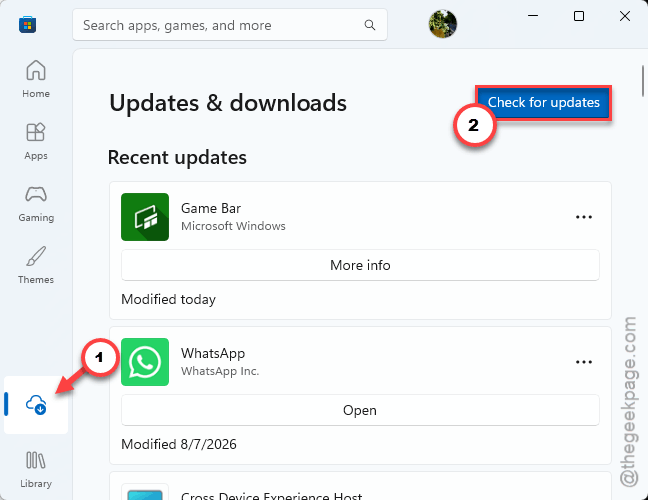
1 – Open the Microsoft Store app from your Start menu.
2 – Click Downloads in the bottom-left corner.
3 – Click Check for updates.
4 – Install anything listed for Paint, then close and reopen Paint.
Check if this works.
Fix 2 – Sign Out of Paint and Back In
This forces Paint to pull a fresh token from Microsoft’s servers, which clears the ghost 0-credit reading.
1 – Open Paint.
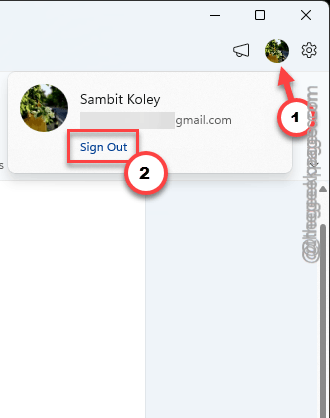
2 – Click your profile picture in the top right corner.
3 – Select Sign out.
4 – Close Paint completely.
5 – Reopen Paint and click the profile icon again.
6 – Sign back in with your Microsoft account.
Now check your credits. For most people, they snap right back.
Fix 3 – Restart the Windows AI Host Service
A background service routes Paint’s AI requests. When it hangs, Paint decides the network is down. But your browser works fine, right? That mismatch is the giveaway.
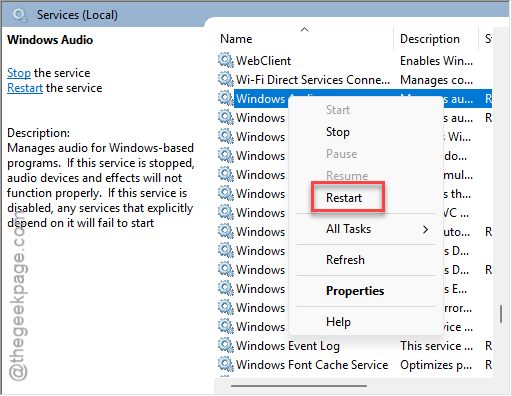
1 – Press Windows + R, type services.msc, and press Enter.
2 – Scroll down to Windows AI Host Service (the list is alphabetical, so W sits near the bottom).
3 – Right-click it and select Restart.
4 – Open Paint and try Co-Creator again.
Fix 4 – Turn Off Your VPN and Check Your Region
Using a VPN? That’s probably it. Co-Creator blocks connections that look like IP spoofing, and it only runs in supported regions.
1 – Press Windows + I to open Settings.
2 – Go to Network & internet, then VPN.
3 – Disconnect any active VPN connection.
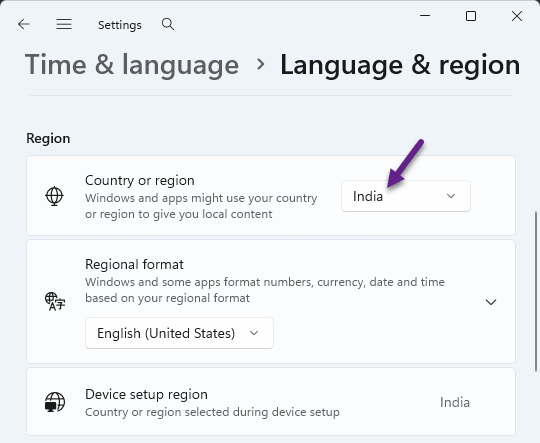
4 – Go back and open Time & language, then Language & region.
5 – Make sure Country or region matches where you actually live (and that it’s a region where Co-Creator is available).
And no, routing through another country to “unlock” the feature does not work. That’s exactly the traffic pattern that triggers the network error in the first place.
Fix 5 – Reset the Paint App
Nuclear option. A reset wipes Paint’s local data and forces it to rebuild its AI connections from scratch (your saved images are safe — this only clears app settings).
1 – Open Settings and click Apps in the left sidebar.
2 – Click Installed apps.
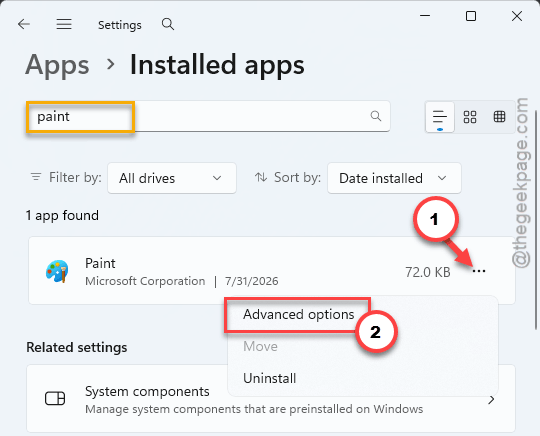
3 – Type “Paint” in the search box at the top.
4 – Click the three dots (⋯) next to Paint and choose Advanced options.
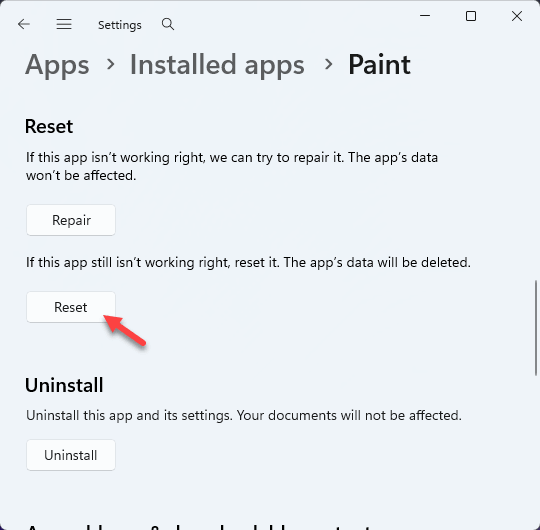
5 – Scroll down and click Reset.
6 – Reopen Paint and sign in again, like in Fix 2.
Keep It From Coming Back
- Let the Store auto-update your apps. Paint fixes land there quietly, and you’ll never see them otherwise.
- Keep the VPN off while using AI features. Co-Creator reads it as spoofing. Every time.
- If the credits vanish again, don’t wait around — sign out and back in first. It’s the fastest reset there is.
People Also Ask
How do I use Co-Creator in Microsoft Paint?
Open Paint and click the Copilot or Co-Creator icon on the toolbar, then type what you want it to draw. You need to be signed in with a Microsoft account, and each image costs one credit. No icon at all? Update Paint from the Microsoft Store — older builds don’t include it.
Why is Paint’s Co-Creator not working?
Nine times out of ten, a stale sign-in token. Sign out from the profile icon in Paint’s top right corner, then sign back in. Still broken? Check for an active VPN, an unsupported region, or an outdated Paint version — a quick Store update handles that last one.