If you want to share your game library with your significant others on Steam, there is nothing like Steam Family. But, while accepting a Steam family request, some users have been given the following error “Failed to Accept the family invite You are ineligible to join this Steam Family at this time” message. So, if you have also run into the same problem while requesting such a Steam family invite, here are some fixes that should fix the problem for you.
Fix 1 – Log in to your friends account and join
NOTE – Steam Family only works if you are using the household Wi-Fi to connect to the Steam client. In other words, you must be connected to the same Wi-Fi while accepting an invitation for Steam Family.
Here are some steps that you may follow to do it correctly –
Step 1 – At first, make sure that the friend (or the family member) that you want to join is not logged into their Steam accounts. If that is the case, log out of Steam.
Steam > Sign out
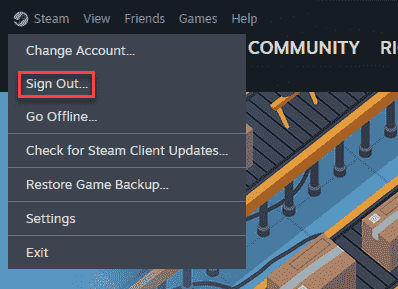
Step 2 – Later, you have to log in to Steam using your friend’s ID that you want to join.
Step 3 – There you will find the pending Steam family sharing request. Accept the Steam Family invite from there.
Step 4 – After this, you can just log out of there.
This is the most efficient way of adding someone to the Steam family.
Check if this helps.
Fix 2 – Check for number of accounts or other restrictions
There are certain restrictions for the Steam Family program. Check whether the account that you are trying to add falls under any such obstructions.
Step 1 – There is a member limit of 5 individual members sharing the same Steam Family.
Step 2 – You can switch families only once in 12 months.
Step 3 – See whether the Steam account in question has any VAC bans or other restrictions in place. You can’t be able to add any such account in your Steam Family.
Step 4 – Regional restrictions on Steam Family walls off any accounts trying to join from another region or country.
See if this helps!
Fix 3 – Wait for the cooldown to join
If you have already tried to join the Steam Family and has encountered this error message, don’t worry. Just give it some time and try once again a bit later. You should also request a fresh, new invite from the Steam family and try to join using that.
This should have fixed the problem for you!