Instagram has a lot of variety of musics that you can use to enhance your reels, stories, posts. But, in some cases, when you search for music, you may not be able to find the exact sound that you are looking for. We have done this discussion on why you can’t find the right music for your Instagram post and the proper solution to troubleshoot it.
Why there are no music in search results on Instagram?
The audio track that you are looking for, if that is not a royalty-free one (or No-Copyright Song), you may not be able to find it directly on Instagram. If you don’t have proper/enough permission to use any copyrighted song, you can’t use it. This holds true for the search results as well.
Additionally, if you are trying to look for a remix or cover of a song on Instagram, you may not be able to find it there. This reason is also as the same as the previous one: licensing or copyrighted material.
Moreover, there is a weird limiter on the number of times you can perform a search for tracks on Instagram. If you can’t search songs after a number of times (<20), Instagram stops showing you tracks in the search result. We have discussed the solution for this as well.
Fix 1 – The track is not available
You have to remember that finding all the songs or tracks on the Instagram app is not possible. It just doesn’t have all the songs.
The track that you are trying to include in your Instagram story may not be available. So, for starters, you can choose a different track for the story that you are uploading on your Instagram wall.
Change the track and re-upload the story. That’s it! This should take care of the issue.
Fix 2 – Switch to a personal account
Using a Professional account can become the cause of this problem. So, switch to the personal account and then, you can use the music in the story.
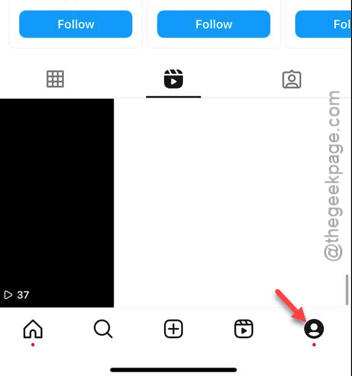
Step 1 – On your Instagram app page, tap on the profile picture on the dock.
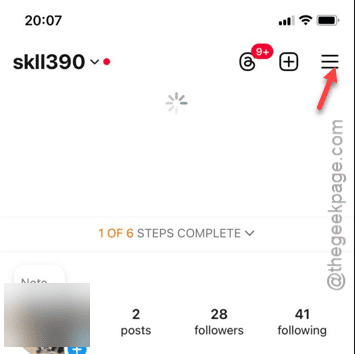
Step 2 – In the profile picture, tap the three-bar button.
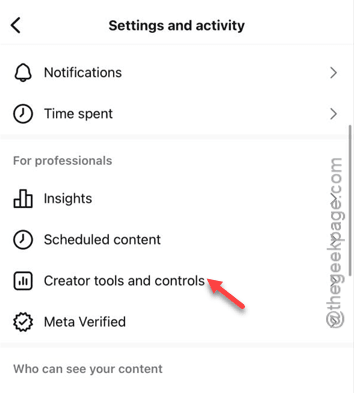
Step 3 – Go down to the ‘For Professionals‘ button.
Step 4 – There, you must open the “Creator tools and controls” option.
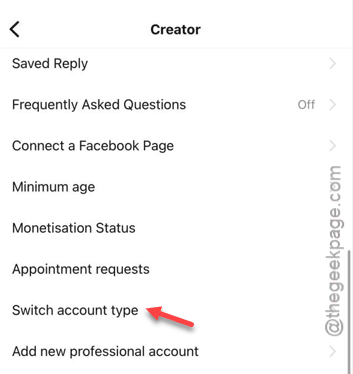
Step 5 – Use the “Switch account type” option in there.
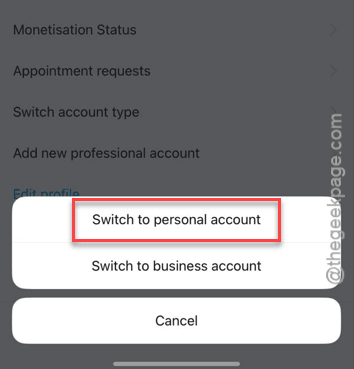
Step 6 – If you are using a Professional account, you will see these two options –
Switch to Personal account
Switch to Business account
Step 7 – Tap the “Switch to personal account” option.
Step 8 – Instagram will show you a standard warning message. Ignore that and touch the “Switch to Personal Account” option.
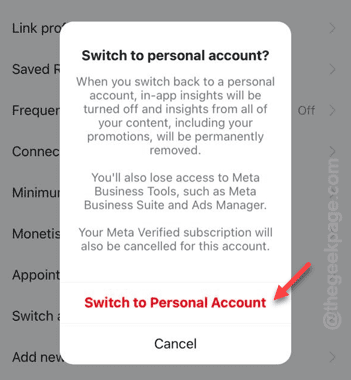
Your account will be transferred to the personal mode and you can
Fix 3 – Save the music and use it
This solution is for the users who have a limiter on the number of song searched on the Instagram feed.
Step 1 – We have to bookmark the song that you are trying to use beforehand. So, open up the Instagram app.
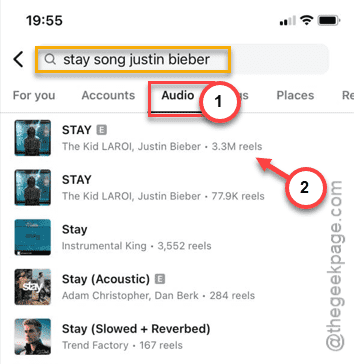
Step 2 – In the Instagram app, tap the search box and search for the name of the track that you are looking for.
Step 3 – Now, if you go to the “Audio” section, and you can find the audio track right there. Carefully, choose which song that you want.
Step 4 – Open it up.
Step 5 – At the top of the music, you shall find the “bookmark” button. Tap that to save it up.
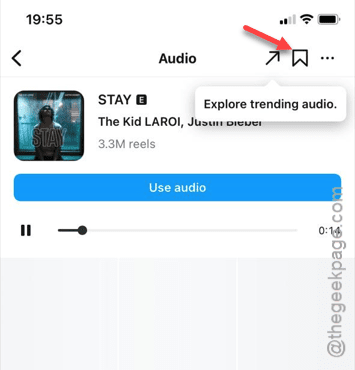
Now, once you have bookmarked the song, you can use the song in your Instagram story without worrying about missing it out in the searching process.