One of the key issues with the heart rate measurement system of Apple Watch is that it takes too long to calculate your heart rate. Then, there is the infamous issue of misreading or wrong heart rate results in various conditions. Altogether, the entire system is flawed and average users tends to sweep it under the rag. But what if we tell that there is a very easy way of getting a more accurate and quick heart rate reading out of your Apple Watch? So, without wasting any further time, let’s delve into the detailed process.
How to get quick and accurate heart rate from your Apple Watch?
No. We will not be using any other tools or components, neither there will be any need of third-party applications. The crown on the Apple Watch also has electrodes that can actually measure the electric signals from your body. We will use this crown of the watch to measure the electric signal quicker than what it does when you are just wearing the device.
Usual heart rate shows up the reading in an interval of 5 seconds. But, following these steps, you will see the heart rate reading every second. Here are the steps you need to follow~
Step 1 – At first, put on the Apple Watch on your wrist.
Step 2 – Start the Heart Rate app from the main app list.
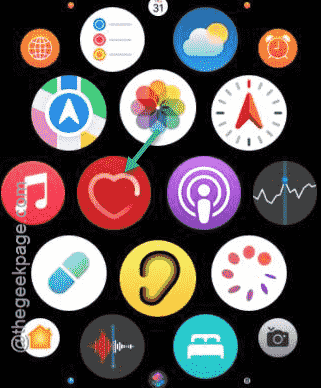
Step 3 – Now, after opening the app, wait for the heart logo to start throbbing on the watch display with the ‘Measuring’ toggle to appear.
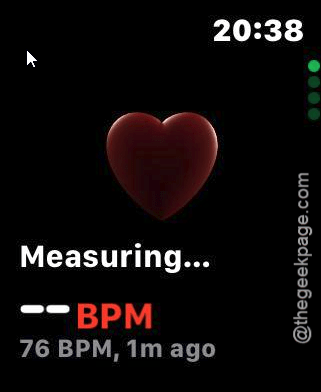
Step 4 – Place one of your fingers on the crown of the watch.
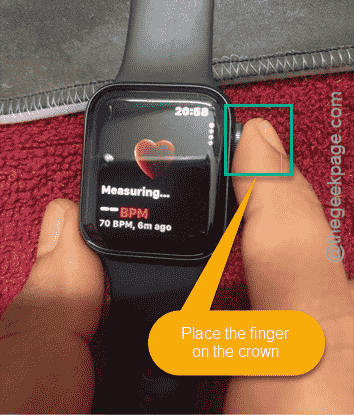
Step 4 – Hold it there for the entire time while you are measuring your heart rate.
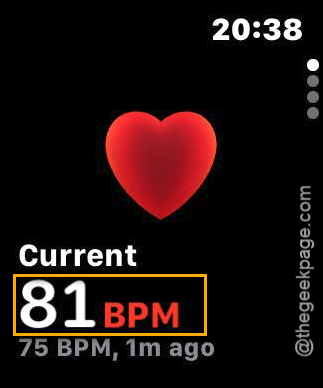
Step 5 – This way, you will see the heart rate sensor data is showing up more frequently than before. Apart from the frequency of the heart rate on the display, it will give more precise heart rate readings.
Using your finger on the watch crown let the watch capture more signals and hence, the swiftness and highly accurate output result.