Got yourself stuck with an Apple Watch on just a red lightning bolt with Time on the screen? The Red Lightning sign that you are seeing alongside the time on the Apple Watch is a sign of extremely low battery level or the deep discharge mode on your Apple Watch. Even when the user tries to switch on the device, the Apple Watch continues to show this red lightning bolt alongside the current time. We have listed the solutions to fix the issue.
Fix 1 – Put the Apple Watch on Charge
The red lightning bolt with just the time only appears when the Apple Watch has depleted the battery completely. So, you can’t turn on the Apple Watch normally.
Step 1 – Do not try to wake up/restart the Apple Watch. There is simply not enough charge to do that.
Step 2 – Next, put the Apple Watch on charge. Make sure to charge your Apple Watch for 30 minutes or so. This way, it will have charged enough to be useable again.

Step 3 – Reboot the Apple Watch using the side button of the device.
You can now use the watch normally again.
Fix 2 – Clean the charger properly and charge the Apple Watch
Sometimes, faulty chargers or moisture, dust on the charging pad may actually decrease the effective charging capabilities.
Step 1 – Inspect the main charging head of the charger.
Step 2 – Take a clean piece of microfiber cloth and use it to clean up the charging head properly.

Step 3 – After clearing the charger, place the Apple Watch on charge. Let it charge for at least half an hour.
Then, check whether you can use it or not.
Fix 3 – Force Restart the Apple Watch
If the Apple Watch is charged enough, but you are still getting the red lightning rod with the time only on the Apple Watch, you have to force restart the Apple Watch.
Step 1 – At first, press and hold these two buttons together on the Apple Watch –
Digital Crown
Side button
Step 2 – Continue pressing these two buttons until the Watch restarts, and the white Apple Logo appears on the screen.
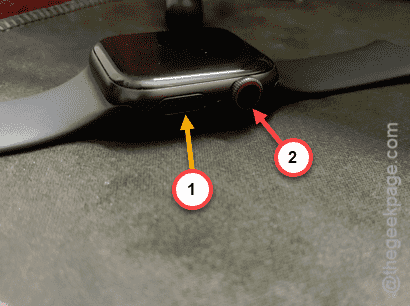
It will fix the issue.
Why the Apple Watch is showing a red lightning bolt and time?
If the Apple Watch battery is too low to even restart the device, it goes into the critically low mode. The battery level has dunked into a critically low level, the standard features of the watch stops working. So, it does show up only the time, which draws only minimal power, along with the red lightning bolt as a prompt to charge the device. The Apple Watch does not show the red lightning bolt and the time on the display all the time. Instead, the usual has to tap the digital crown once to view the time. This can also be treated as a feature, as it shows up the time during a critical scenario where the user will have access to that.
The only way to get rid of this situation is to put on the Apple Watch on charge. You must charge you have a device for at least half an hour before you can use it again.
FAQs-
1. Why my Apple Watch is showing up red lightning bolt?
An Apple Watch display the red lightning bolt when its battery is critically low. The watch only displays the time in this state. Charging the Apple Watch for 10–20 minutes will fix it and make it operational again.
2. What to do if the Apple Watch battery is too low?
Turning on the Low Power mode and disabling other utilities, such as Mobile Data, should help the Apple Watch last long. Reducing the brightness of the watch will also help if the Apple Watch battery is too low.