Does the lock screen wallpaper on your iPhone turns black automatically? Many users have resorted to various forums exclaiming grief after facing the same problem of the lock screen turning black on their devices. Don’t worry. This particular issue usually occurs due to the Focus mode settings, iOS bugs, or even some of the display configurations that you have changed recently. Irrespective of the reason why the lock screen is turning black, here is the list of proved solutions that will resolve the issue for sure.
But, before going to the main solutions, here is the quick fix tab to restore the wallpaper back to normal~
| Issue Cause | Quick Fix | Time Needed |
|---|---|---|
| Focus mode misconfiguration | Settings > Focus > (particular focus mode) > Options > turn off Dim Lock Screen | 3 min |
| Region based restriction | Change the region | 5+ min |
| AOD wallpaper issue | Settings>Display & Brightness > Always on Display > Show Wallpaper | 2 min |
Fix 1 – Turn off the Dim Lock Screen option
Does the lock screen does dim or turns black while you are using any of the Focus Modes? That should clarify the reason behind this problem.
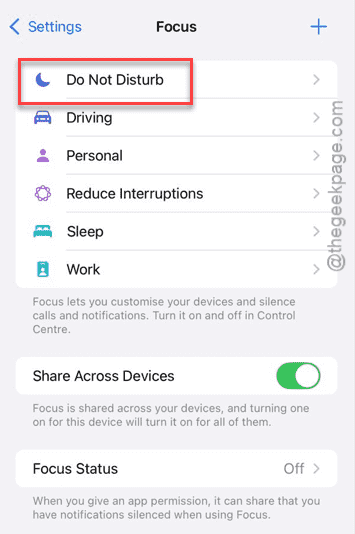
Step 1 – Open the iPhone Settings and reach the Focus mode settings.
Step 2 – Choose the focus mode settings that you use the most, like Do Not Disturb or Work. Tap to open up that particular focus mode settings.
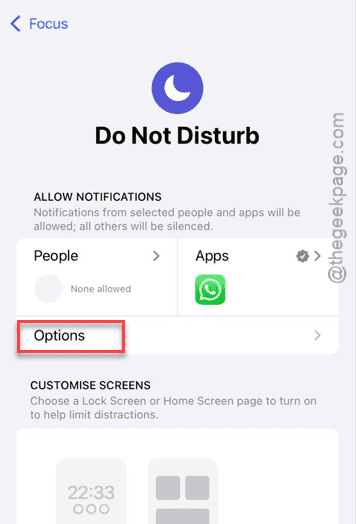
Step 3 – Then, proceed to open Options tab.
Step 4 – Next, turn off the Dim Lock Screen option.
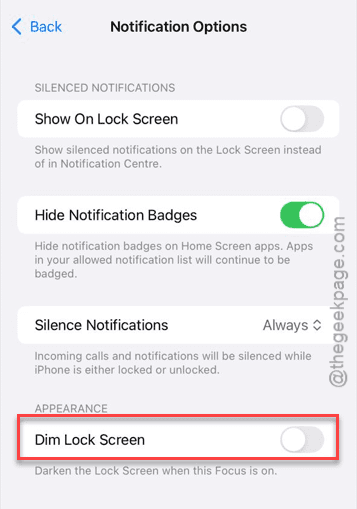
Step 5 – Repeat the same steps for the other focus modes you use, and turn off the dim lock screen issue as well.
After turning off this feature, the wallpaper on the lock screen won’t appear to be black or dim.
Fix 2 – Change the iPhone’s Region and revert it
The change of region trick has helped many users solve this black lock screen issue on iPhone.
Step 1 – In the iPhone Settings console, open up the General tab.
Step 2 – Next, load up the Language & Region settings.
Step 3 – Later, open the Region settings.
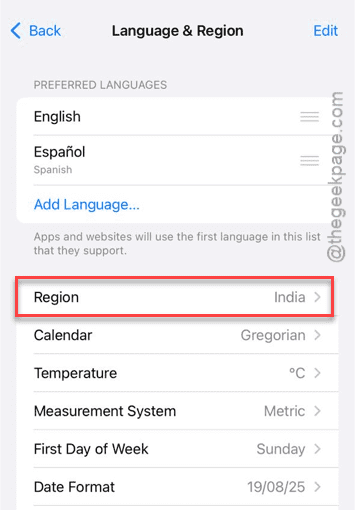
Step 4 – Now, you have to choose any other region from the list of available regions. Like, Indonesia, Italy, or it can be any of the regions.
Step 5 – You will be prompted about the choice of keyboard. We suggest that you keep on using the same keyboard.
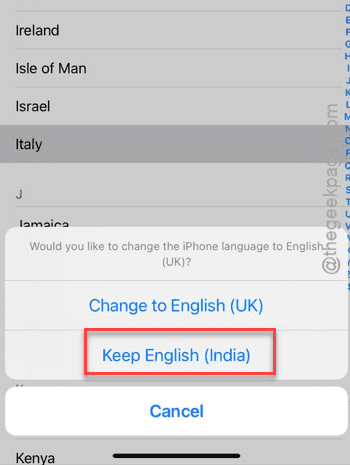
Within a few seconds, the region will be changed.
Step 6 – Now, once the region is changed, tap the Region button one more time.
Step 7 – This time, set it to your original region (that you were using before).
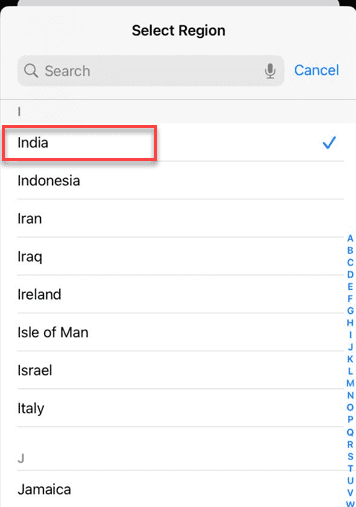
Once you have changed the region, the problem with the wallpaper on lock screen turning black will be solved.
Fix 3 – Enable Show Wallpaper option in iPhone settings
If you have turned on the always on display on your iPhone, enable the Show wallpaper option in there.
Step 1 – To do this, you must load up the iPhone Settings page and go to the Display & Brightness settings.
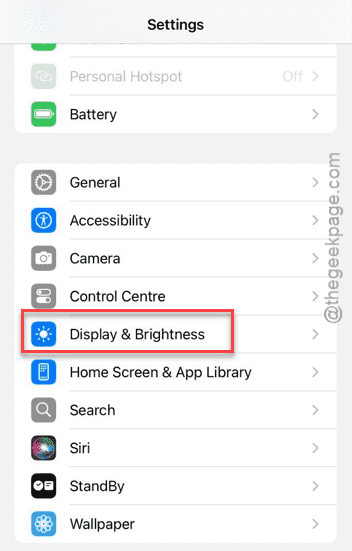
Step 2 – Then, go to the Always on Display settings there.
Step 3 – Turn on the Show Wallpaper option.
Once you have turned it on, the wallpaper option, it will show up normally on the lock screen. It won’t show up as dark.
Fix 4 – Use a different lock screen wallpaper
There is a chance that the problem is linked to the current lock screen you are using.
Step 1 – To counter this, you must set a new lock screen wallpaper.
Step 2 – Open Settings page. Load up the Wallpaper settings, next.
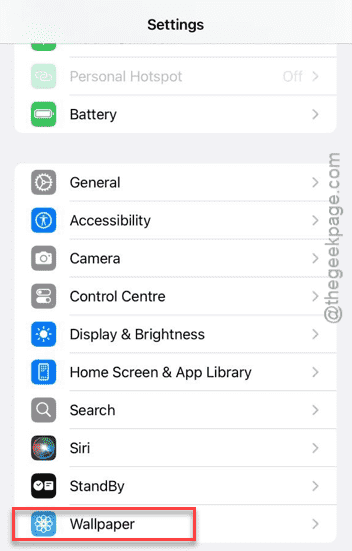
Step 3 – Then, tap the Add new wallpaper button to create a fresh new pair of wallpapers on the device.
Or use the Customize button in the lock screen wallpaper to customize that.
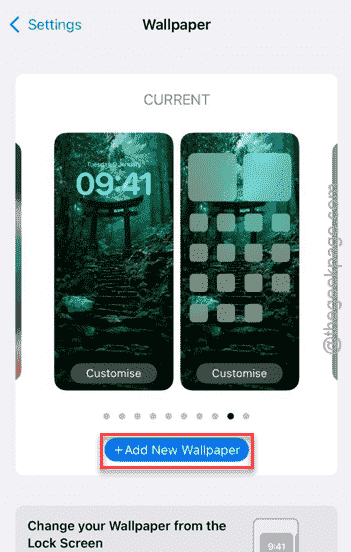
Step 4 – Now, change the lock screen according to your preference.
After you have changed the lock screen image, the problem will be finally gone.
Bonus Tip – Restart the iPhone and update
Still having issues with the lock screen on your iPhone? Do a simple restart procedure and try to update the device later.
Step 1 – Turn off the device using the Power button at the top of the Control Centre.
Step 2 – Once you have turned it off, switch it on normally.
Step 3 – After doing this fresh restart procedure, open iPhone Settings page and follow this path~
General > Software Update
Step 4 – Look if an update is pending on your iPhone. Install the pending update, if any of such is available there.
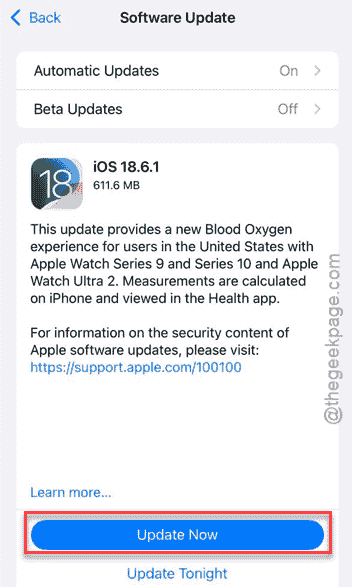
Once you have installed the update, it will take care of the black lock screen issue that you are having there.
FAQs –
1. Why my iPhone lock screen wallpaper is turning black randomly?
This problem on the iPhone usually occurs due to the misconfigured Focus Mode settings, wrong AOD settings on the device. Otherwise, a region error may also cause this problem on iOS 18 as well.
2. Will changing the lock screen wallpaper fix the black screen issue?
Yes. According to user reports, it seems that changing the wallpaper on iPhone has fixed this wallpaper lock screen problem. So, set a new wallpaper and test it yourself.
3. Can third party apps cause lock screen black issue on iPhone?
Yes. Third-party modification tools on iPhone like LockWidget, iOS 16 Lock screen can sometimes cause such problems. We recommend removing such apps from the device and re-applying images as the iPhone lockscreen.
Hope these fixes have helped you!