Does the battery on your iPhone 17 or 17 Pro draining too fast? Generally, newer iPhone models like iPhone 16, 17 significantly better battery life than its previous predecessors. But, if your new iPhone’s battery is draining way too fast that you have to charge the device twice daily, it must be a disappointing experience. This is clearly an anomaly, that can be fixed with a few quick resolutions.
Fix 1 – Force Restart the iPhone
Force-restarting the iPhone can omit any temporary glitches that are causing this battery draining issue.
Step 1 – To do this, close all the apps on the iPhone. Next, press the Volume Up button once and release it.
Step 2 – Next, press and release the Volume Down button.
Step 3 – Finally, press-hold the Power button on the iPhone until the iPhone screen dies, and you can see the Apple Logo has appeared on the screen.
Now, after force-restarting the iPhone, observe the battery usage for at least 24–48 hours. Check if this fix your problem.
Fix 2 – Give it some time to learn your usage pattern
The battery drain issue is normal in case of new devices like your iPhone 17. These devices are equipped with AI, ML embedded in the iOS 26 that learns your usage pattern and optimize the battery consumption over the time. So, you must use the iPhone for a few weeks and as the device optimizes itself according to your utilization, battery drain issue will be resolved. In upcoming weeks, you will see the battery draining issue has been fixed.
Fix 3 – Use the iPhone in Low Power Mode
The Low Power mode on the iPhone restricts background processing by apps and place limiter on power hungry tasks. Using the iPhone in Low Power mode may help fix the battery draining issue.
Step 1 – Go the iPhone’s Settings page.
Step 2 – Load up the Battery tab.
Step 3 – Turn on the Low Power Mode from there.
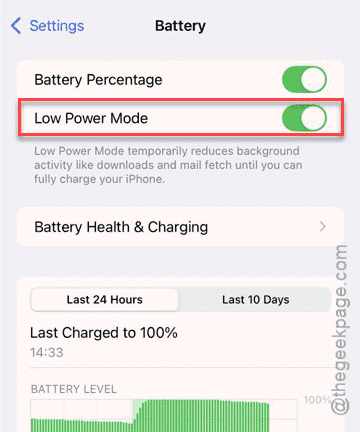
There will be next to zero battery drain while the device is in low power mode.
Fix 4 – Install the latest version of iOS 26
Many iPhone users have reported facing bugs like extra battery draining issues on the first stable build of iOS 26. Updating to the latest version should fix the issue.
Step 1 – On the iPhone Settings page, head on to the General tab.
Step 2 – Next, tap to load up the Software Update section.
Wait for a few seconds. Then, you will see the latest patch for the iOS 26 is waiting for installation.
Step 3 – Tap the Update Now button once to start updating the device.
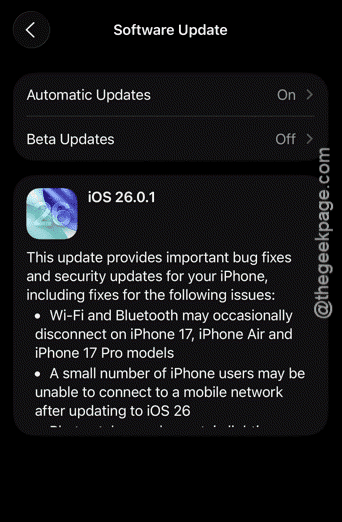
It will automatically download the patch and install it. Your iPhone will restart to complete this installation process. The battery issue should be fixed.
Fix 5 – Consult Apple Support
There is an extremely slim chance, but a hardware fault may result into such problem with the device battery draining too faster than usual. So, if you have used the device for a week and still getting an idle battery drain like 15-20%, you should take up the device to an Apple Authorized service centre. In case of any hardware dispute, you are entitled to a free replacement.
However, if the return window is still open against your purchase, you should return the device and get a new device.
Additional tips to fix battery drain issue on iPhone –
1. Turn off Wi-Fi, Bluetooth before you go to sleep. Sometimes, apps working in the background can soak a lot of battery power, even when the iPhone is in idle condition.
2. Disable the Always on feature of the iPhone and Use the device in dark mode. It will save some battery for sure.