Can’t view the battery percentage of your iPhone? The battery percentage marker can be easily enabled on iOS from the iPhone settings. But, if the battery percentage indicates incorrect battery level, it just can be a glitch. We recommend these fixes for a quick and easy resolution of this wrong battery percentage issue on the iPhone. If the issue continues to exist even after applying these solutions, you should contact the Apple Support.
Fix 1 – Turn on the Battery Percentage in iPhone Settings
You can easily enable the battery percentage from the battery settings in the iPhone.
Step 1 – Load up the iPhone Settings. Proceed to the Battery settings.
Step 2 – Next, turn on the Battery Percentage option.
Step 3 – If it is already turned on, disable the Battery Percentage feature, and re-enable it.
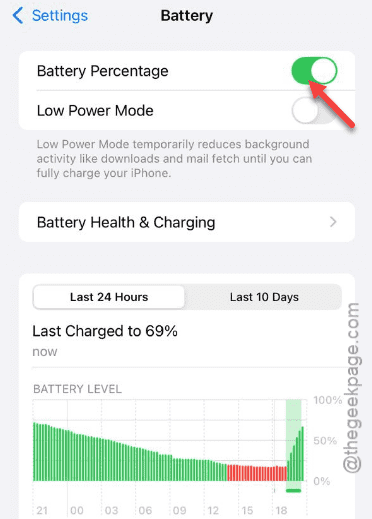
You can directly read the battery percentage from the iPhone status bar.
Fix 2 – Calibrate the Battery Manually
The only way you can make sure that the battery percentage is showing the wrong marker, by calibrating the iPhone’s battery manually.
Step 1 – You have to drain the iPhone’s battery till the battery hits 0. Just open the camera and leave it open, or run some heavy apps or games to quickly deplete the battery.
Step 2 – Now, put the iPhone on charge. Do charge the iPhone using a wired charger.
Step 3 – Don’t unplug the charger even if it reaches the 100% mark. Let it charge for more than 30 minutes after it hits the 100% mark.
Step 4 – Go ahead and restart the iPhone once.
Step 5 – Use the iPhone normally for a full cycle and check the battery percentage marker on the status bar.
This way, you can recalibrate the battery percentage on the iPhone.
Fix 3 – Update the iOS to the Latest Version
Some of the users have got this problem after getting the iOS 26 update.
Step 1 – In the iPhone Settings page, go to the General tab.
Step 2 – Proceed to the Software Update section.
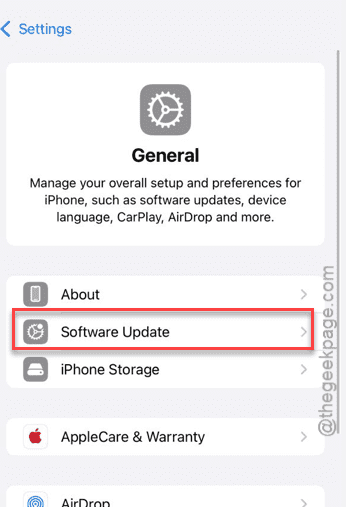
Step 3 – Then, if you find any pending updates there, install it on the iPhone. Choose the Update Now option. iPhone will automatically download and install the update.
After restarting the iPhone, battery percentage will show up properly in the iPhone’s status bar.
Fix 4 – Contact the Apple Support for Better Resolution
If the battery percentage is still not showing up in the status bar, you should consult the Apple Support. The wrong battery percentage can be a resultant of a hidden battery fault, which is a type of hardware issue. So, you should not waste any more time and get the device checked by authorized technicians in an Apple Service Center.