Some Helldivers 2 players have complained ran fine last week — then 6.0.1 landed, and now the game dies about 20 seconds after launch. Every single time. And you’re not imagining that timing. The 20-second mark is a real thing, and it’s the clue that points straight at the fix.
Why This Happens
Basically? The patch added a hang detector. It watches the game start up, and if it decides the game is frozen, it kills it. Sounds sensible. But the detector is broken — it mistakes normal startup work, like shader compilation, for a freeze.
So the game isn’t really crashing. It’s being shut down by its own babysitter, at almost exactly the 20-second mark.
Old config files and a stale shader cache (leftover compiled graphics files from before the patch) slow the startup down, which makes the false alarm even more likely. That’s why the fixes below attack both sides — the detector and the slow start.
Fix 1 – Switch Off the Hang Detector
The detector lives in a plain text file, and one line controls it.
1 – Right-click Helldivers 2 in your Steam library.
2 – Select Manage, then Browse local files.
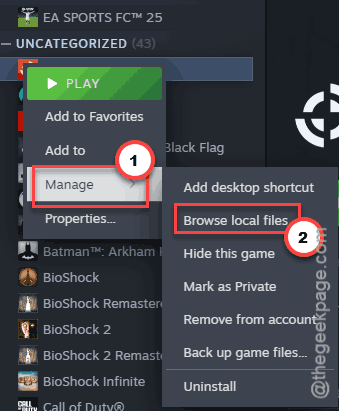
3 – Open the data folder.
4 – Open settings.ini with Notepad. If Windows asks which app to use, pick Notepad.
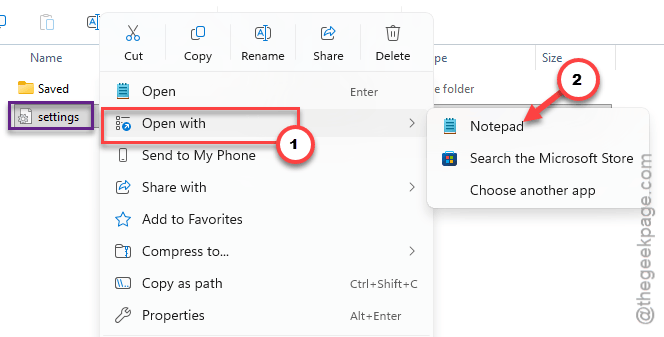
5 – Find the line crs_enabled = true.
6 – Change true to false.
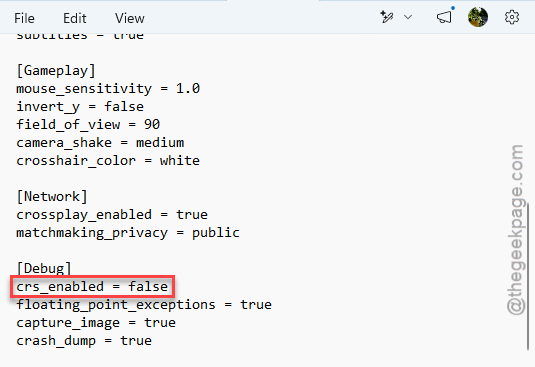
7 – Press Ctrl + S to save, then launch the game.
That line is the killswitch. And for a lot of players, this alone ends the 20-second crash.
Fix 2 – Turn Off the Other Trip Wires in the Same File
Three more settings feed that same detector. Crash dumps and image captures run a background loop that hammers your CPU right while the detector is watching. And floating point exceptions let tiny rendering math errors trigger the killswitch too.
1 – Open settings.ini again, like in Fix 1.
2 – Change crash_dump = true to false.
3 – Change capture_image= true to false.
4 – Change floating_point_exceptions = true to false.
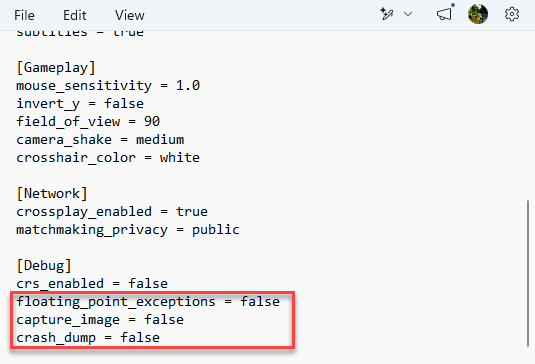
5 – Save the file and try the game.
Fix 3 – Force DirectX 11
The hang detector regularly trips over DirectX 12 shader stutter. Forcing the game into DirectX 11 mode sidesteps that whole trigger.
1 – Right-click Helldivers 2 in Steam and select Properties.
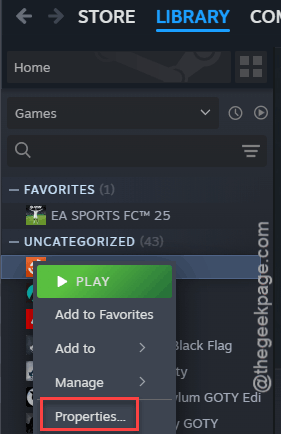
2 – Stay on the General tab and find the Launch Options box at the bottom.
3 – Type this nto the box:
–use-d3d11
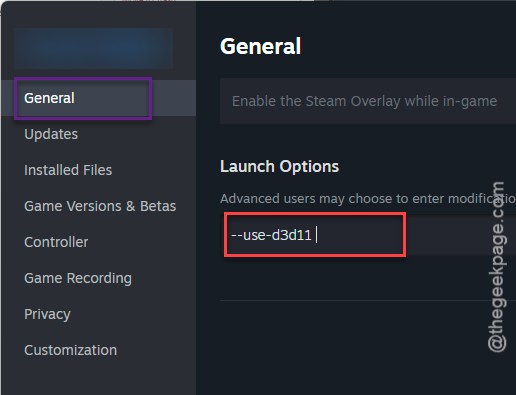
4 – Close the window and start the game.
Wondering where the save button is? There isn’t one — Steam stores the option the moment you type it.
Fix 4 – Delete the Shader Cache
Still dying at 20 seconds? Wipe the cache the game built before the patch. A stale cache means a slow startup, and a slow startup is exactly what sets the detector off.
1 – Close the game completely.
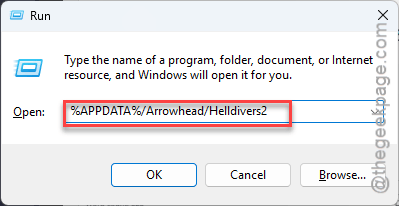
2 – Press Windows + R to open the Run dialog.
3 – Paste this in the Run panel, and click OK.
%APPDATA%/Arrowhead/Helldivers2
4 – Find the shader_cache folder.
5 – Delete it.
The first launch after this takes noticeably longer, because the game is rebuilding the cache from scratch. That’s expected. Let it sit.
Fix 5 – Delete the User Settings File
Same folder, different file.
1 – Quick one: open the Arrowhead\Helldivers2 folder from Fix 4.
2 – Then, delete the user_settings.config, and launch the game.
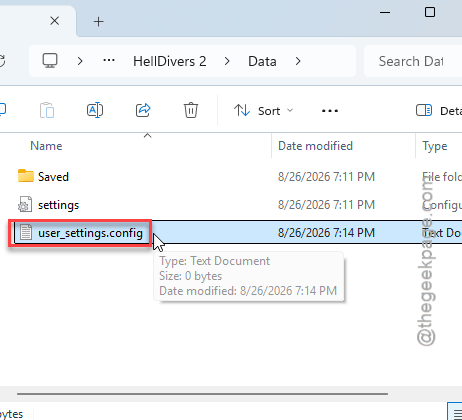
This wipes the hardware hooks the engine set up before the update and forces it to build clean ones. Your video settings reset in the process (a minute of your life to redo, tops).
Fix 6 – Rebuild GameGuard and Launch as Admin
GameGuard? That’s the game’s anti-cheat. When its files half-update, it hangs the launch — and the detector does the rest.
1 – Open your Helldivers 2 install folder and go into bin. The usual path is C:\Steam\steamapps\common\Helldivers 2\bin.
2 – Delete the GameGuard folder inside.
3 – Right-click helldivers2.exe and select Run as Administrator.
4 – Wait while the game downloads a fresh GameGuard folder.
5 – Add that new folder to your antivirus whitelist.
6 – Restart your PC and launch normally.
How to Prevent This
- Recheck settings.ini after every patch. Updates sometimes flip those values back to true. Thirty seconds to verify.
- Clear the shader cache after big patches, before problems start. The rebuild is slow once, then you’re set.
- Keep GameGuard whitelisted in your antivirus so updates don’t mangle it mid-download.
- And when a fresh patch breaks the game for everyone, wait a day before deep surgery — a hotfix often beats you to it.
People Also Ask
Why does Helldivers 2 keep crashing on launch?
Since patch 6.0.1, the usual cause is the game’s own hang detection — it mistakes slow startup work for a freeze and closes the game around the 20-second mark. Setting crs_enabled to false in data\settings.ini turns the detector off. Corrupted shader caches trigger it too.
Is Helldivers 2 crashing for everyone today?
If yours dies about 20 seconds in, that’s the patch 6.0.1 detector bug, not a server outage. A quick look at the game’s Steam forum or the Helldivers subreddit will tell you whether a crash wave is hitting everyone or just your setup.
How do I fix Helldivers 2 not launching at all?
Delete the GameGuard folder inside the game’s bin directory, then run helldivers2.exe as administrator so it redownloads clean anti-cheat files. No luck? Wipe shader_cache under %APPDATA%\Arrowhead\Helldivers2 and force DirectX 11 with the –use-d3d11 launch option in Steam.