Facing ghost touch issues on your iPad? The ghost touch problem that you are having on your iPad is an erratic behavior from the device. If you are facing this ghost touch issue on your device, you may want to troubleshoot this as soon as possible. The iPads with this problem will start to open up apps, swipe among the screens chaotically, rendering the iPhone completely useless.
Fix 1 – Clean the iPad screen
If there is a smudge on your iPad screen, or it has a layer of a liquid, it can induce ghost touch on your device.
Step 1 – What you can do is to take a clean microfiber cloth (if you can’t find a microfiber cloth, you can use a regular, clean cotton cloth).
Step 2 – Then, use the cloth to clean the surface of the iPad.
Once you have cleared the surface, the problem with the ghost touch should go away.
Fix 2 – Use the iPad without hard case
Sometimes the hard case that you are using on your iPad can put pressure on the screen protector film, inducing ghost touch on the device.
Step 1 – To troubleshoot this, just disarm the device from the hard case.
Step 2 – Now, see whether the iPad is still registering ghost touch inputs.
If it doesn’t register any such ghost touches, it is the hard case that is the cause of the problem.
Fix 3 – Force restarting the iPad
You should force restart the iPad to fix the problem on your device.
Step 1 – Before executing this procedure, make sure to close all the app windows that are still open on your iPad.
Step 2 – Next, just put pressure on the Volume Up button and release it on your iPad.
Step 3 – Next, press and release the Volume Down button there on the device.
Step 4 – Finally, press the Power button on the top of your iPad. Keep pressing the Power button on the top until the iPad restarts.
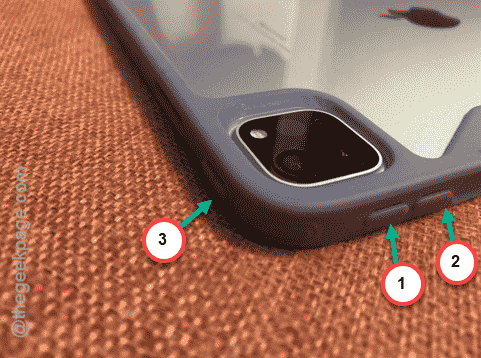
Once the iPad restarts, the ghost touch problem should go away, given the problem originated from the
Fix 4 – Reset all of your iPad settings
You should reset all the settings that exist on your iPad.
Step 1 – Just go to ahead and open up the Settings tab on the iPad.
Step 2 – In the Settings page, get to the “General” tab.
Step 3 – Therefore, get to the “Transfer or reset iPad” option.
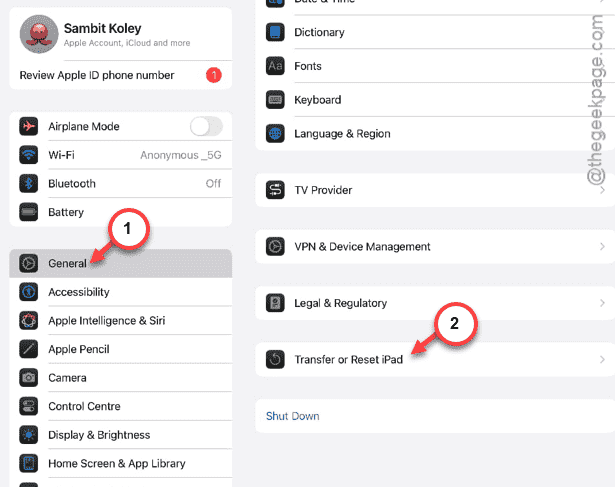
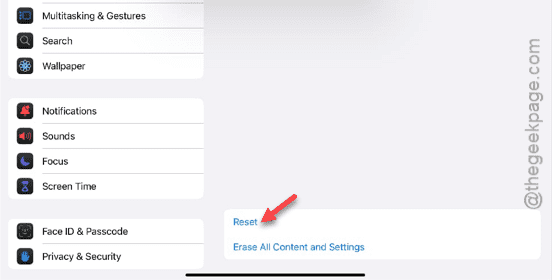
Step 4 – In that page, tap the “Reset” option present at the bottom of the page.
Step 5 – Now, tap the “Reset All Settings” option.
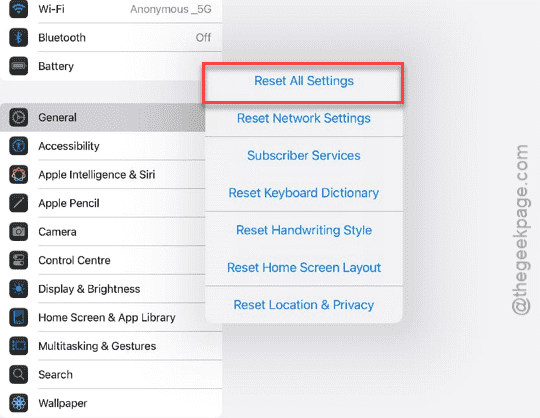
The next part of the process involves a verification step. Do that and your iPad will restart automatically. See whether the ghost touch issue is resolved or not.