Facing ghost touch issues on your iPhone? Ghost touch issues are the unnecessary touch inputs that can causes erratic touch responses on the device. Ghost touch issues can be a real thing, if there is something like water on the phone screen. But, if you are facing the ghost touch issues even when the iPhone screen is clean and dry, these solutions will be helpful.
Fix 1 – Use the iPhone without cover
Got a fractured tempered glass on your iPhone? If you have a broken tempered glass or a deformed hard case, it can cause ghost touch problems. Sometimes, the iPhone case that you are using can be too tight on the display. This may register some ghost touches. If you have any such case or cover or a faulty screen protector, remove it and test.
Fix 2 – Update your iPhone
If you are behind schedule on iOS updates, you must update the device to resolve the ghost touch issues.
Step 1 – You should open up the Settings page.
Step 2 – Next, go to the “General” tab in there.
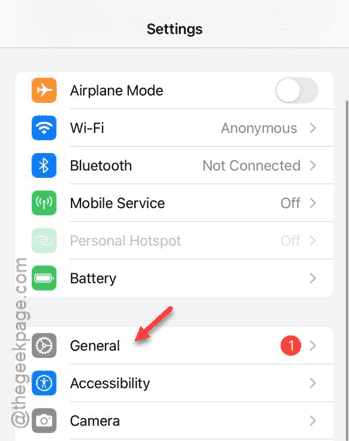
Step 3 – There you shall find the “Software Update” panel. Go there.
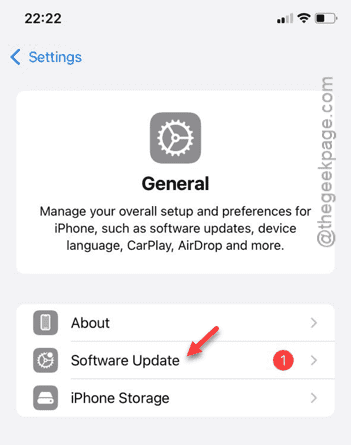
Step 4 – Once you are there, tap the “Install Now” button to update the iOS.
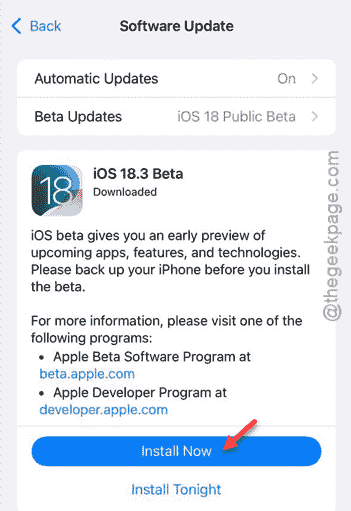
After updating the iOS, the ghost touch problem will be resolved.
Fix 3 – Reset all the settings
If a modification in the settings is causing this problem, resetting the settings should fix the issue.
Step 1 – To do this, you have to reach the Settings page first.
Step 2 – Next, load up the “General” tab.
Step 3 – Next, open the “Transfer or reset iPhone” option.
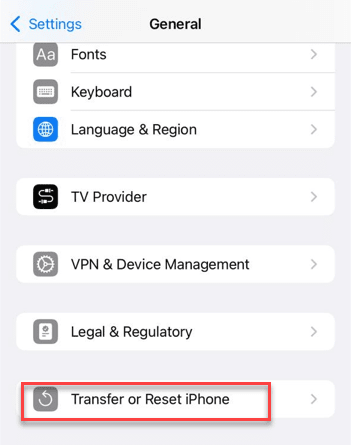
Step 4 – Touch the “Reset” option.
Step 5 – Next, tap the “Reset All Settings” option on there.
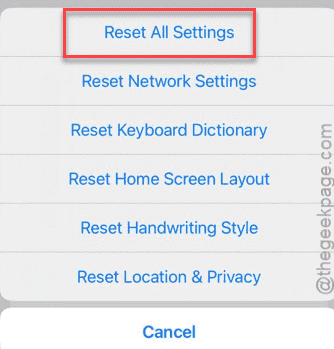
The rest of the resetting process is quite simple. You must verify it using your passkey once. When all the iPhone Settings are reset to normal, the issue with the ghost touches should go away.
Fix 4 – Contact Apple Support
If you are still facing ghost touch problem with your iPhone, you should escalate it with the Apple Support team. If the issue is originating from any hardware problem, you can get it fixed from there.