Your GTX card ran FFXIV fine for years. Then Dawntrail’s engine update landed, Nvidia moved on to newer silicon, and now the game dies mid-loading screen. But the card is fine — I’ve fixed this on enough machines to promise you that. The stuff around the card is what broke.
Why This Happens
Three culprits keep showing up. The biggest is Nvidia’s recent drivers — releases after November 2025 are flat-out bugged for 10-series cards in this game. Not underpowered. Bugged.
The second is memory. Dawntrail’s engine is brutally picky about RAM stability, and an XMP profile (the “fast RAM” setting in your BIOS) that behaved for years can suddenly start throwing fatal ffxiv_dx11.exe errors on loading screens.
And the third? Software poking at the game — overlays, full-screen optimizations, the official launcher itself. All of it can trip an engine that’s already stressed on older hardware.
Fix 1 – Roll the Nvidia Driver Back
The silver bullet, according to basically everyone who’s fought this. New drivers are the trigger. So go back to a version from November 2025 or older.
1 – Open Nvidia’s driver download page in your browser.
2 – Search for your card model and download a driver dated November 2025 or earlier. [You can directly google the driver version and download it directly from the NVIDIA driver.]
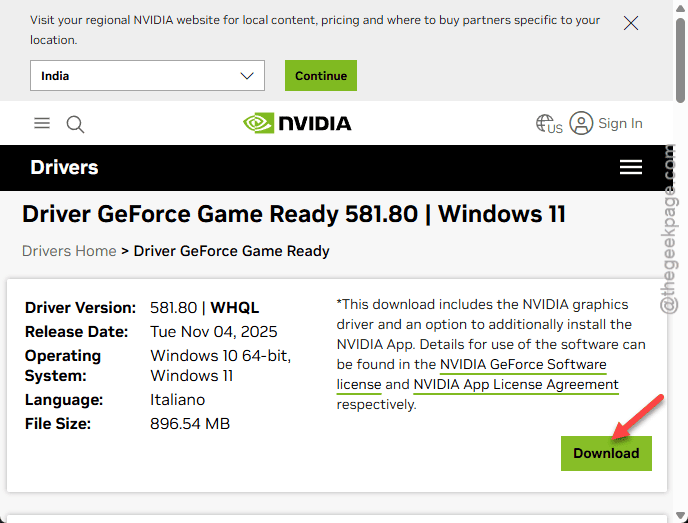
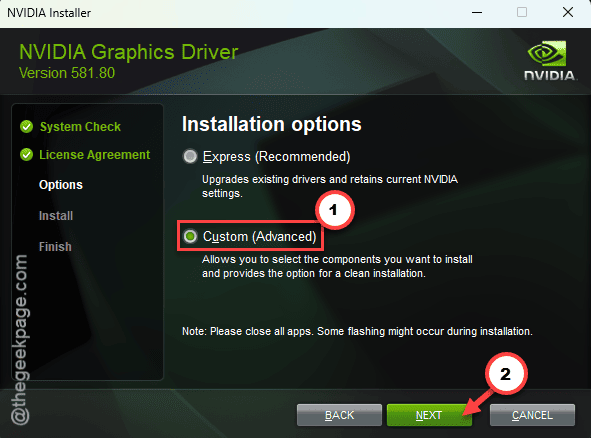
3 – Run the installer and pick Custom (Advanced).
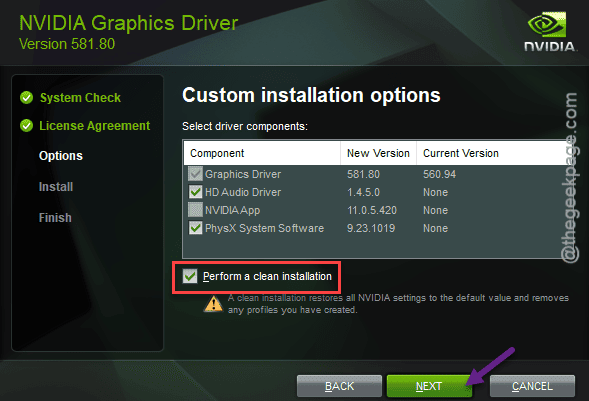
4 – Tick Perform a clean installation. This wipes the broken driver’s leftovers instead of layering on top of them.
5 – Restart your PC when it finishes.
And skip the driver updates Nvidia offers afterward — at least until the release notes confirm the 10-series bug is dead.
Fix 2 – Disable Full-Screen Optimizations
Windows 11 puts a layer between the game and your screen (it calls this full-screen optimization). On older cards, that layer conflicts with Dawntrail’s updated engine and causes those generic asset-loading crashes.
1 – Open File Explorer.
2 – Go to the game folder. The usual spot:
C:\Program Files (x86)\SquareEnix\FINAL FANTASY XIV - A Realm Reborn\game
3 – Right-click ffxiv_dx11.exe and choose Properties.
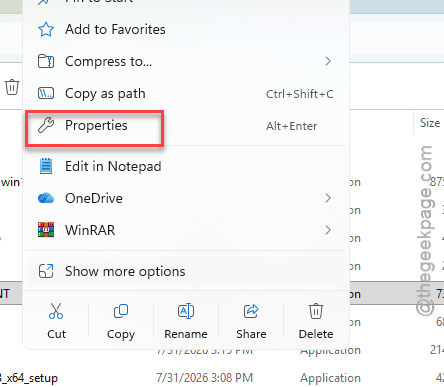
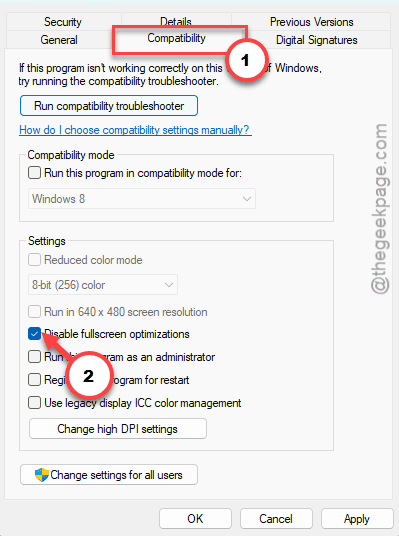
4 – Open the Compatibility tab.
5 – Check the Disable full-screen optimizations box, near the middle of the tab.
6 – Click Apply, then OK.
7 – Launch the game the normal way.
Fix 3 – Turn Off XMP and Other Overclocks
Loading screen crashes specifically? That smells like memory. Older DDR4 kits running XMP on 10-series era motherboards trip Dawntrail constantly. Back to stock settings.
1 – Restart the PC and tap your BIOS key during startup — usually F2, Delete, or F12.
2 – Find the Memory, Overclocking, or Advanced settings tab.
3 – Locate the XMP setting. AMD boards sometimes label it DOCP.
4 – Change it from Enabled or Profile 1 to Disabled.
5 – While you’re in there, reset any CPU or RAM overclocks back to their default profiles.
6 – Save, exit, and boot into Windows.
Your RAM runs a bit slower now. Honestly? You will not feel it in this game. And a few lost megahertz beat a crash to desktop in every dungeon.
Fix 4 – Kill the Overlays
Discord’s overlay, RivaTuner’s stats counter, anything that draws on top of the game — they all hook into the game’s executable to work. And Dawntrail has gotten touchy about being hooked.
Quick version: turn the overlay off inside each app’s settings, or just quit the apps entirely before playing. Discord and RivaTuner are the usual suspects. Then run a dungeon or two and watch.
If the crashing stops, you found it. Re-enable overlays one at a time to catch the guilty one.
Fix 5 – Launch Through XIVLauncher Instead
The official client adds its own problems. XIVLauncher (a free, long-running community launcher) skips it completely and starts the game directly. And for plenty of 10-series players, that alone ended the crashes.
1 – Download XIVLauncher from its official project page.
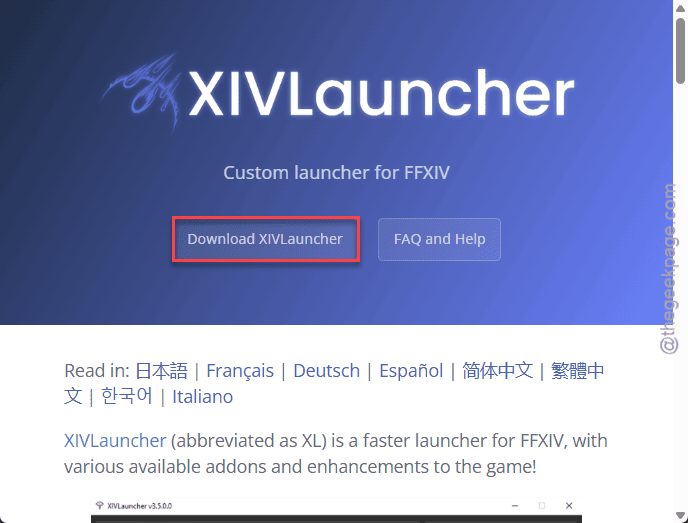
2 – Install it and sign in with your Square Enix account.
3 – Start the game from XIVLauncher from now on.
Your login still goes through the same Square Enix servers. The tool replaces the launcher window, not the account system.
Fix 6 – Test Your RAM With Memtest
Still crashing after the driver rollback? Time to rule out dying hardware. RAM degrades with age, and 10-series era builds are old enough for it. MemTest86 is the tool most people use (the free version covers this fine).
1 – Download MemTest86 and follow its setup guide to make a bootable USB stick.

2 – Restart the PC and boot from that stick.
3 – Let the full test run. It takes a few hours, so overnight works well.
4 – Read the results screen when it’s done. Red rows mean errors.
Any errors at all? That RAM needs replacing. And no driver or setting will fix a physically failing stick. If the test comes back clean, at least you know the hardware’s solid and the problem is software.
How to Prevent This
– Hold off on day-one Nvidia drivers for an aging card. Let other people find the bugs first.
– Leave XMP off on this machine unless something else clearly needs the speed.
– Launch without overlays by default. Turn one on only when you actually need it.
– Expect old-hardware turbulence for a few weeks after every big expansion patch. Check driver notes before updating anything.
People Also Ask
Can a GTX 10-series card still run FFXIV Dawntrail?
Yes. These cards meet the requirements and run the game fine on drivers from November 2025 or earlier. The crashes come from newer Nvidia drivers carrying a 10-series bug, not from the hardware being too weak. Roll the driver back and most systems settle down immediately.
Why does ffxiv_dx11.exe crash on loading screens?
Loading screens hammer your RAM, and that’s exactly where unstable memory gives out. XMP profiles on older DDR4 kits are the usual cause — disable XMP in the BIOS and test again. If crashes continue, run MemTest86 overnight to check whether a stick is physically failing.
Is XIVLauncher allowed by Square Enix?
It’s third-party, so it isn’t officially endorsed. In practice it’s open source, has been widely used in the community for years, and signs you in through the normal Square Enix servers. Download it only from the official project page, and skip any plugins you don’t recognize.