Gaming rigs crashing while compiling shaders for a game is nothing new. So, if your computer has crashed while doing the same thing for Dune: Awakening, no need to worry. Dune: Awakening does this avoid in-game stutters, graphic quality detoriations, etc. But it should never crash the system. There are several measures that you may take to fix this problem at your end.
Fix 1 – Update the BIOS
NOTE – Make sure to remember your Microsoft account password. Sometimes after updating, the system BIOS can reset your system PIN or any other alternative method of authentication system. You have to use your Microsoft account password to successfully log in to the system.
The process of updating the system BIOS is not fixed. It varies system to system. Make sure to back up your system before proceeding to the main steps.
Download the BIOS update utility from your system manufacturer’s website.
Dell – Use Dell Support Assist tool to update BIOS.
HP – Visit the HP drivers page to download and install
Asus – Use MyAsus tool to download and update the BIOS
You may get occasional BIOS firmware updates through the Windows Update channels. So, make sure to take a look here –
Settings > Windows Update
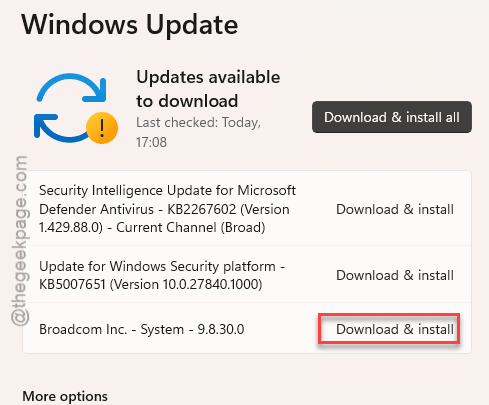
If there is any firmware update pending, install it right away.
Check whether you can play Dune: Awakening or not.
Fix 2 – Update the GPU driver
The entire ‘Shader compilation’ works for better graphics processing. So, you must install the latest GPU driver.
Step 1 – Open up the NVIDIA App on your computer.
Step 2 – Visit the “Drivers” tab. You can find the latest GPU driver update waiting for you there.
Step 3 – Then, tap the “Download” option there to install the graphics driver update there.
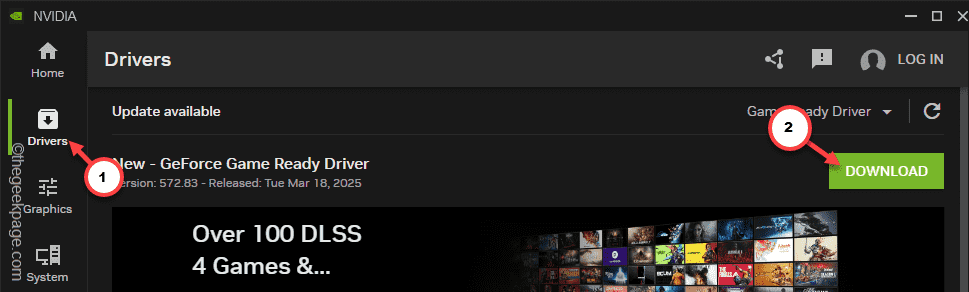
Downloading and installing the driver will happen automatically. Just wait patiently during the process. Later, you can enjoy Dune: Awakening again.
Fix 3 – Use optimal performance and efficiency cores
Some users have recommended reducing the number of CPU cores used by the game during the shader compilation step. This way, there won’t be any excessive heating issues. According to the reports, restricting the Dune Awakening to use the optimal the cores (at least 4 efficiency and 4 performance cores) have been fruitful in completing the shader compilation stage.
You may use the tool of your choice, while Intel Extreme Tuning Utility or XTU can be recommended.
Fix 4 – Reset the system BIOS
Sometimes a minimal change in the BIOS system can trigger this kind of problem. So, we recommend you reset the BIOS settings to the default settings.
Step 1 – Restart your device and wait until the screen lits up to show you the manufacturer’s logo.
Step 2 – Repeatedly press the button that is connected to your BIOS to load up the BIOS console on your machine.
Step 3 – Find the “Restore BIOS settings to default” option there. Usually, you can find this setting at the bottom part of the BIOS page.
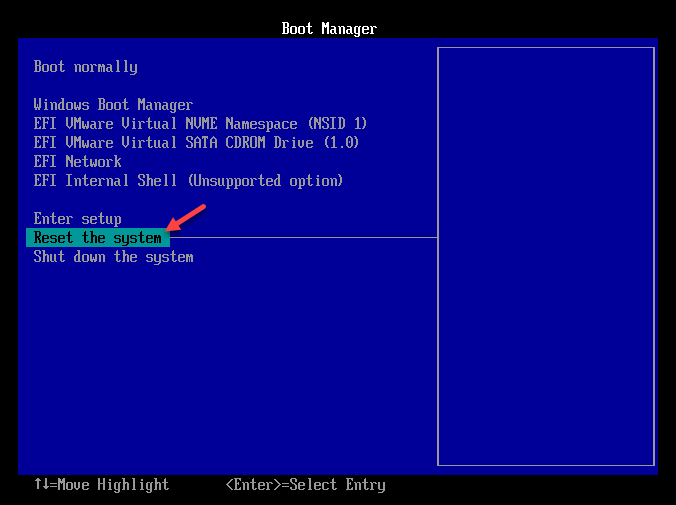
Windows will restart automatically while resetting the BIOS settings to the normal settings. You won’t see the “Please wait while BIOS backup processing” message again.
Fix 5 – Don’t overclock your system
The gamers with Intel’s 13th and 14th generation chipsets have experienced terrible performance flaws in their usage. This crash can be triggered if you have overclocked your CPU or GPU. Disable any overclocking enhancements that you have done on your system. Launch Dune: Awakening on your PC, and this time, shaders will be compiled without any issues.