A cracked back glass on your Apple Watch is a serious problem that you should not ignore. The back glass on the Apple Watch is very sturdy, but sometimes it may break due to huge impact pressure. Unlike the front screen crack, this can cause skin irritation or even let water/sweat get into the watch’s internals. Here is a comprehensive guide on what you should do if you find yourself in this situation.
STEP 1 – Use a Packing Tape as a Temporary Measure
The most immediate step you should take is to prevent the tiny glass shrapnel from getting into your wrist or skin.
Step 1 – Clean the back of the watch with a dry microfiber cloth.
Step 2 – Then, cut a small but adequate amount of packing tape.
Step 3 – Apply it smoothly over the sensor area of the wearable. Make sure there are no bubbles or liquid present over the lights.
This should protect your wrist from getting cut from tiny shards of glass on the backside.
STEP 2 – Strict Moisture Isolation
A cracked back glass of Apple Watch provides an opening for any liquid, like water or even sweat, to get inside the Apple Watch’s important sensor regions placed at the back of the wearable.
Step 1 – Do not wear the watch in shower or during swimming.
Step 2 – If you have to wear it, place a thin sweatband underneath the watch on the wrist.
Do not let water, even tiny droplets of it make its way inside the Apple Watch through the broken back glass.
STEP 3 – Use a Bumper Back Protection
Rather than using a tape to bind the Apple Watch together, using a bumper back protection is recommended.
Step 1 – Get a back-glass vinyl skin or a heavy-duty bumper case that comes with a rear plastic shield.
Step 2 – Apply the skin on the wearable carefully and gently.
Step 3 – Measure your heart rate and blood oxygen readings to check whether the sensors have taken the hit or not.
If you don’t get any reading from your Apple Watch or a flatline reading, you have to consult an authorized Apple Service Center.
STEP 4 – Verify Other Damage
Apple rarely repairs the back glass of the wearable; instead, they just replace it with a new one. Check whether you are eligible for a cheaper replacement.
Step 1 – Go to the Watch app on your iPhone. Then, open up the My Watch tab.
Step 2 – Tap All Watches on the left-hand corner. Tap the i button next to this Apple Watch.
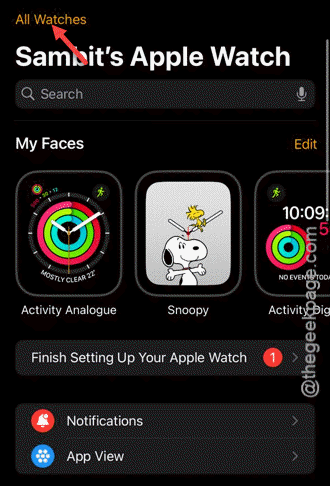
Step 3 – Note down the serial number from there.
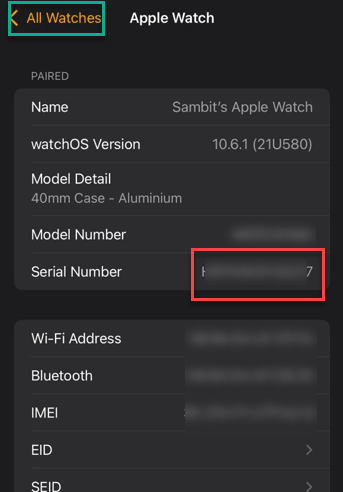
Go to the Apple Care+ and put the serial number to check whether it is available or not.
If the Apple Care+ is available, you just have to pay a nominal fee (~$79) and get a brand new Apple Watch.
If the Apple Watch is not covered by the Apple Care+ service, the charge for the back glass replacement can be exorbitantly high: near a new Apple Watch MSRP.
Hope these steps have helped you!