Seeing a blinking green light at the back of your Apple Watch? Don’t worry. It is a very common scene to see the flashing green light on the back of your Apple Watch. But, if you are seeing the continuous green light blinking on your wrist, it may annoy you. We have discussed the reason behind these symptoms and the steps that you can take to fix the green light issue.
Why the Green Light is blinking from the back of the Apple Watch?
You may have already noticed that this green light starts to blink whenever you start to measure your heart rate. There are some green LEDs present on the back of the watch that starts to blink when it is measuring your heart rate.
The main sensor on the Apple Watch is an optical heart rate monitor. This particular sensor measure your heart rate based on photoplethysmography method. It uses the infrared and green LEDs to reflect the blood cells flowing through your veins. The green light that blinks continuously on the backside of the Apple Watch means that the optical heart rate monitor is measuring your heart rate.
So, it is completely normal the LEDs to blink to assess the heart rate properly.
Fix – Disable the Heart Rate monitoring
Your Apple Watch monitors your heart rate, even when you are not measuring it explicitly. In that case, disabling the ‘Heart Rate’ may work out.
Step 1 – To do this, you will need the iPhone. Go to the Watch app on your iPhone.
Step 2 – Now, go to the “My Watch” section of the app. You will find all the watch settings there.
Step 3 – Find the “Privacy” option there and open it up.
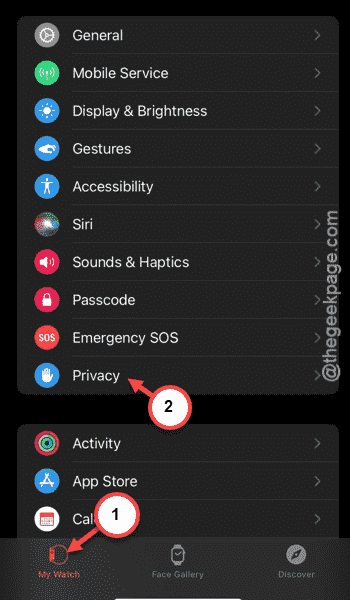
Step 4 – In the Privacy panel, you shall find the “Heart Rate” feature.
Step 5 – Disable it from there.
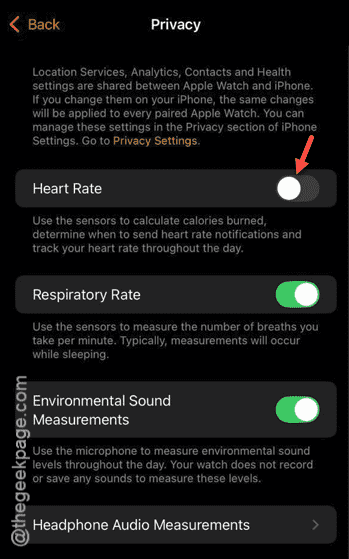
After you have disabled it, your iPhone won’t measure your heart rate throughout the day on its own. But, you can measure it manually using the utility directly from your Apple Watch.
Hope this clarifies the green light blinking situation and resolves your query!