The voiceover feature on the Apple Watch lets the device read out the contents directly from the watch screen. While this feature is critical for the users who need visual aids to use the Apple Watch, the voiceover can become annoying for the regular users. The following guide contains all the steps that you will need to implement to invoke or revoke the voiceover feature on your Apple Watch.
Why the Voiceover feature is not turning off?
The voiceover feature on your Apple Watch is a part of the accessibility suite on your Apple Watch. This is offered as an optional feature on the wearable. The watch reads out all the menu, settings, apps and other items on the screen. Whenever the user touch a portion of the panel of the watch, it calls out that specific item, helping the user determine their choice of action.
But, the same feature can become a point of annoyance, as the common users don’t always want this guided approach on the device. So, there are two approaches you can take. The first one includes the basic approach where you may disable the voiceover feature briefly. Then there is the more permanent approach where you can turn off the voiceover system completely.
Fix 1 – Deactivate the voiceover briefly
The accessibility shortcut on your Apple Watch is set to voiceover mode.
Step 1 – You can press the crown on the watch three times to turn the voiceover feature on or off.
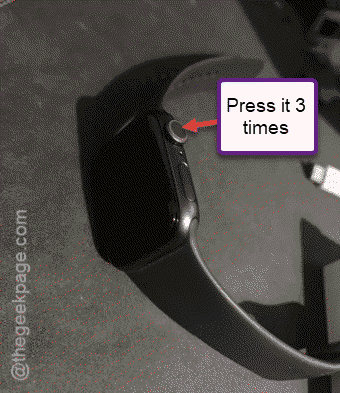
This should turn off the voiceover feature on the watch. You can later turn it on by pressing the same crown button thrice.
Fix 2 – Disable the voiceover permanently
If you want you can completely turn off the voiceover feature.
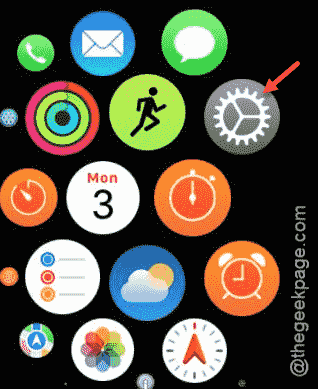
Step 1 – At first, press the crown once and tap the “Settings” menu.
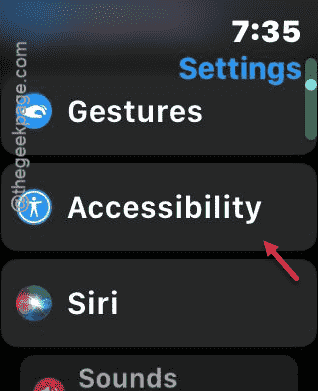
Step 2 – Find the “Accessibility” tools in there.
Step 3 – Go down to the bottom of the Accessibility page to find the “Accessibility Shortcut” option. Open that up.
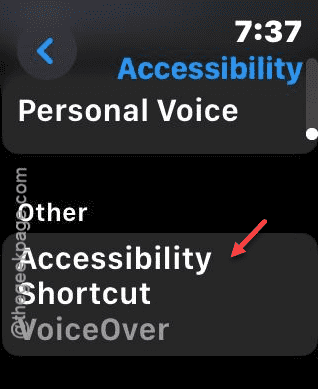
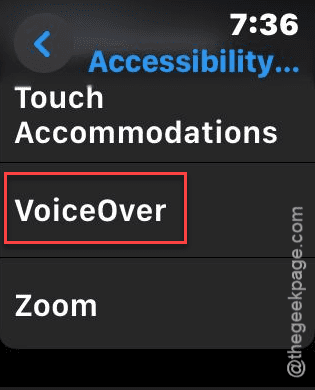
Step 4 – Locate the “VoiceOver” feature there and deactivate it.
Once you have deactivated it, the same won’t be disturbing you again. See if this works out for you.