Apple Watch may not turn on due to overheat. So, if your Apple Watch is also feeling unnecessarily hot, and it is not switching on, the overheating can be held as the primary reason. We have explained this problem with minute details, along with a few basic fixes that can easily fix the overheating problem that you are facing on your watch.
Fix – Let the Apple Watch Cool Down, restart and charge
While the Apple Watch has turned off due to overheating issues, you can’t turn it on and use it right away. The standard operating procedure in this case is to leave it alone for a few hours and then proceed.
Step 1 – At first, remove the case from your Apple Watch wearable.
Step 2 – After this, leave the Apple Watch alone for a 2–3 hours.
Step 3 – Now, put the Apple Watch on charge. Let the Apple Watch charge for 10–15 minutes.
Step 4 – Finally, press and hold the side button on the Apple Watch to start it.
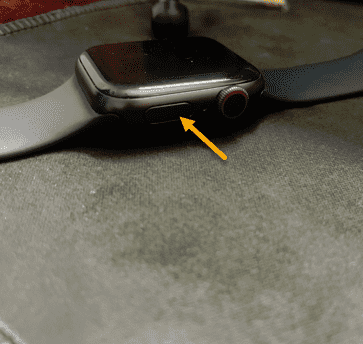
This time, the Apple Watch will start up normally.
Fix 2 – Consult with the Apple Support
If you have followed the above-mentioned steps, and still no respite from the issue, i.e. your Apple Watch is still not turning or not operational, you should consult with the Apple Support.
Step 1 – Reach the Apple Support webpage. Sign in using your Apple ID and password.
Step 2 – Next, select the Apple Watch, and get the support page for ‘Unable to Power On‘.
You can also schedule a drop-off to submit your device and get it checked by them for any kind of hardware-related issues.
Further Suggestions –
Do not let your Apple Watch overcharge, like don’t leave it to charge before you go to sleep. Sometimes, hardware malfunctions or problems with the Apple Watch battery may lead to such calamity.
You should consult with the Apple Support without trying to boot it further.
Why the Apple Watch is not turning On after overcharging?
The Apple Watch may not turn on after overcharging due to either battery related or software related problems. Although every Apple Watch is equipped with a charging protection technology, continuous overcharging the device may break it. Sometimes, the effect of this overcharging can be temporary, like automatic shutdown of the watch. But, the complete failure of the battery protection technology can lead to fatal errors, causing damage to the watch’s hardware. The most prominent cases have seen to affect the battery of the watch. This problem usually resolves automatically if the Apple Watch is left alone for a few hours.