You will never want your Apple Watch to wake you up while you are in your deep sleep. If the watch screen illuminates automatically in a dark room, it will certainly cause disturbance to your sleep. The usefulness of wearing the watch automatically goes down with these kinds of issues. You can follow the following guidelines to fix the Apple Watch turning on during your sleep.
Why the Apple Watch turning on during sleep?
Every Apple Watch is equipped with several sensors like gyroscope, accelerometer that lets it track the relative position of the watch. So, whenever you lift your wrist, you will see the watch illuminates it to show up the time and other information on the screen.
But, while you are going to sleep, even the involuntary movement of your wrist may light up the watch screen. This can cause disturbance to your sleep. There are certain features that you need to disable on your Apple Watch settings to fix that.
Fix 1 – Put the Apple Watch in Theater mode
You can invoke the Theater mode on your Apple Watch to fix the problem.
Step 1 – On the Apple Watch, tap the side button.
Step 2 – Next, scroll down and enable the “Theater Mode” in there.
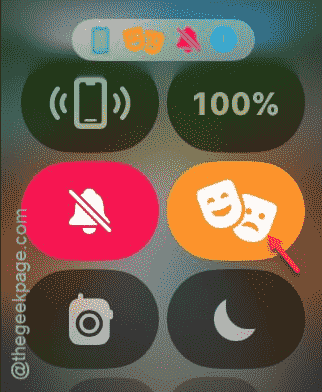
When you put your Apple Watch in theater mode, all the alerts gets silenced. Now, you can wear your watch while sleeping, but it won’t disturb you again.
Fix 2 – Turn off the Always On feature on the watch
While the ‘Always On’ feature is enabled on your watch, a part of the screen shows up the time all the time. This may disturb your sleep in a dark room.
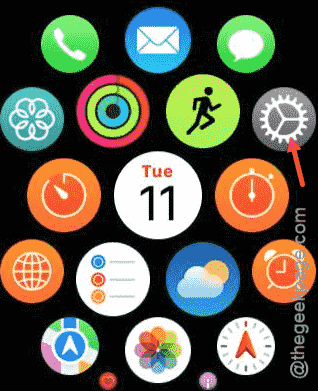
Step 1 – Simply, tap the crown on the watch.
Step 2 – When the app list loads up on the device, choose to open up the Settings.
Step 3 – Scroll down and open up the “Display & Brightness” option from there.
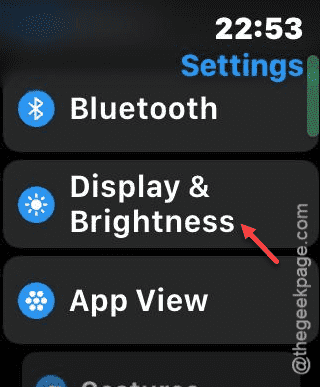
Step 4 – Now, find the “Always On” option.
Step 5 – You have to turn this off.
Once you have turned this off, your Apple Watch won’t be disturbing you in your sleep.
See if this helps!