Got your Apple Watch got stuck on the charging screen? A few users have reported this problem where the users can’t operate their smartwatch as it is just showing up the charging screen. This is not a regular scenario, and the problem that you are having at your end happens rarely. If you are facing the similar problem on your device, these steps will be useful in troubleshooting the issue.
Why the Apple Watch is stuck on charging screen?
The charging screen only shows up when you plug the Apple Watch into the magnetic charge. The charging screen automatically disappears the moment you remove it from the charging station. Now, if the watch got stuck to the charging screen, you can consider it as an anomaly. This is a rare mishap. So, we have recommended these solutions that restore the normal function of the watch.
Fix 1 – Force restart your Apple Watch
You can force restart the Apple Watch to get rid of this bug or glitch. So, force-rebooting the device should fix it.
Step 1 – You have to press and hold the Side button and the crown on your watch.
Step 2 – If you press those two buttons together, the Apple Watch will restart automatically.
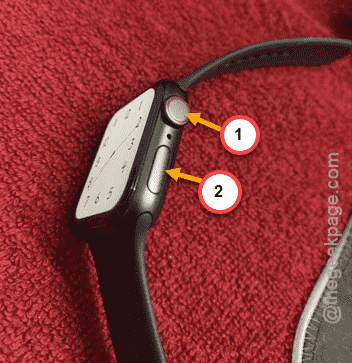
After it restarts, the watch will load up normally. You won’t get stuck to the charging screen of the device.
Fix 2 – Charge your Apple Watch for 30 minutes
It is recommended that you charge the watch for at least 30 minutes. If this is the case of deep discharged battery on the device, you must put the Apple Watch for sometimes before it becomes operational once again.
Simply, place the Apple Watch on charge for half an hour and then, it will become operational once again.
Fix 3 – Clean up the watch, charging pod
A problem with the charging system may cause this problem in your case.
Step 1 – Simply go ahead and take up a clean cloth to clear out any dust or debris from the back of the Apple Watch.
Step 2 – Do the same to the MagSafe adapter as well.
Step 3 – If there is any fault in the adapter, you may consider changing it as well.
Check if this helps.