Water got into your Apple Watch? Don’t worry. Your Apple Watch is completely waterproof, so water should not have any effect on it. Having said that, it is also true that you can’t use the Apple Watch while there is water in it. We have explained this phenomenon in details, alongside the proper measure that you can take to troubleshoot the water problem on your Apple Watch.
What happens if water gets into my Apple Watch?
Your Apple Watch is not just simply waterproof. It also carries a swim proof badge to some depth. So, water won’t cause any problem to the watch. But, the Apple Watch can’t function properly if there is water in the watch. The watch automatically goes into a lockdown mode where you can’t use the device while there is water clogged in it.
Apple Watches has this cool feature where you can execute a procedure to eject out the water from the device. This is a very simple process that requires minimal user inputs. You can just go through these steps and execute them to remove the excess water from your watch.
How to remove water from Apple Watch?
The steps are very simple.
Step 1 – What you have to do is to put the Watch water lock mode. In this mode, the touch screen panel of the Watch stop temporarily functioning.
Step 2 – Tap the side button on your watch.

Step 3 – When this loads up the Control Center, find this water droplet icon (💧) there.
Step 4 – Tap this once to turn on the water lock.
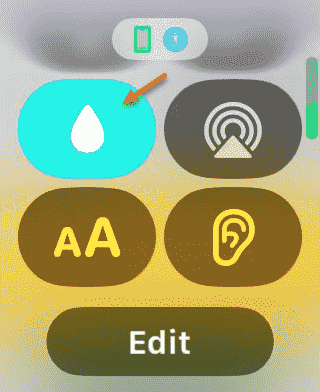
Once this lock is enacted, you can’t use the touch screen on the watch. You can’t swipe up, down or across the surface of the watch while the watch is in under the water lock.
Step 5 – Now, after doing this, you should be back to the Apple Watch home page.
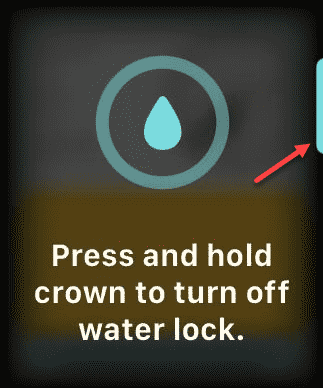
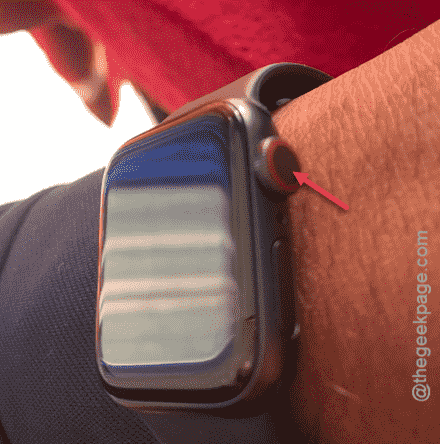
Step 6 – Next, press and hold the crown on the watch.
Step 7 – You will see a beautiful animation that may help you track the progress of the process.
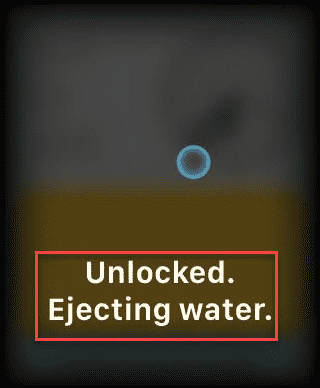
This starts the water ejection procedure from the device. This thing should be completed within a few seconds.
When this procedure complete, you can use your watch just like before.