Screen time Passcode is a very useful security feature on iPhone. But, while disabling the synchronization of the iCloud contacts, you may have seen this message “Screen Time Passcode Enabled” on the screen. We have started from the basic, explaining what is the Screen Time Passcode, the requirement of such privacy features and the process to disable that on the iPhone.
What is a Screen Time Passcode?
Some of the crucial features on iPhone has this extra layer of security placed on them, which doesn’t let just anyone commit any changes. Screen Time Passcode is normally a 4-digit pass code. You have to input and verify your access if you want to make some changes in the iCloud settings or make some other intricate changes in iPhone Settings.
Why am I seeing this ‘Screen Time Passcode Enabled’ message?
The reason why you are seeing this ‘Screen Time Passcode’ banner is because the iPhone owner has activated the Screen Time passcode from the iPhone Settings.
Screen Time Passcode doesn’t provide the same level of security as of Face ID or Touch ID.
Fix Turn off the Screen Time Passcode
There are two options available for you. Either, you can turn off the Screen Time Passcode or, change the current Screen Time Passcode option.
But, what if you can’t recall the Screen Time passcode? You can delete the Screen Time Passcode and set up a new one as well.
Step 1 – Open up the iPhone Settings.
Step 2 – You can find the desired settings in the “Screen Time” mode. Open it up.
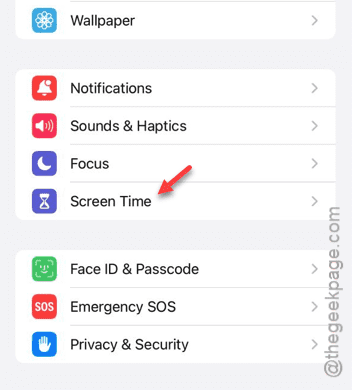
Step 3 – Slide down through the same Settings page, and you shall see the “Change the Screen Time Passcode” option in there.
Step 4 – Tap that option.

Step 5 – Now, it gives two options. Those options go like this –
Change Screen Time Passcode
Turn off Screen Time Passcode
Step 6 – Select the “Turn off Screen Time Passcode” option.
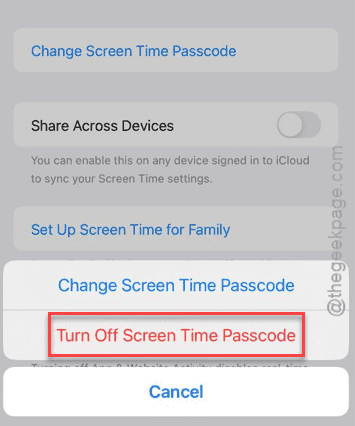
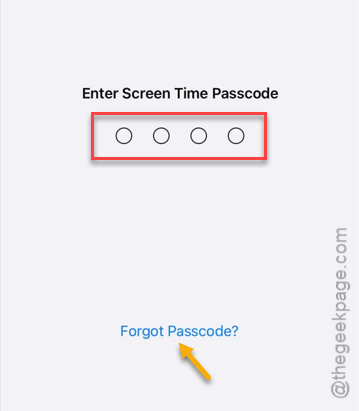
Step 7 – Input the 4-digit Screen Time passcode in there to proceed.
Step 8 – If you have forgotten the passcode, tap the “Forgot Passcode?” option and follow the rest of the steps. You can reset the passcode.
Once you have revoked the Screen Time passcode from your iPhone, you can disable the Contact’s synchronization in the iCloud settings.
See whether this works out for you or not.