Guided Access mode provides a secure, restrictive environment to the users. But, the same feature of the iPhone can become a nightmare for you if you have put the device on Guided Access and forgot the passcode to disable it. You will get stuck in the Guided Access mode if this happens. This guide should help you get out of the problem.
Why it is not possible to exit Guided Access mode without a passcode?
To know why the Guided Access mode doesn’t allow you to quit the app, you have to understand the logic behind the Guided Access mode. The Guided Access mode is a restrictive mode. So, it blocks the intended user to a specific application or a window. This way, the user cannot switch between multiple apps, and they are confined to a single application. This mode is extremely useful while giving the device to children.
Now, a passcode is a 4 or digit passcode that you have to use to manage the Guided Access mode on the iPhone. If you forget the passcode, you can’t escape the Guided Access mode. This access control mode doesn’t have a loophole that you can use to escape from it. So, you might be wondering what to do in this case. These steps should help you.
Fix – Force restart the iPhone
The only way you can escape from the Guided Access mode is to force restarting the device.
Step 1 – You can gently press and release the Volume Up button on the side of the iPhone.
Step 2 – Later, hit and release the Volume Down button on the same side.
Step 3 – Next, press-hold the Power button of the device. Once you have held the button for 10 seconds or so, the iPhone will shut down and restart automatically.
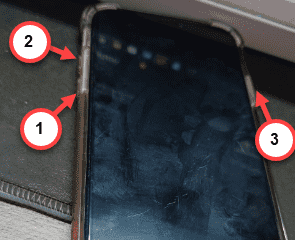
This entire process is known as the ‘Force-restart’ procedure. When the iPhone does restarts, it will be out of the Guided Access mode automatically. You can also disable the Guided Access mode (but you will need the Apple Passcode to do that) from the Settings page.
Hope this trick has helped you!
www.youtube.com/watch?v=7xTBIMfw6MA&t