Getting no sound from your iPhone notification after the iOS 26 update? A group of iPhone users have started to face this weird issue on their iPhone, where they are getting the notifications, but without any chiming sound or alert. This problem needs an urgent addressing as it can cause significant level of headaches if you start to miss important notifications again and again.
Fix 1 – Toggle the Ring/Silent Button/Action Button
You can easily fix the problem by toggling the Ring/Silent button or the Action button.
Step 1 – If your iPhone has the Ring/Silent button, toggle it to Silent Mode.
Step 2 – Next, toggle it to the Ringer mode.
Step 3 – Now, repeat the same steps for a few times. But, make sure the iPhone is in Ring mode once you are done with the process.
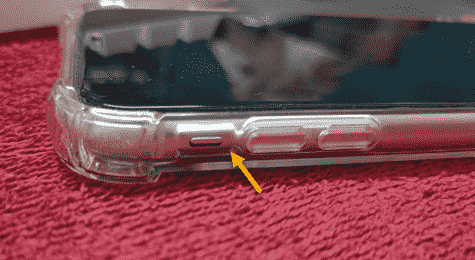
Step 4 – If you have the Action Button on your iPhone instead of the Ring/ Silent button, and you have to set it to Silent, Ring function, try pressing it a few times to switch between the Ringer and Silent mode.
This simple workaround has solved the notification sound issue for many users after updating to the iOS 26.
Fix 2 – Restart or Force restart the iPhone
If you are still having issues with the notification sound issue, the force restart procedure should fix the issue.
Step 1 – At first, press the Volume Up key once on the iPhone.
Step 2 – Next, press and release the Volume Down key once.
Step 3 – Finally, hold down the Power button on the iPhone for 10 seconds or so to restart the iPhone.
Once you have force-restarted the iPhone, the low notification sound issues should be resolved.
Why am I not getting any notification sound for iPhone notifications after updating to iOS 26?
The users may not get any notification sound on their iPhones after updating to iOS 26 due to the status of the Ring/ Silent mode switch, or a bug in the iOS 26. This problem has a very quick resolution, where the user can fix it simply by switching off the Ring/Silent mode a few times. Notification sound is the native part of the iPhone’s Sounds and Haptics set of features. iPhone automatically mutes all the notification sound in the Silent Mode.
FAQs –
1. What does the Action Button do on iPhone?
The Action Button on the iPhone works as a customizable button to launch apps, shortcuts, utilities such as camera. It replaces the older Ring/Mute switch on the iPhone, as it provides more flexibility than the limited scope of the older mute switch button. It is available on the iPhone 15 or later models.
2. Why there is no notification sound on my iPhone 17?
The reason you are not getting any sound on your iPhone 17 can be due to a reported bug in the iOS 26. Users have reported not having any notification sound on the updates iOS 26 devices. While toggling the Mute switch a few times have fixed the problem for many affected users.