Are you getting the ‘Loading chunk failed‘ error message on the Discord app? Discord has become more just a tool for communication for the gamers. But, like other applications on your system, discord can sometimes run into issues. This loading chunk failed issue appears at startup of the app. So, if you don’t resolve the problem, there is no way you can get past it. Don’t worry, it will take just a minute or two to take care of this problem.
Fix 1 – Restart Discord Process
1 – Close Discord.
2 – Press CTRL + SHIFT + Esc keys together to open Task manager
3 – Now, Locate and end all Discord related processes, by right click on them and choosing end task.
4 – Open Discord again
Fix 2 – Refresh the Discord application
the easiest and simplest solution to this problem is to refresh the discord application on your system.
Step 1 – While the ‘Loading chunk failed’ a statement is showing up on the Discord application, press and hold the Ctrl+R keys together.
Step 2 – This shortcut configuration is used to refresh the application manually. Within a few seconds, you’ll see the normal discord app layout.
Refreshing the Discord application should fix the problem, what’s the majority of the users who have come across this issue.
Fix 3 – Reinstall Discrod like this
if the local cache of the discord application is corrupted, this sort of error message may come up.
Step 1 – Open up the Task Manager by right-clicking the Windows button.
Step 2 – End the Discord app processes or any other sub-processes from there.
Step 3 – Open up another Run panel. Paste this there and click OK.
%localappdata%
Step 4 – Locate the Discord folder there and delete it from there.
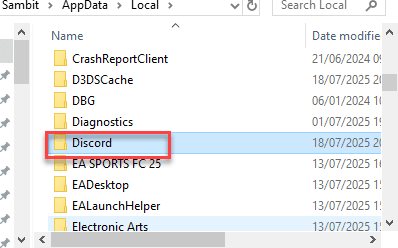
After deleting the folder, close the File Explorer window.
Step 5 – After this, press Win+R shortcut key.
Step 6 – This time, paste this there and click OK.
appwiz.cpl
Step 7 – Locate the Discord app there. Right-click the Discord app and tap Uninstall to uninstall the app from the device.
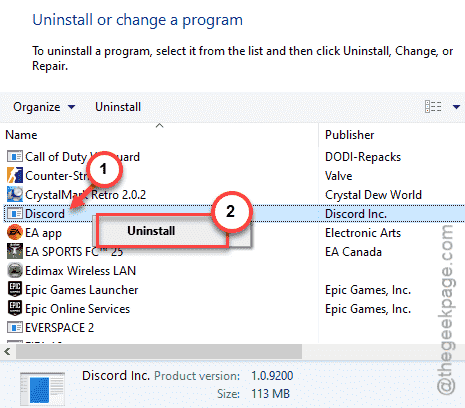
Once you have uninstalled the app, quit the Control Panel page.
Step 8 – Get the latest Discord installer. Later, you can use that to reinstall the Discord app on your system.
After reinstalling the Discord app, open it and log in to your account. Check whether this works out for you.
Workaround – Use the Discord on web
If the loading chunk is continuously giving you trouble, you should use the discord on web.
Step 1 – Open up a browser of your choice and go to the Discord webpage.
Step 2 – Now, once you are on the discord web page, login with your account ID and password.
This way, you can bypass the loading chunk problem on your Discord app.