iPhone Alarm not going ringing timely, interrupting your daily schedule right from the start? If you are affected by this issue, you should not neglect it. There are many reasons why the iPhone alarm is not going off on your device. Starting from the possible primary reason being the improper alarm settings, Focus settings misconfiguration, or even some rare cases of iOS bugs or glitches. Here are some proven fixes that have come to the aid of many affected users who have resolved the similar problem on their device.
Here is the quick fix table that should help you achieve a quick resolution –
| Issue Cause | Quick Fix | Time Needed |
|---|---|---|
| Alarm silent | Clock > Alarm > the alarm > choose a sound | 2 min |
| Alarm Sound too low | Settings > Sound & Haptics > Slider to max
Disable silent mode |
1 min |
| iOS bug/ glitch | Settings > Windows Update > Update Now | 3-4 min |
If you want a more detailed overlook, follow the detailed steps to troubleshoot the issue~
Fix 1 – Make sure Alarm Tone is not Set to None
There is a high possibility that the has not been any alarm tone. This way, you won’t be hearing any alarm sound at the specific time.
Step 1 – Open the Clock app. Next, go to the Alarms tab. Tap to manually edit the alarm on the device.
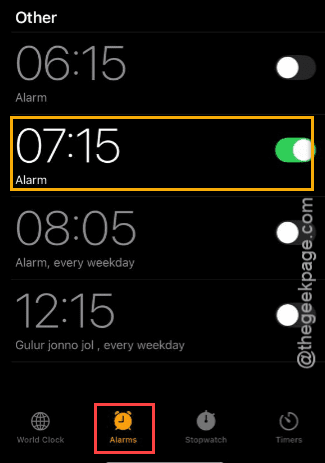
Step 2 – Next, check the Sound box of the alarm. Tap it once, if it is set to None.
Step 3 – Choose a preferred sound from the list to set it as the alarm tone.
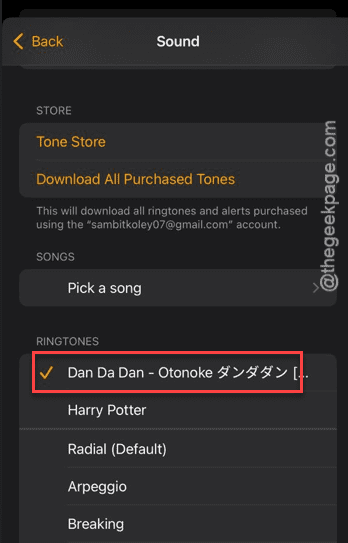
If you have additional alarms, make sure those have proper alarm sound as well. Set up a quick alarm and check it out yourself.
Fix 2 – Disable the Attention Aware feature
Attention Aware feature can lower the alarm volume in certain scenarios.
Step 1 – Navigate to the Accessibility tab on your iPhone.
Step 2 – Next, go to the Face ID & Attention tab.
Step 3 – Turn off the Attention-Aware Features option.
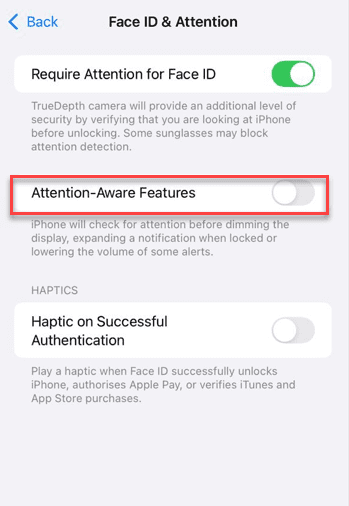
Step 4 – You will be required to input the Face ID passcode.
Do this and the Attention-Aware feature will be turned off.
Step 5 – Next, go this way ~
Accessibility > Voice Control
Step 6 – Turn off the Attention Aware module.
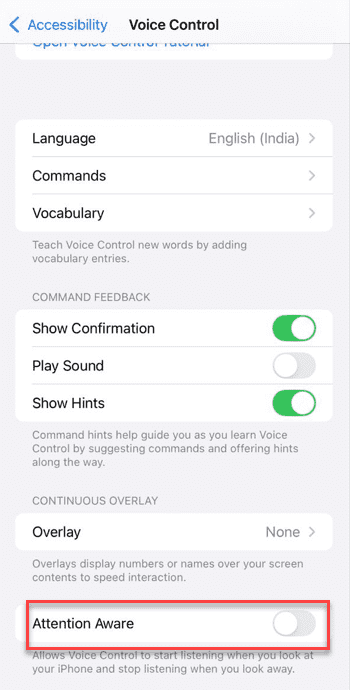
After turning it off, check it out whether this works or not.
Fix 3 – Change the Volume Level and Keep it out of Silent Mode
Sometimes, the alarm may not go off on your iPhone while you are using it in the Silent Mode.
Step 1 – In the iPhone Settings, head on to the Sound & Haptics tab.
Step 2 – Increase the volume to the max by adjusting the slider there.
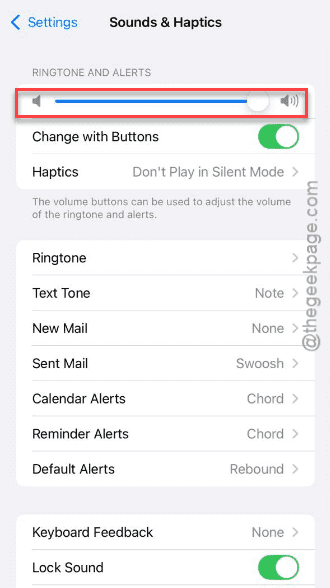
Step 3 – Make sure to disable the Silent Mode on the device. If you are using the Silent switch, switch to the Ringer Mode.
Now, you may expect the alarms to function properly.
Fix 4 – Try installing the Latest iPhone Update
There is a presence of a reported bug in the latest iOS version that has caused this problem.
Step 1 – In the iPhone Settings, proceed this way –
General > Software Update
Step 2 – Wait for a pending update to show up, ready for installation. You can then decide to use the Update Now button to update the device.

The alarm bug will be solved on your iPhone. Check if this actually helps.
FAQs –
1. Will my iPhone work in Silent mode or Do Not Disturb mode?
Yes. The alarm system is designed to ignore the Focus Mode or even the normal Silent mode. So, the alarm should ring at the correct time, unless you have set up a particular focus mode to ignore the alerts for the alarm.
2. Why the alarm is not going off on my iPhone?
There are multiple possible reasons why the alarm is not going off on your iPhone. The most basic reason behind this issue being the low or no-sound alarm setup, wrong focus mode selection. Setting up the alarm correctly should rectify the issue.