Can’t connect to a particular server in Rocket League due to Error Code 91? This particular error message goes like this, ‘Server is from the wrong region. Please try again later. Error Code 91‘. It is not the random matchmaking or the multiplayer experience, but the actual liberty to enjoy the game with 4-5 of your friends and custom servers, that makes Rocket League so good. Just follow the troubleshooting steps that we have explained below, and you will be kicking that ball with your friends in no time.
What is Error 91 in Rocket League?
You can get the best experience out of Rocket League only when you are playing with your friends. The Error 91 is directly linked to the server connectivity issues in Rocket League. Users have come across this particular error code only when you are setting up a private game.
But, while starting a private match, region selection plays a vital role in the game play experience. Private games in Rocket League are preset to run on recommended servers. This way, the game chooses the server automatically, which may lead to several server-based complications. So, if you are setting up the private match for the users from different regions, the game can throw up this error message as it is unable to recommend a particular server that works for all the users.
Fix – Change the region manually
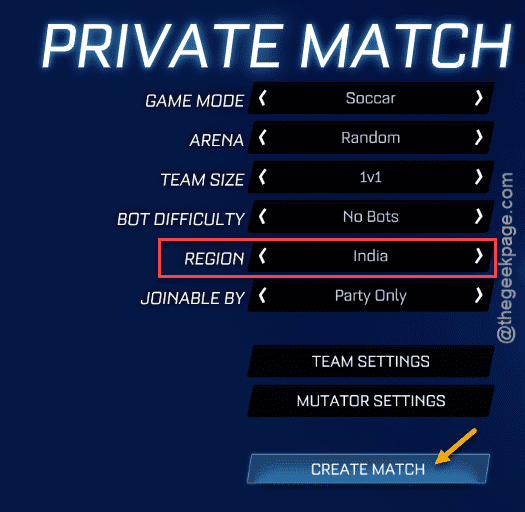
There is one definitive solution for this problem. Simply toggle the server of the Private match to a particular server that is closest to you or your region.
Step 1 – Load up Rocket League on your machine, if you have closed it already.
Step 2 – Tap the Play button and select Private Match from there.
You will see that the server is set to Automatic mode.
Step 3 – Switch the server to your region or anything that is close to you.
Step 4 – Finally, tap the Create match to create a new game session in Rocket League.
Now, you can enjoy the Rocket League match now. This will take care of the server problem that you were having before.
Hope this fix has solved the problem!