Some Apple Watch users have recently noticed a weird problem where they can’t reset their device. Just like other Apple device, resetting a particular one requires a standard procedure. The steps to reset the Apple Watch can differ depending upon the state whether the Apple Watch is connected with the iPhone or not. So, we recommend you follow each and every steps by word and enact at your end minutely to reset the Apple Watch.
How to reset the Apple Watch – A step-by-step guide
Follow the steps in order mentioned below to reset the watch successfully.
Method 1 (Unpaired Apple Watch)
Step 1 – At first, have your Apple Watch charger plugged in and switched on. But, don’t put the Apple Watch on charger yet.
Step 2 – Now, switch off the Apple Watch as you normally do.
Step 3 – Next, press and hold down the side button of the watch until you can see the power option on the screen. Once you see the power option, you can release the side button.
Step 4 – Now, press and hold down the crown of the Apple Watch until you see this message on the device—
Place on power source to proceed
Step 5 – Now what you have to do is to place the Apple Watch on the charger, and you will see the option to reset the watch! Or, you may get the ‘Erase All Content and Settings‘ option.
Step 6 – You have to confirm your action twice (standard resetting procedure).
This way, your watch will restart, and you will get a fresh new Apple Watch. Set it up and enjoy!
Method 2 (Paired Apple Watch)
You can use the Watch app to reset the watch reset directly from there.
Step 1 – On the Watch app, go this way –
General > Reset
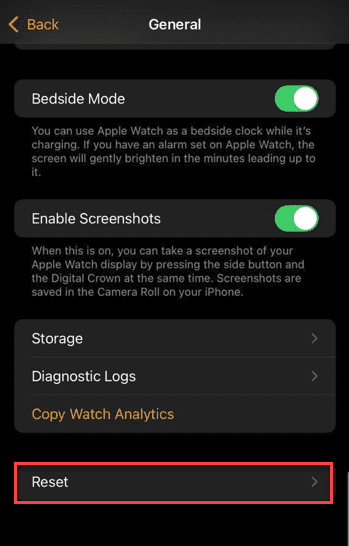
Here you will find all the resetting tools for the Apple Watch.
Step 2 – Then, use the Reset Apple Watch Content and Settings.
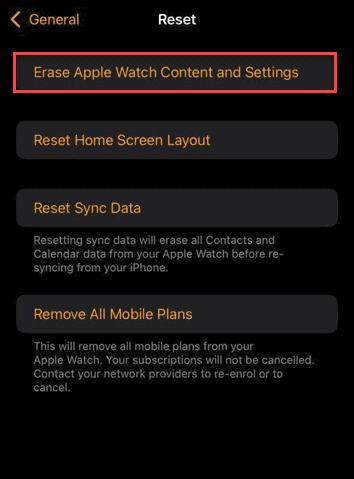
Step 3 – Follow the rest of the on-screen steps on the watch to reset it completely.
Check if this works out for you!
Why can’t I reset the Apple Watch?
We don’t reset our watches on a regular basis. Maximum Apple Watch users doesn’t even reset the watch in its entire lifespan. The procedure itself it is not that complex, but it comes with some intricate steps that average users, even some veterans, may miss. The step that we are talking about is the one involving charging the device while you are resetting.
But, if your iPhone is already connected to Apple Watch, it is extremely easy to reset the watch. You can do it directly from the Watch app as well.