Another Palworld patch, another boss that kills the game instead of you. This time it’s Panthalus — and the World Tree, which boots whole groups mid-teleport. I’ve watched this game break in new ways with every big update, and this one’s no different. The crashes come from a few confirmed engine bugs: the Japanese text input triggering in fullscreen, guests loading terrain before the host, and a busted key-rebinding screen that corrupts your config file. All of them have workarounds. None of them need a reinstall.
Fix 1 – Switch Your Keyboard to English Before Launching
There’s a confirmed engine bug where the Japanese IME (the input system for typing Japanese text) crashes the game in fullscreen mode. It fires even if you never type a word.
1 – Look at the taskbar in the bottom right corner of your screen, near the clock.
2 – Click the language indicator.
3 – Select English (US) from the list.

4 – Now launch Palworld.
Can’t ditch the Japanese layout because you actually use it? Play in Windowed Borderless mode instead — the bug only bites in fullscreen.
Fix 2 – Let the Host Reach the World Tree First
The World Tree disconnects aren’t random. If a guest teleports into the area before the host, the terrain never generates for them and the session dies. Classic Palworld: the fix is a house rule, not a patch.
1 – Have the server host fast-travel to The World Tree first.
2 – Wait 15 seconds so the host’s terrain fully loads in.
3 – Now the guest players teleport in, one by one.
Order matters here. And yes, it’s ridiculous that it matters. But groups following this sequence stop crashing.
Fix 3 – Unbind the Middle Mouse Button
The new key-rebinding screen has a conflict bug. Assign anything to the middle mouse button and it can corrupt your entire config file. Quietly, too — you find out on the next launch.
1 – Open Options from the main menu.
2 – Go to Controls.
3 – Check every action — Attack, Inventory, all of it. Make sure none are mapped to the Middle Mouse Button.
4 – If the game refuses to save your changes, hit Reset to Defaults and rebind from scratch.
Losing your custom binds stings. Beats losing the whole config, though.
Fix 4 – Stop Tracking the Predator Hunter Achievement
Weird one. Achievements are failing to unlock in this patch, and the retry loop behind the scenes destabilizes the whole game. Tracking the Predator Hunter achievement makes it constant.
So: unpin it.
Don’t track it through the Xbox Game Bar or the Steam overlay, and turn off overlay notifications while you’re at it.
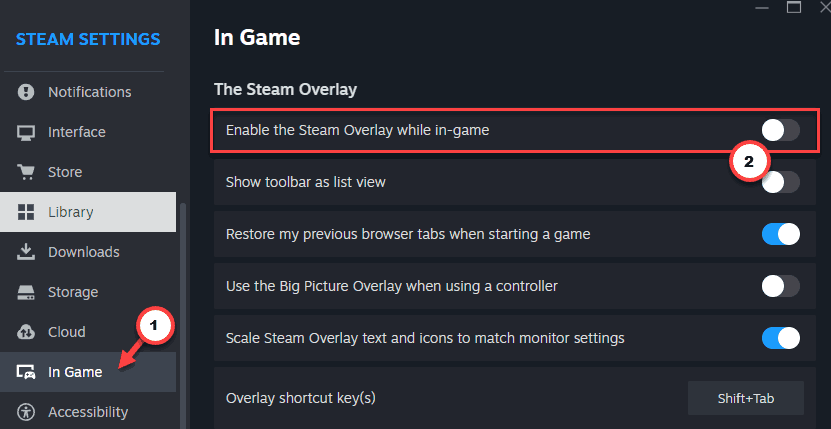
The achievement still unlocks when the backend catches up — watching the tracker just wasn’t worth the crashes.
Fix 5 – Drop Your Graphics Settings Before Entering Sunreach
Sunreach runs terribly right now. The area is unoptimized and leaks memory until the game falls over.
1 – Open Options, then Graphics.
2 – Lower View Distance to Medium or Low.
3 – Do the same for Grass Details.
4 – Then head into Sunreach.
Everywhere else can stay pretty. It’s just this one zone eating memory like it’s free.
Fix 6 – Toggle Multiplayer Off to Rescue a Crashing World
World crashes on load every single time? This gets you back in.
1 – Launch Palworld to the main menu.
2 – Select Start Game and highlight the world that keeps crashing.
3 – Click Change World Settings.
4 – Switch Multiplayer to OFF.
5 – Click OK / Save Settings and load in. It should load clean this time.
Once you’re in and everything’s stable, exit to the menu and flip Multiplayer back on. Your friends can rejoin.
Keep It From Coming Back
- Make the host-first World Tree order a standing rule for your group. Fifteen seconds of waiting beats a full session crash.
- Leave the middle mouse button unbound until the patch notes say the rebinding bug is dead. Don’t trust it early.
- Back up your save folder before every major Palworld update. This developer patches fast, and things break fast right along with it.
People Also Ask
Why does my Palworld world keep crashing?
In the current patch, the usual causes are the Japanese IME bug in fullscreen, a corrupted config from middle-mouse rebinding, and the memory leak in Sunreach. Switch your keyboard to English (US), check your key binds, and lower view distance before entering Sunreach.
Why does my Palworld server keep kicking me out?
Most kick-outs right now happen at the World Tree. If a guest teleports in before the host’s terrain generates, the session drops everyone. Have the host fast-travel there first, wait about 15 seconds, then bring guests in one at a time.